Homeplug advice needed please..

stevewestern

Suspended / Banned
Messages
5,472
Edit My Images
Yes
We have just had BT Infinity installed and the desktop is using a Belkin 54mbps wireless usb adaptor which I guess needs replacing in order to get any benefit.

So, what do I need to do - get a faster adaptor ?

Get some homeplugs - these are things I know even less than nothing about so would these be a good way to go ?

What about the laptops - if I plug in a faster adaptor will that work ? (one is 6-7 years old running XP, the other 4 years old with Vista)

Obviously I know nothing about these things so any help would be much appreciated - many thanks in advance !
 
Neil - I am getting 24mbps on the desktop at present, which is much the same as it was before we got Infinity - is there no way as far as you know to improve on this ?
I had hoped for something of a boost...!
 
Your best bet would be Ethernet to the desktop. Gigabit preferred! Is that possible? If not, homeplugs are a good choice as it depends where you are as to how strong the signal is with wireless. A potential problem with Homeplugs is the actual speed depends on the quality of the power supply. For example I have a set of homeplugs that are 500Mbit ones. They sync at 156Mbits but between computers I get an actual throughput of 60Mbps.

An alternative would be to upgrade to a Wireless N router. Some are dual band running 2 N carriers - one at 2.4GHz (same as wireless G) the other at 5GHz. The advantage is if your hardware will work with the 5G signal (not all wifi N modules will), it is much less crowded spectrally. All your neighbours are likely to be on the 2.4GHz band so you should get a better speed. The downside is that the hardware is more expensive (although not much) and the range on 5GHz is lower than the 2.4GHz.
 
My notebook can transfer at about 18Mb to the router upstairs. I have a wireless access point downstairs which extends the network to connect to the TiVo, Xbox, media streamer etc... And it can talk to the upstairs router at up to 80Mb. My notebook is the b standard while the other access point is dual channel N.
 
Neil - I am getting 24mbps on the desktop at present, which is much the same as it was before we got Infinity - is there no way as far as you know to improve on this ?
I had hoped for something of a boost...!

what speed have you been advised youll be getting on fibre?

if youre only getting 24mbps from a 54mbps itll more than likely be signal/interferance. and you may have the same issue with a faster wireless.

as andy said best bet, if you dont need wireless would be ethernet. how far from the router is the computer?
 
The router is about as far as it can be in this house - downstairs, and 15m away, so no great distance.
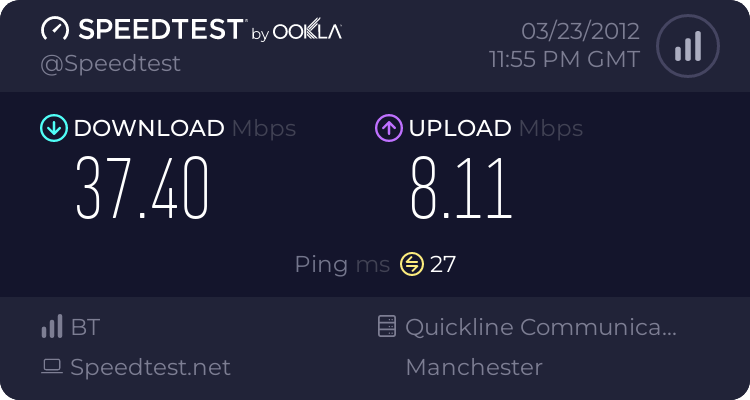
We were told to expect up to 40mbps, and that as we are very close to the box out in the street it should be close to possible....

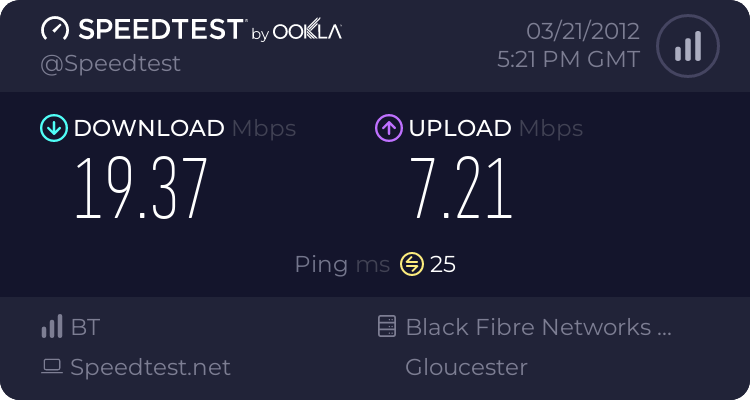
http://www.speedtest.net/result/1845417503.png

The house is only a few years old so the wiring ought to be good, or is that me clutching straws ?
If a wireless N router is needed, any suggestions ?

Oh, and thanks for all the replies so far !
 
Last edited:
My suggestion: 20m of Ethernet cable and a drill ;)

The problem you have is that unless you're wired to the box, you have another variable at play - the speed of your wireless. Even ifg it's syncing at 54Mbit/sec (or 150/300Mbps if on N) if there's lots of interference as a number of routers are on, you will get a less than ideal throughput. Are you in a built up area? Do you have a phone/laptop where you could run some form of sniffing program to see what the congestion is like where you live?

Really, a bit of cable is by far your best bet....
 
what id do if i didnt rent :(

And that is part of the problem...!
Now, just a thought, but I have just dug out an old router - a D-Link DIR655, which is meant to be a pretty good 'N' router.
How easy is it to install in place of the BT homehub ? Do I need to download any software, or can I just plug it in in place of the other one ?

Again, thanks for the help !
 
First off - is the card in the PC a wireless N card/USB device. If it isn't, a wireless N router isn't going to help.

I have no idea about replacing the BT Homehub. But google will be your friend....
 
PS. As it's a 2.4GHz Wireless N router it still may not help. It would be worth trying though. You can probably just plug the uplink from the router into one of the ports of the homehub and have both running in parallel. You may get problems with IP address settings though. You'll definitely want to turn the DHCP server off on the D-link if you have both on at the same time.
 
Just one more question to ask of you good and helpful folks - if I were to plug in a laptop directly via ethernet cable would that show me the best possible result I ought to get, or would it be limited in some way ?
I just tried and still got under 20mbps


Moving the desktop is a pain, and I don't have a long length of cable to hand !
 
That should be your actual speed as Ethernet will run at least five times faster than that. Try a few different speed test servers though as some can be overloaded.
 
Home plugs are great if you have dead spots in the house and can't get wi fi signal, also there're pretty cheap on dabs and ebuyer these days
 
The hub should be next to the PC and connected via Ethernet, modem plugged in next to the NTE5, surprised they installed it any other way

Looks like you are on the 40/10 product and should get pretty near that if you abide by the above conditions. Might be cable issues between your premises and the cabinet, length of aluminium will make a difference

There again could be interference, if you suspect a REIN issue try tuning in a radio to MW 612khz and you should hear an audible noise if there's a problem

If you consistently get low speeds contact your service provider
 
Last edited:
Hmmm...BT gave me Homeplugs when I signed up :/

Wire it in...30m of cat5e is only £3 on ebay

1852427913.png
 
Given all the suggestions for going wired I think I ought to try it, but not sure how I am going to run the cable upstairs and across the room without a massive amount of making good work when we move.
I'll let you know what happens, and as always, many thanks for all the replies !
 
Back
Top