Home Cinema / Media Streaming Discussion

neil_g

Suspended / Banned
Messages
30,364
Name
Neil
Edit My Images
No
Following on from the other recent thread I thought it might be good to get an idea of what everyone is running for Home Cinema and/or media streaming and what you think of it, how it works etc.

So feel free to add yours, comment, discuss etc otherwise this will fall on its face slightly :D

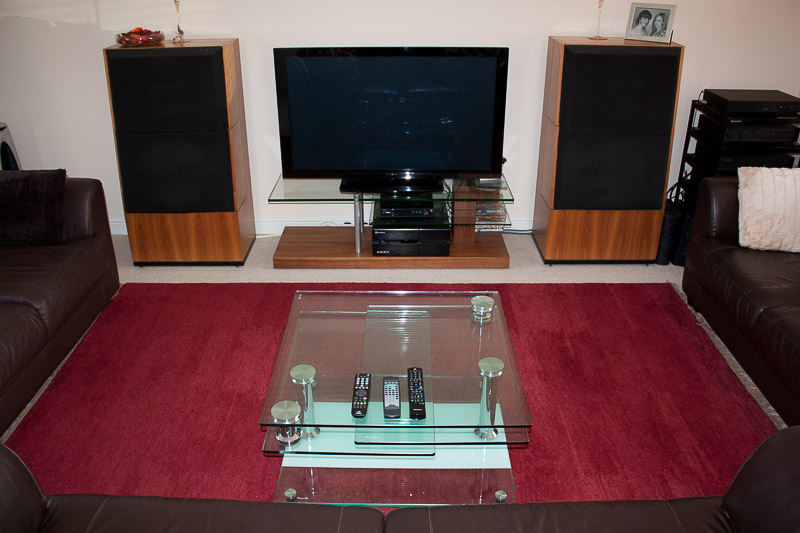
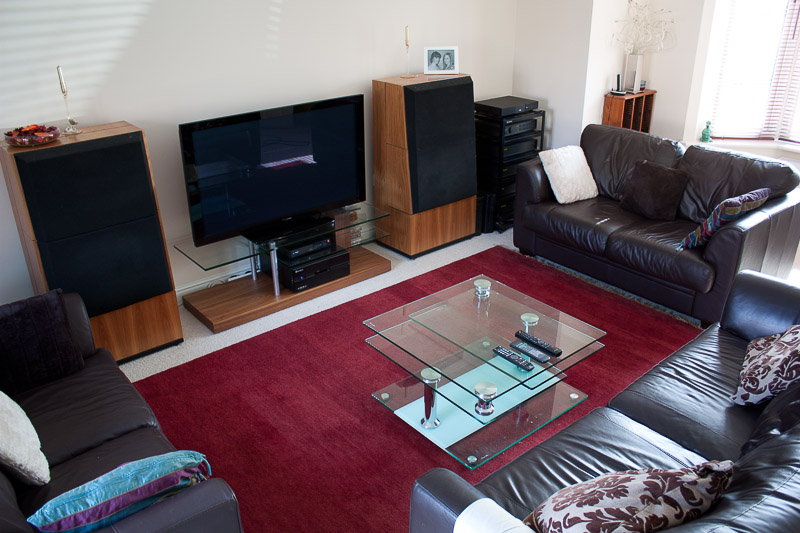
Currently I'm running:

TV - Pioneer PDP-436PDP 43" Plasma
Amp/Receiver - Yamaha DSP-A1092 Dolby Digital (Got an Onkyo TX-SR506 DTS ready to be plumbed in)
Speakers - KEF KHT1505 5.1
Players/Streamers - Sky HD+, WDTV Live
Media Storage (if applicable) - HP N40L Microserver + Startech DAS (7Tb of media space)
Misc - B-Tech BT11 speaker stands, 4-1 HDMI Switch, IR Repeater (for IR through a cupboard door), Bluetooth Audio Streamer

WDTV accesses a media share on the HP over ethernet/homeplugs. The Microserver also has Serviio installed for DNLA to iPad but yet to get this working nicely.

Pretty happy with the set up, the Pioneer is pretty old now (7-8 years) and while its still going strong its pretty limited on spec (only 1 HDMI, not full HD etc).

The WDTV is great, plays everything you throw at it. I'm not overly happy with the interface though, it also insists on rescanning the entire media share when you reboot anything affecting connection back to the storage.

Will add some pics later.
 
Last edited:
I use an apple tv for all streaming. Works a treat. Netflix is a bit grumpy now and then but it is usually ok.

Got an old projector for tv and normal hifi for sound.
 
I'm using a pretty lo-tech solution........ My PC is connected to my AV amp via a 10m HDMI cable. I can control the PC via an app on my phone or a wireless keyboard.

Whilst streaming is available via the AV amp, it always took forever for the media scanning to happen.
 
I have spent WAY too much money on toys in this area :D :

TVs: Pioneer LX508D (living room), Panasonic 50G30 (bedroom), Panasonic 24" full HD LCD (office). Currently thinking of upgrading the Pio to a 65" Panasonic early next year :D
Players: 2 x silent Atoms and 1 x near silent E8400 all running xbmc (one of the Atom PCs is just about to get an overhaul to a i3-4330), all 3 use a MySQL database on the server to share media info.
3 x PCs running xbmc and sharing the info of the above
Recorders: 2 of above players with satellite cards in recording freesat via MythTV.
Amp system 1: Naim DAC/XPS, 52/Supercap, 2x 135s, DBLs
Amp system 2: Cambridge audio DACMagic, Naim Nait, Dynaudio 5s (IIRC)
Media storage: 6TB RAIDZ (RAID5-like) array on AMD based fileserver running FreeBSD. Shared as a Windows share (everything can see it then!).
Misc: 2x managed 16 port Gbit switches at either end of the house to connect everything, 1 pair of 500Mbit powerline adaptors for the bedroom system, FTTC provided by Clara.Net
 
I reckon your problems were to do with deinterlacing settings.... Which £60 box you looking at (I'm all Intel'd up here and am happy with that but might try a £60 box just for laughs).
 
I just use my laptop ... Ive never found the need to stream anything to the tv
 
is wdtv any different to apple tv

more file format support.

I reckon your problems were to do with deinterlacing settings.... Which £60 box you looking at (I'm all Intel'd up here and am happy with that but might try a £60 box just for laughs).

this one - http://www.amazon.co.uk/XstreamTec-...1?ie=UTF8&qid=1383656972&sr=8-1&keywords=xbmc

apparently its identical to "G-Box Midnight MX2 Android 4.2 Jelly Bean Dual Core XBMC Streaming Mini HTPC TV Box Player" which is £100.
 
I use a silent Intel NUC box running Win7 behind the TV, connected via HDMI. Use XBMC to get the movies from a share on my Qnap nas via gig ethernet.
Seems to work just fine, streams full 1080p blueray with no issues. Control XBMC via an app on my phone.
Advantage with this is you can also use the TV as a big monitor for youtube etc.

The TV is just a full hd Sharp jobbie from Sainsbos a few years ago, it's LED though.

I got my son to do a little Raspberry PI project to setup a little media box but although it worked the PI didn't have the resources to handle rewinding or fast forward, didn't buffer too well....
 
can you get any add on's to help with this ??

i know apple prefers mp4 format for movies don't want to sit there converting all my files into mp4
pass. personally i wouldnt bother unless you get a 2nd gen appletv and jailbreak it for xbmc. but the 2nd gen is more expensive than the 3rd gen as the 3rd cant be jailbroken.
 
My setup:

Central Node:
HDAnywhere 4x4 HDMI over Cat6 matrix
Sky+ HD 2TB box
Humax Freeview HD box
Mac Mini running Plex
Apple TV

Loft:
QNap TS-659 Pro NAS running Plex Server

TV Room:
Panasonic Plasma 65VT30
Onkyo TX-818 Amp
3x B&W FPM6 speakers
2x B&W FPM2 speakers
1x BK XXLS400 sub

Family Room:
Panasonic Plasma 50VT50
Denon AVR-2312
3x B&W FPM6 speakers
1x Rel Q200 sub

Study:
Panasonic Plasma 42VT30

Kitchen:
Panasonic LCD 37 inch something!

Photos of the TV Room

8362227197_303eb5d8a2_c.jpg


8362227767_855c84c8f4_c.jpg


8363290792_7076b049dd_c.jpg


For media streaming, Plex is simply brilliant. Always works and downloaded all the cover art/metadata so presents a very easy to use interface that is entirely controlled via the mac Mini remote. The HDAnywhere box allows all TVs in the house to share all the four sources.
 
I only have sky and apple tv, had looked into jailbreaking it but my internet has gone pants since moving so i doubt i'll be able to use it, certainly not evening times which is a complete pain
 
Do those boxes do full HD/DTS sound as well Neil or do you just need passthrough? Doesn't say what processor is in there but I'd expect it to need audio acceleration...

Some gratuitous images:

IMG_2391-800.jpg


IMG_2394-800.jpg
 
Do those boxes do full HD/DTS sound as well Neil or do you just need passthrough? Doesn't say what processor is in there but I'd expect it to need audio acceleration...

ive no idea to be honest. need to do a bit more reading.

other option is another acer revo and ditch windows and go for the linux flavour xbmc. the other half would kill me spending the money though.
 
Panasonic 42" plasma, humax foxsat HDR, Skybox F3 (for it's "special features"), using Plex and XBMC on my MBA and jailbroken ipad, and I've got a Sky NowTV box on the way, (the £10 one), which I will sideload Plex on for streaming.
 
Lounge

LG 47" 3D LED TV.
PS3
Apple TV
Sony 7.1 receiver running Kef centre, front speakers and sub and ceiling speakers for the rears.

Kitchen
Apple Airport Express
Creative i20 (??) speakers

Dining Room
Apple airport express
Creative 2.1 speakers

Bathroom
Apple airport express
IP44 rated waterproof ceiling speakers
T Class amplifier

Bedroom
Samsung 22" Smart TV
Apple TV


Server
Currently Dell T110 with 4 x 2Tb drives and 16Gb RAM. But changing to HP N40L Micro-server as it's smaller and better IO performance. Also use UK and US Netflix, Lovefilm and iTunes Match.

My main aim was ease of use, multiroom support and wife acceptance.

Currently reripping/recoding all the films as I'm p***ed off with the DLNA standard and how unstandardised it is. Which encoding to use, what audiostream and so many other bloody choices. What plays on one device doesn't play on another etc etc. So mp4 here I come.
 
Last edited:
As for switching from Apple TV to a wd tv, think carefully. I've used many media streamers/ players over the years.

The best by far is XBMC. The Apple TV is second. I prefer the integration of Apple TV which is why I use it.

I was hoping the next gen of consoles would bring better media player options but the ps4 can't play audio CDs or mp3s and can't stream media. The xbox one may be better when it comes to media but no real details yet.
 
Lounge
Panny 50VT50
Denon 2312
Oppo 93
Apple TV
Virgin media box
Kef 3005 front centre
Kef htb2 sub
4 x ceiling speakers
Sonos Playbar (for normal tv and music)
Sonos sub

Bedroom
Sonos Play 5

Bedroom
Sonos Play 1 (arriving tomorrow hopefully)

All media streamed from iTunes library on iMac in upstairs office.
 
inkiboo wow that is sweet set up I'm jealous lol

Took a lot of time and effort to get everything right. We effectively built a new house so every room is wired with Cat6 (over 150 connections). Hopefully we've future proofed as much as we can!
 
model numbers only where I can remember them..

46" Panasonic plasma
Sony receiver / amp, it does 7.1 but I only have 5.1 speakers
Sony BD (BDP-S550)
Panasonic freeview HDD and BD recorder (DMR-BWT720)
KEF 104AB front speakers, <3 these
REL strata 5 subwoofer, and <3 this too
Mordaunt Short centre and rears

Media PC, not that I need one very often, is a Mac Mini (used because it is small and silent) running Windows 7 (this turns it into a "PC" ;) ).

Satellite (1) Sky+ HD box attached to a self-installed 90cm dish because I got fed up with the sky installed mini dish blowing out of alignment every five minutes.
(2) sky minidish attached to a a cheap and cheerful tecnomate non-recording box and pointed at Hotbird for the Italian channels, not that my Italian is good enough to understand much .
Will eventually be getting a motorised 1m dish and appropriate box, together with a 9x12 multiswitch and putting twin outlets in every room, but that's way, way down the list of jobs that need doing in this house..

edit : I've got a Synology NAS box as well, but only using that for backup and iSCSI at the moment, haven't looked into its media server streaming capabilities yet.
 
Last edited:
other option is another acer revo and ditch windows and go for the linux flavour xbmc. the other half would kill me spending the money though.
Or an Intel NUC.... Linux is where it is at for xbmc. As Dale says, xbmc far surpasses any other media player out there (although it can take a year or two to fully understand how to get everything working properly ;))....
 
Or an Intel NUC.... Linux is where it is at for xbmc. As Dale says, xbmc far surpasses any other media player out there (although it can take a year or two to fully understand how to get everything working properly ;))....
Yeah yeah. I got impatient.. :D

I don't know much about NUC, but looks like £125 exc memory and storage? Presumably that will do hd video and dts audio onboard?
 
Yup. The cheapo one wouldn't do me (no audio amps with HDMI on!) but OK if you have that covered I guess.... Just add 2G memory and 30G mSATA and away you go. It should do HD and everything.... worth a quick google before you take a punt though.
 
yeah true, the cheap one says:

Audio
• Intel®High Definition Audio via the HDMI v1.4a interfaces

The next one up (£215) says:

AUDIO
• Intel High Definition Audio (Intel HD Audio) via two HDMI 1.4a outputs supporting 8 channel (7.1) digital audio
Indicators and Control
 
:|

Intel Next Unit of Computing Kit DC3217IYE - Core i3 3217U 1.8 GHz Barebone £215.39
Plextor 64GB M-SATA 6GBps SSD £63.65
Crucial 4GB DDR3 1333MHz Laptop Memory Module Mt/s CL9 1.35V/1.5V £27.99

Cart total inc vat: £307.03
 
To me the shortcoming in a lot of these systems is the control element. I know how to make things work because I set them up. My wife can make things she uses regularly work but is lost when it comes to say playing a movie off the server.

Neil mentioned some of the shortcomings with the WDTV box and I've had it need the source reselecting because the server has done an update and rebooted - just the sort of thing that makes someone trying to use it get angry and call it names :)

If someone made a Sonos like simple control system that delivered the signal to your playing device (don't want to pay for wireless speakers I don't need) at a sensible price (sonos connect is stupidly expensive for a wdtv type box that only does music)... I'd be very interested. Sonos are doing well because they have covered the control side of things - apps that work not ones that sometimes work with DLNA and sometimes just don't.

I programmed our Harmony remote to change all the inputs and turn stuff on as required but after that you sometimes have to know what you are doing. I can do complicated to set up but need simple to use for a quiet life :)
 
That's why I love Plex running on the Mac Mini. Can use the Apple Remote and the interface is very easy to navigate.
 
Apple TV and airport express all controlled from PC, iPad, iPhone or android device.

Independent volume for each output and you can use iTunes or any iOS device as a source.

Sonos has introduced an iPad app for control as they are so good.

Airport express and some PC speakers works out about £65 per room or you can use your Hifi or anything else
 
:|

Intel Next Unit of Computing Kit DC3217IYE - Core i3 3217U 1.8 GHz Barebone £215.39
Plextor 64GB M-SATA 6GBps SSD £63.65
Crucial 4GB DDR3 1333MHz Laptop Memory Module Mt/s CL9 1.35V/1.5V £27.99

Cart total inc vat: £307.03
I know it seems expensive, but it will do everything you throw at it AND be a proper computer too (so adding & upgrading it over time) becomes worth it IMHO.
 
To me the shortcoming in a lot of these systems is the control element. I know how to make things work because I set them up. My wife can make things she uses regularly work but is lost when it comes to say playing a movie off the server.
We use a £12 remote control to operate xbmc. Fundamentally, up/down/left/right, OK and VCR controls (pause/ff/skip/stop) are all that is needed.

Once set up (by you - and that may take a little time ;)) xbmc is by far the easiest interface to use IMHO. The box boots into xbmc and you are in a media player without even knowing you are running a PC underneath. We have a list of unwatched films, all populated with IMDB info to choose from by default on the movies page. The TV page just has a list of programs and when you enter a particular program, it is broken into series together with a tick next to the episode if you've watched it. Pressing play on a partially watched movie/TV episode just asks you if you want to start from where you've left off or start from the beginning. Not only that, the UI is the same on all 3 boxes and I can partially watch a film/episode on one box, stop it, move to another and it will ask me if I want to resume from where I had stopped on the other box.

Audio is always supplied by the TV, so no need to swap inputs on the amp either. Input 3 -> xbmc, Input 4 -> TV.

Simples - as I believe the kids say these days ;)
 
Back
Top