Histograms and Exposure

Plain Nev

Vincent Furnier
Suspended / Banned
Messages
2,722
Name
Neville
Edit My Images
Yes
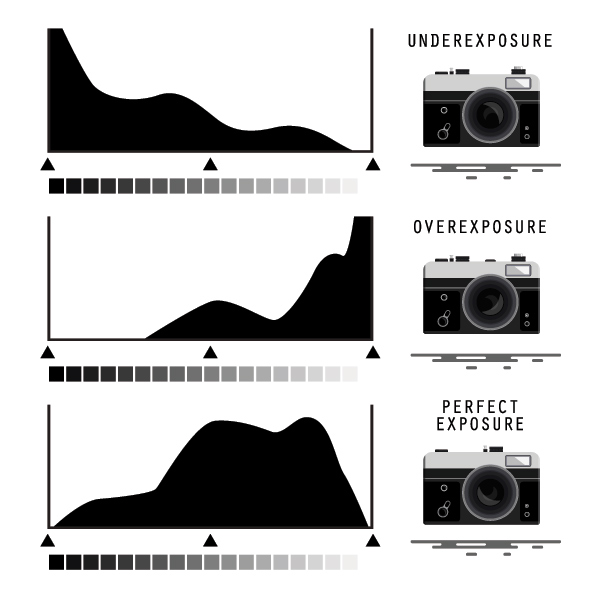
I've not really had to worry about histograms before, but now I'm trying to get to grips with them and understand them better. My question concerns exposure. Obviously you have a meter built into your camera and you can either rely on that or under and over expose, if you know your onions. But is it better to rely on your histogram? If you watch the pros at work that's what they seem to do when they take a shot rather than rely on a meter.
 
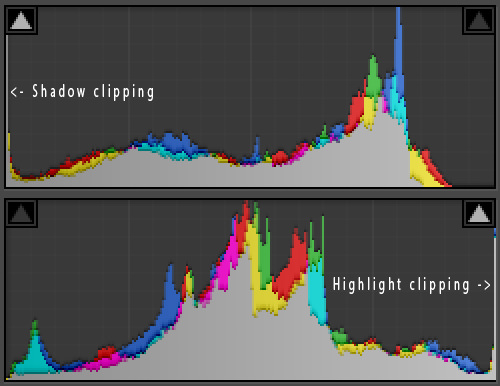
I trust the histogram- it really is the thing that matters. I turn the highlight tool on so I can if there any blinkies - now a few are fine, dependent on what you are shooting but ideally you want the histrogram towards the right but not actually clipping the right. Blacks are easier to add in post production than try to remove.

Have a read


Last edited:
I will, thank you. I've a sort of basic understanding of how they work. But I'm not familiar enough yet to put them into practice.
 
The histogram is based on the jpeg/camera processing of it; and the histogram can be quite wrong when it comes to clipping highlights in a raw file. I don't find histograms particularly more useful. If your goal is to push the exposure (ETTR) then the histogram is more useful; but I think image review is still better.
 
The histogram is based on the jpeg/camera processing of it; and the histogram can be quite wrong when it comes to clipping highlights in a raw file. I don't find histograms particularly more useful. If your goal is to push the exposure (ETTR) then the histogram is more useful; but I think image review is still better.
I agree with the first part, the Jpeg profile (whatever it may be called in each camera) could affect the Histogram quite markedly depending on which one is used, but over time you may get used how the Histogram represents scenes if one sticks to the same profile. The 'Blinkies' are also quite useful, but again, affected by the Jpeg profile. But again, hopefully one would learn how to interpret what they are seeing in conjunction with the actual image.

If you are talking about image review in camera though, then I think LCD is not calibrated, and may also adjust the image shown, possibly brightening dark image, and darkening bright images. If it works for you though, great. :)

I only use RAW, and so set the Jpeg profile to the 'Flat' profile, for the least affect on the Histogram, and stick with that profile. Works for me. :)
 
I agree with the first part, the Jpeg profile (whatever it may be called in each camera) could affect the Histogram quite markedly depending on which one is used, but over time you may get used how the Histogram represents scenes if one sticks to the same profile. The 'Blinkies' are also quite useful, but again, affected by the Jpeg profile. But again, hopefully one would learn how to interpret what they are seeing in conjunction with the actual image.

If you are talking about image review in camera though, then I think LCD is not calibrated, and may also adjust the image shown, possibly brightening dark image, and darkening bright images. If it works for you though, great. :)

I only use RAW, and so set the Jpeg profile to the 'Flat' profile, for the least affect on the Histogram, and stick with that profile. Works for me. :)

That's pretty much how I work with things too.
 
I only use RAW, and so set the Jpeg profile to the 'Flat' profile, for the least affect on the Histogram, and stick with that profile. Works for me. :)

I do the same - and this is why I say a few blinkies are ok as the RAW will have a little more latitude than the jpeg - usually 1/3rd stop - so a click of the shutter wheel.
 
I only use RAW, and so set the Jpeg profile to the 'Flat' profile, for the least affect on the Histogram, and stick with that profile. Works for me.
On my Nikons I use the "camera neutral" profile and I set the parameters to the minimums (contrast/saturation/etc). Also note that some cameras will flash the highlight warnings/blinkies if any color channel exceeds 255 and not clipped to white. You do have to learn your camera to make the most use of these things; but I don't usually push that far, I use the extra as a safety margin.
 
Thank you gentlemen. I feel I have a much better understanding of it now. Be interesting to put it into practice.
 
Back
Top