High ISO grain removal

Olgale

Suspended / Banned
Messages
51
Name
Olga
Edit My Images
Yes
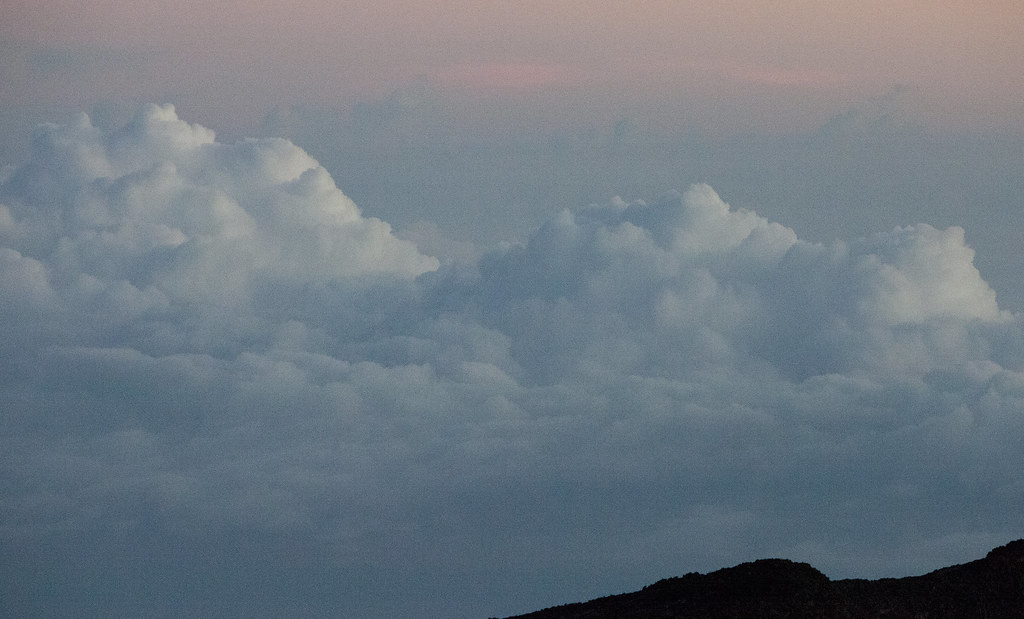
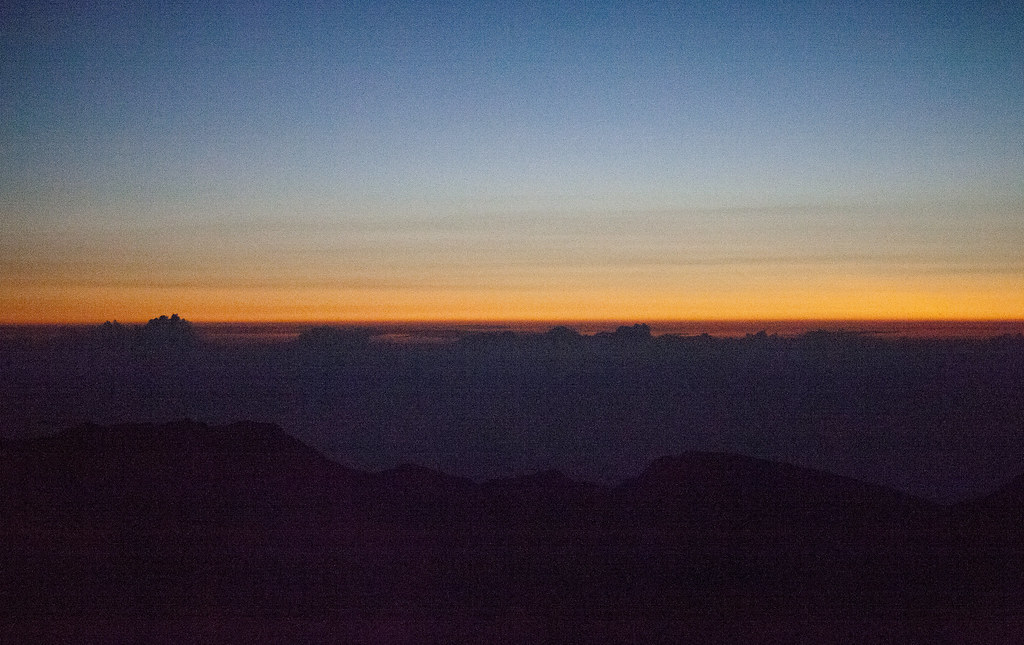
I did some photos at high ISO = 12800 and now struggling to remove the grain.
I tried the Noise removal filter but it doesn't do the job. Any suggestions on effective way to remove grain?
I apologize if this was already discussed in different thread and I missed it.
 
Andy's right...
For example LR3 is brilliant at removing noise whereas LR2 was a bit hit and miss; so it very dependent on the software.
Also - it's about managing expectations.
On the 5DII ISO 12800 is in the extended ISO range for a reason. The colours are not completely accurate and if you try to brighten the image then shadow noise will be unacceptable and very very hard to remove. ISO 25600 is for emergencies only, inaccurate colours and noise than can't be killed even with a correctly exposed image.
However - going down an ISO... ISO 6400 has accurate colours and the noise can easily be got rid of, and ISO 3200 will print to A3 without noise reduction.
Here's an example of ISO 25600 - There is a tiny hint of noise reduction needed for this web image and at best it would probably good enough for an A5 print. But at 1/25s and wide open at f4 I'm amazed I got anything!
Here's an example of ISO 12800 - there's no noise reduction on the web image and it only needs the smallest noise tweak to be good enough to print to A3. It's the same stage as the previous image, but this time the 60W spotlights were slightly less dimmed - why to performers like the dark ??????
 
Can you post a pic so we can see what your dealing with? Did you shoot raw or jpeg?
 
Can you post a pic so we can see what your dealing with? Did you shoot raw or jpeg?
sure :-) I have two images to share:
#1 - ISO 12800
5469900666_8280f944dd_b.jpg

#2 - ISO 25600
5469304831_48c2825a9a_b.jpg
 
Not sure if it's something you've already tried but Imagenomic - Noiseware community edition works well and isn't just a time limited trial.

http://www.imagenomic.com/
 
Olga - what post processing did you do?
In particular the second image does not look straight out of the camera.
By the noise and banding I'd guess the shadow detail has been lifted a couple of stops.
As I posted earlier - at ISO 12800 the shadow detail is not particularly clean.
 
Olga - what post processing did you do?
In particular the second image does not look straight out of the camera.
By the noise and banding I'd guess the shadow detail has been lifted a couple of stops.
As I posted earlier - at ISO 12800 the shadow detail is not particularly clean.
no pp was done :-) only conversion from RAW to TIFF to JPEG
 
no pp was done :-) only conversion from RAW to TIFF to JPEG
Hmmm - I'm beginning to think the problem is in the RAW conversion.
Maybe it would be worth finding out what ACR settings are being used and posting them here.
I'm hoping one of them will look like it's causing the problem.

You could confirm this by taking a shot with the camera set to RAW + JPEG.
I'm betting the JPEG looks much cleaner than your converted file.
That's a nice easy test - please give it a go.
 
Hmmm - I'm beginning to think the problem is in the RAW conversion.
Maybe it would be worth finding out what ACR settings are being used and posting them here.
I'm hoping one of them will look like it's causing the problem.

You could confirm this by taking a shot with the camera set to RAW + JPEG.
I'm betting the JPEG looks much cleaner than your converted file.
That's a nice easy test - please give it a go.
I am not quite sure I understand your point about what the problem appears to be in RAW conversion?
In any case - ACR settings are - 8bit, 5196 x 3138 (16.3mp), 500 ppi, Matte paper/standard
 
Olga - I had a feeling you might have trouble with my request - so here's a worked example.
ISO 12800 of my car which is a neutral silver (and needs a clean)
As you can see - the JPEG is very usable - which is why I asked you to try a test taking RAW + JPEG.
I didn't use a tripod, etc - so the 100% crop looks soft - but there's plenty good enough quality there to print to A4 and probably to A3.

1) JPEG straight out the camera resized to 800 pixels wide
IMG_1919_jpeg_full.jpg


2) RAW converted using LR3 defaults and resized to 800 pixels wide
IMG_1919_raw_full.jpg


3) JPEG straight out the camera - 100% crop
IMG_1919_jpeg_crop.jpg


4) RAW converted using LR3 defaults - 100% crop
IMG_1919_raw_crop.jpg


5) RAW converted using LR3 defaults plus a bit of luminance noise reduction.
IMG_1919-raw_nr_crop.jpg
 
Noiseware will clean those up quite nicely, although the banding in the sky in the second image is another issue, I'd select the sky and use a stronger setting and try and smooth it out.
 
Olga - I had a feeling you might have trouble with my request - so here's a worked example.
ISO 12800 of my car which is a neutral silver (and needs a clean)
As you can see - the JPEG is very usable - which is why I asked you to try a test taking RAW + JPEG.
I didn't use a tripod, etc - so the 100% crop looks soft - but there's plenty good enough quality there to print to A4 and probably to A3

wow, I wouldn't think that JPEG image straight from camera on high ISO will be so much better than the RAW. Thanks for advise, I'll try out shooting both in camera.
 
Noiseware will clean those up quite nicely, although the banding in the sky in the second image is another issue, I'd select the sky and use a stronger setting and try and smooth it out.

Thanks, I'll try the trial to see how it works, judging by the examples on the site it really works :-)
 
Back
Top