

You are using an out of date browser. It may not display this or other websites correctly.
You should upgrade or use an alternative browser.
You should upgrade or use an alternative browser.
High Dynamic Range (HDR)
- Thread starter RD400
- Start date

cw318is
Suspended / Banned
- Messages
- 1,479
- Name
- Caleb
- Edit My Images
- Yes
To get started all you need is to turn on bracketing and download photomatix. Using bracketing you expose your shot as normal, and then the camera will take a shot each side at say -1 and +1 stop, so you'll have three shots - underexposed, correct and overexposed. Load it all into photomatix and tweak the sliders as neccesary.
Alternatively you can do it yourself using exposure bias, this is my first attempt at it with 5 shots, -2 to +2;
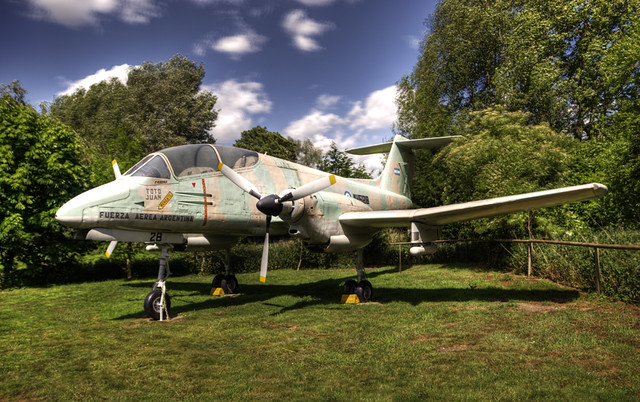
HDR Pucara by cw318is, on Flickr
Obviously anything that moves (like clouds) kindof ruin it a bit, but if you bracket its all taken from one scan, so you won't have the problem you see with the clouds and trees.
Alternatively you can do it yourself using exposure bias, this is my first attempt at it with 5 shots, -2 to +2;
HDR Pucara by cw318is, on Flickr
Obviously anything that moves (like clouds) kindof ruin it a bit, but if you bracket its all taken from one scan, so you won't have the problem you see with the clouds and trees.
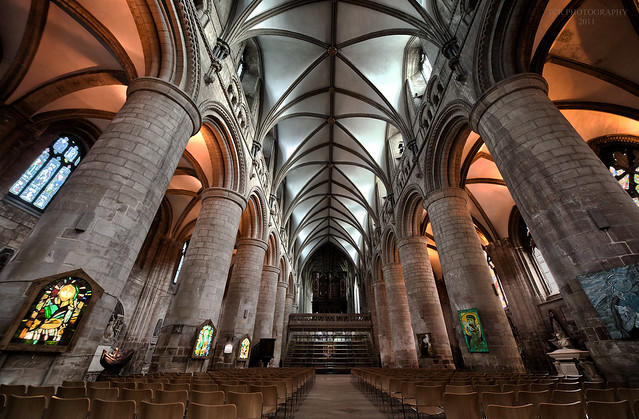
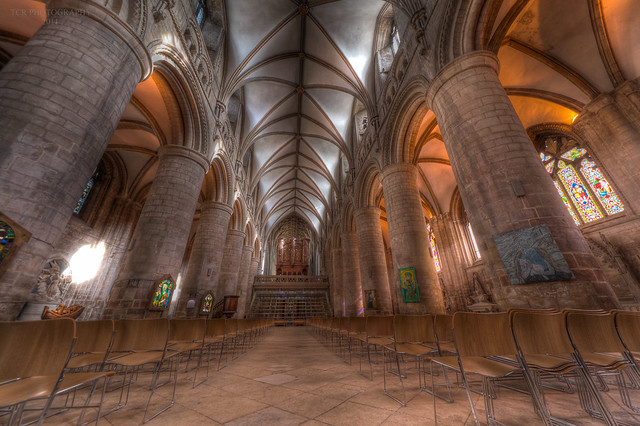
I find it works especially well in black and white. The art of HDR starts in learning WHEN to use it; some scenes just don't work well. Cloudy skies and shady skylines work well and as Tom has demonstrated so beautifully, interiors can look stunning to.
Here's one of my b&w efforts...
Blackfriars bridge 2
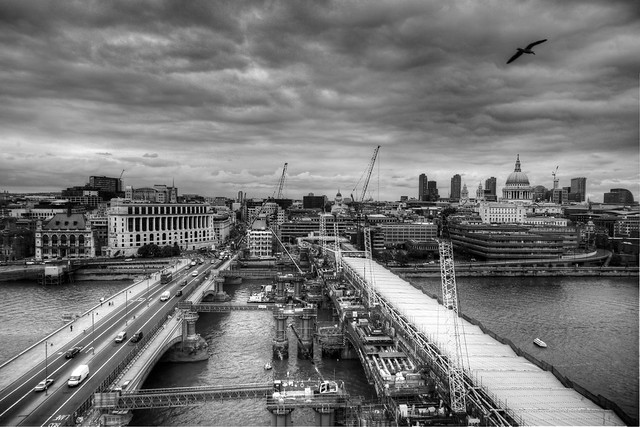
Date Taken: 2011-05-11 14:29:13
Camera Model: DSLR-A900
Focal Length: 24 mm
Aperture: f/11.0
Exposure Time: 0.004 sec (1/250)
ISO: 320
...and one of the very few colour ones I've tried and liked the look of (normally I don't like them!)....
MilleniumBridge
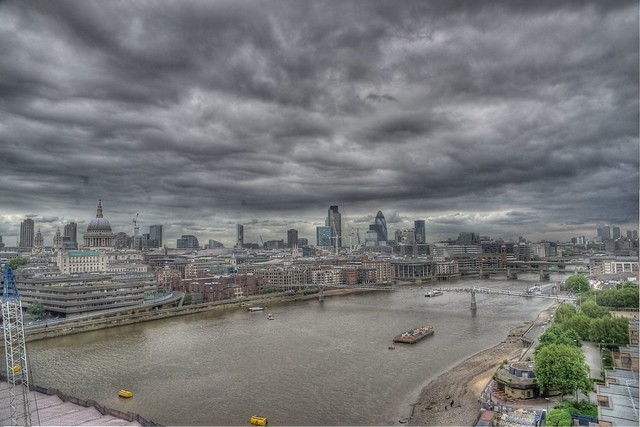
Date Taken: 2011-05-11 14:34:30
Camera Model: DSLR-A900
Focal Length: 24 mm
Aperture: f/11.0
Exposure Time: 0.002 sec (1/500)
ISO: 320
Both were three bracketed photos -3 -> 0 -> +3
Here's one of my b&w efforts...
Blackfriars bridge 2
Date Taken: 2011-05-11 14:29:13
Camera Model: DSLR-A900
Focal Length: 24 mm
Aperture: f/11.0
Exposure Time: 0.004 sec (1/250)
ISO: 320
...and one of the very few colour ones I've tried and liked the look of (normally I don't like them!)....
MilleniumBridge
Date Taken: 2011-05-11 14:34:30
Camera Model: DSLR-A900
Focal Length: 24 mm
Aperture: f/11.0
Exposure Time: 0.002 sec (1/500)
ISO: 320
Both were three bracketed photos -3 -> 0 -> +3

killwilly
Suspended / Banned
- Messages
- 1,081
- Name
- Alan
- Edit My Images
- No
To get started all you need is to turn on bracketing and download photomatix. Using bracketing you expose your shot as normal, and then the camera will take a shot each side at say -1 and +1 stop, so you'll have three shots - underexposed, correct and overexposed. Load it all into photomatix and tweak the sliders as neccesary.
Alternatively you can do it yourself using exposure bias, this is my first attempt at it with 5 shots, -2 to +2;
HDR Pucara by cw318is, on Flickr
Obviously anything that moves (like clouds) kindof ruin it a bit, but if you bracket its all taken from one scan, so you won't have the problem you see with the clouds and trees.
That is a nice photograph and not too overdone. Did you use photomatix, or some other software to merge the 5 shots?
OP

RD400
Suspended / Banned
- Messages
- 693
- Name
- Michael
- Edit My Images
- Yes
Thanks for the reply`s do I have to use Photomatix or can this been done in photoshop
is this is what I have .
Also excuss my thickness but I have a canon 550d could you explain this to me a bit more .
Using bracketing you expose your shot as normal, and then the camera will take a shot each side at say -1 and +1 stop, so you'll have three shots - underexposed, correct and overexposed.
where on my menu would I find it as I can only see WBShift/brt Ihave seen expo.comp/AEB and what setting would I have the camera in P,TV,AV OR M
Also the images you have showen me are outstanding all of this makes me want to understand it more so I can have a go
is this is what I have .
Also excuss my thickness but I have a canon 550d could you explain this to me a bit more .
Using bracketing you expose your shot as normal, and then the camera will take a shot each side at say -1 and +1 stop, so you'll have three shots - underexposed, correct and overexposed.
where on my menu would I find it as I can only see WBShift/brt Ihave seen expo.comp/AEB and what setting would I have the camera in P,TV,AV OR M
Also the images you have showen me are outstanding all of this makes me want to understand it more so I can have a go


Uneducated_Rick
Suspended / Banned
- Messages
- 2,599
- Name
- Ricky
- Edit My Images
- Yes
Works well on buildings. Depending how you do it, you can get completely different looking shots.
that second shot has an otherworldly feel as though it were a computer game generated shot


flossie
Suspended / Banned
- Messages
- 560
- Name
- Richard
- Edit My Images
- Yes
I`ve seen a few picture now in High Dynamic Range (HDR) can some explain to me the process and what kit you need to do this type of picture.
The process involves taking exposure-bracketted photos, loading them into your computer, turning the settings up to maximum post-apocolyptic or chocolate box unreality, gougeing both your eyeballs out with a blunt spatula, then posting them online...
 Michael thanks for that explains it for me in a way I can understand it


Jelster
Suspended / Banned
- Messages
- 9,986
- Name
- Steve
- Edit My Images
- Yes
flossie said:The process involves taking exposure-bracketted photos, loading them into your computer, turning the settings up to maximum post-apocolyptic or chocolate box unreality, gougeing both your eyeballs out with a blunt spatula, then posting them online...
I take it you're not a fan of the technique then ?

- Messages
- 6,217
- Name
- Ian D J
- Edit My Images
- Yes
I, too, have only just very recently discovered the dark art of HDR, and while I've still got a long way to go I'm actually hooked on it! Strange since it was only a few short months ago I was dead against it (because "it isn't photography, etc, etc, etc, hehehe  ) but now it's "clicked on me", it actually had the effect of breathing new life in my passion for photography.
Here's a couple or three attempts I've taken only in the past couple of weeks, where I used between 3 to 6 bracketed shots using my Lumix TZ8 (yes, a compact!) . .
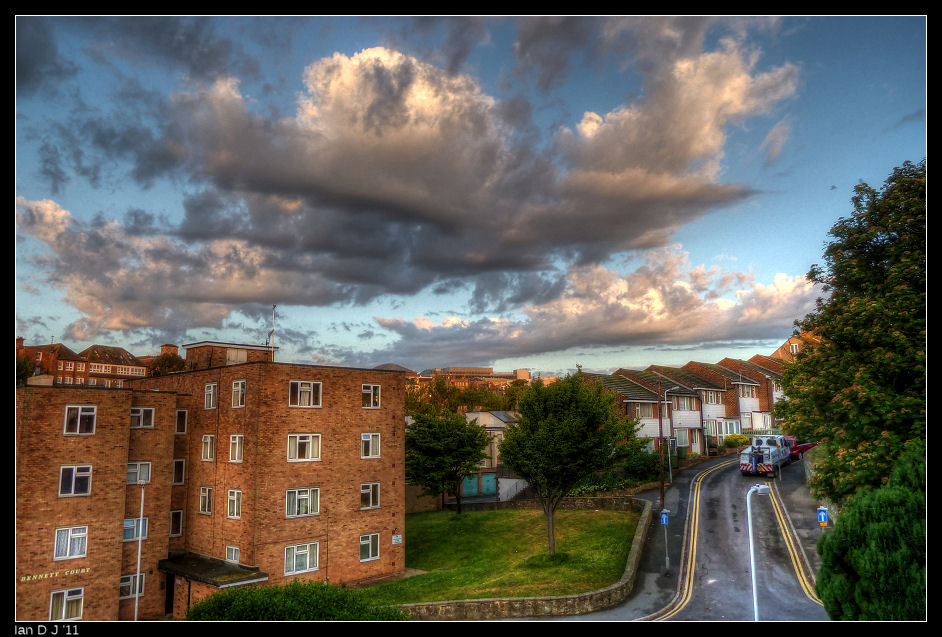
St Eanswythe Church at Folkestone. HDR seem to bring out the texture on buildings more than a single exposure shot. However, note how the leaves on the tree looks "busy", it was where the wind was moving the tree while the camera was busy taking the bracketed shots!


Near the Harbour at Folkestone (The Old High Street). The skyscape does look a bit off, but again, practice makes perfect.

Early morning sky. Provided the clouds themselves aren't moving very fast, HDR really does come into it's own when it comes to capturing the cloudscape!
And how HDR creates that FPS computer game effect . . .
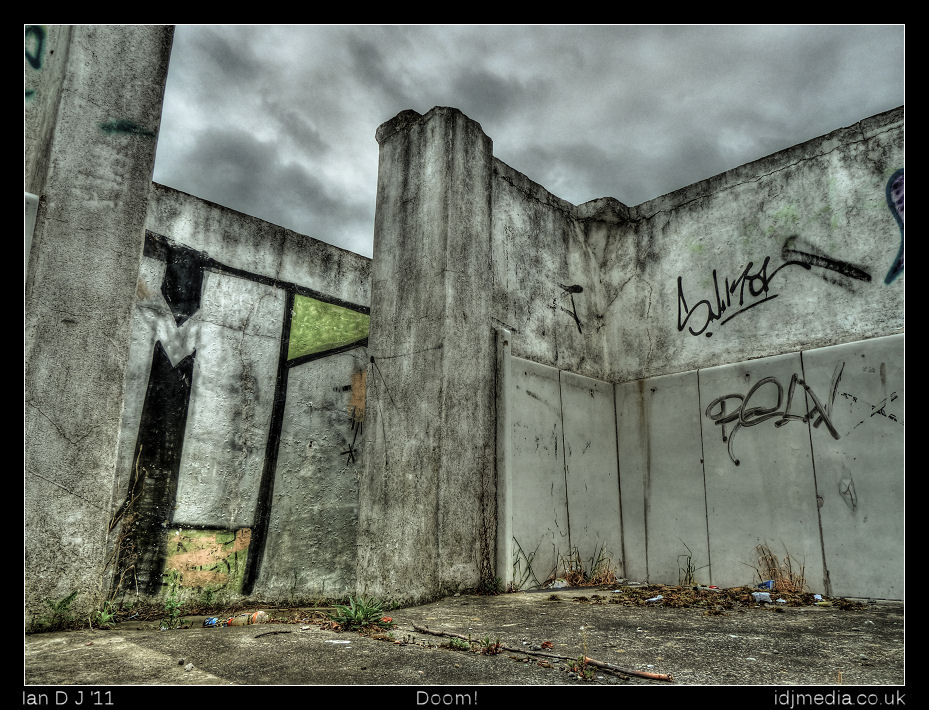
I think it all depends what you want out of HDR and working out how it does and doesn't work in terms of subject matters and general lighting conditions.
) but now it's "clicked on me", it actually had the effect of breathing new life in my passion for photography.Here's a couple or three attempts I've taken only in the past couple of weeks, where I used between 3 to 6 bracketed shots using my Lumix TZ8 (yes, a compact!) . .
St Eanswythe Church at Folkestone. HDR seem to bring out the texture on buildings more than a single exposure shot. However, note how the leaves on the tree looks "busy", it was where the wind was moving the tree while the camera was busy taking the bracketed shots!
Near the Harbour at Folkestone (The Old High Street). The skyscape does look a bit off, but again, practice makes perfect.
Early morning sky. Provided the clouds themselves aren't moving very fast, HDR really does come into it's own when it comes to capturing the cloudscape!
And how HDR creates that FPS computer game effect . . .
I think it all depends what you want out of HDR and working out how it does and doesn't work in terms of subject matters and general lighting conditions.
Last edited:

petersmart
Suspended / Banned
- Messages
- 5,000
- Edit My Images
- Yes
Thanks for the reply`s do I have to use Photomatix or can this been done in photoshop
is this is what I have .
Also excuss my thickness but I have a canon 550d could you explain this to me a bit more .
Using bracketing you expose your shot as normal, and then the camera will take a shot each side at say -1 and +1 stop, so you'll have three shots - underexposed, correct and overexposed.
where on my menu would I find it as I can only see WBShift/brt Ihave seen expo.comp/AEB and what setting would I have the camera in P,TV,AV OR M
Also the images you have showen me are outstanding all of this makes me want to understand it more so I can have a go
It can be made almost totally automatic:
Set continuous mode on your camera together with AEB.
Set the timer to a few secs.
Press button.
Continuous mode together with AEB will automatically take 3 pics then stop.
Obviously you need a tripod.
.
petersmart
Suspended / Banned
- Messages
- 5,000
- Edit My Images
- Yes
The process involves taking exposure-bracketted photos, loading them into your computer, turning the settings up to maximum post-apocolyptic or chocolate box unreality, gougeing both your eyeballs out with a blunt spatula, then posting them online...
Not necessarily:
http://www.flickr.com/photos/20926615@N05/sets/72157624765849404/
.

Samphire
Suspended / Banned
- Messages
- 1,726
- Name
- Wendy
- Edit My Images
- Yes
I tried with a few pictures last night, I have posted very few pictures on here as I have never felt they are good enough, however I really like the effect it has given my photo's.
 [/url][/IMG]
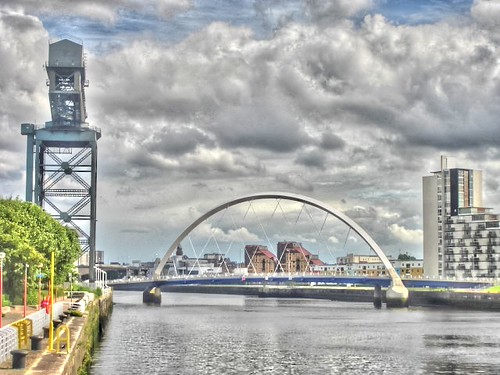
Glasgow 2 enhanced by samphire67, on Flickr
Glasgow 2 enhanced by samphire67, on Flickr
flossie said:The process involves taking exposure-bracketted photos, loading them into your computer, turning the settings up to maximum post-apocolyptic or chocolate box unreality, gougeing both your eyeballs out with a blunt spatula, then posting them online...
I'm not sure you're doing it right

You have to go back in time to 2004 and steal their techniques, then pat yourself on the back and show everyone how awesome you are.
Yes, i did do a few compressed HDR pics
Yes, that was 2004 (had to do it by hand in photoshop back then)
Yes, I have deleted them never to be shown to anyone ever!
Yes, i did do a few compressed HDR pics
Yes, that was 2004 (had to do it by hand in photoshop back then)
Yes, I have deleted them never to be shown to anyone ever!

- Messages
- 7,018
- Name
- Keith
- Edit My Images
- Yes
Thanks for the reply`s do I have to use Photomatix or can this been done in photoshop
is this is what I have .
You can achieve -similar- effects by using a gradient mask in photoshop.
In this case 2 shots can be enough. You paste in your overexposed or foreground shot over the top of your underexposed or sky shot, as anew layer, add a mask to the sky layer and then put a black to white gradient on the mask to "cut through" the sky and reveal the foreground correctly exposed below. You can also use a soft edged black brush to fine tune the edges.
Worth having a search on youtube for examples.


unplugged
Suspended / Banned
- Messages
- 271
- Name
- Robin
- Edit My Images
- Yes
I, too, have only just very recently discovered the dark art of HDR, and while I've still got a long way to go I'm actually hooked on it! Strange since it was only a few short months ago I was dead against it (because "it isn't photography, etc, etc, etc, hehehe
Haha HDR is about the only way you can make Folkestone look good


- Messages
- 8,852
- Name
- Tom
- Edit My Images
- Yes
Take it the Nikon D3000 can't do auto bracketing?
Nope, Use Ex comp or just manually change the exposure.
Just found this method too.
1. With this method, set your Nikon D3000 on the tripod. This time, set your D3000 to capture in RAW format. This will allow you to later use the in-camera editing feature.
2. Point and shoot at your intended subject. With this method, you can shoot in any mode you want manual, auto it makes no difference. Just point and shoot away! You will still need to capture three images though. So, shoot three pics!
3. Once three pictures have been taken, hit the play button on the back of the camera. Leave the first picture you took alone. Advance to the second picture, and hit the ok button. This will bring up a menu, and you need to select the NEF raw editing feature.
4. From there, change the exposure on the second photo to 2.0. Save it by choosing the EXE option. Change the exposure on the third picture to -2.0. Save it. Now when you transfer these to your computer, you will have three images one with 0.0 exposure, one with 2.0, and one with -2.0.
5. Again, you can use those three photos in the application of your choice to be combines into an HDR image. I have played with both Photomatrix and Photoshop, and both are pretty useful. You can check other blogs out there for ongoing flame wars on the subject.

Flying giraffe
Suspended / Banned
- Messages
- 1,189
- Name
- Neil
- Edit My Images
- No
is there certain curcumstances this will work, and others where it wont? i have just tried, got the 3 pics, but the end result just looks normal, am i missing something?
Flying giraffe
Suspended / Banned
- Messages
- 1,189
- Name
- Neil
- Edit My Images
- No
going to take some more, is there a subject that will work better than others, ie a car, flowering bush etc?
Flying giraffe
Suspended / Banned
- Messages
- 1,189
- Name
- Neil
- Edit My Images
- No
Post your 3 pics then we can all have a play with them.
your only down the road, pop round and show me
heres 3 i took earlier, 


my end result just looks like a std photo
- Messages
- 8,852
- Name
- Tom
- Edit My Images
- Yes
is there certain curcumstances this will work, and others where it wont? i have just tried, got the 3 pics, but the end result just looks normal, am i missing something?
You using Photomatix? Are you using tonemapping or exposure fusion?

Flying giraffe
Suspended / Banned
- Messages
- 1,189
- Name
- Neil
- Edit My Images
- No
You using Photomatix? Are you using tonemapping or exposure fusion?
I used photomatrix and cs5 and left it on default, which one should I be using?, thanks for the example, want to have another try but not sure what subjects would give a more dramatic look to it
- Messages
- 8,852
- Name
- Tom
- Edit My Images
- Yes
Buildings, cars, landscapes. They benifit the most.
In photomatix, set it to tonemapping and details enhancer. There are a list of presets, which get you in the general ball park, bewtween face melting and subtle. Then just try playing with the sliders. You'll want one of the enhancer presets to get the "proper" HDR look.
In photomatix, set it to tonemapping and details enhancer. There are a list of presets, which get you in the general ball park, bewtween face melting and subtle. Then just try playing with the sliders. You'll want one of the enhancer presets to get the "proper" HDR look.
Flying giraffe
Suspended / Banned
- Messages
- 1,189
- Name
- Neil
- Edit My Images
- No
Thanks ill have another go later, is this how they get tin cartoony affect?

Flying giraffe
Suspended / Banned
- Messages
- 1,189
- Name
- Neil
- Edit My Images
- No
I tried to get more of the sky in because of the effects seen in the other posted examples,you have certainly done wonders with it, thanks
- Messages
- 8,852
- Name
- Tom
- Edit My Images
- Yes
I tried to get more of the sky in because of the effects seen in the other posted examples,you have certainly done wonders with it, thanks
No worries, as with other things, just takes a little while to get to grips with it and get the best out of it.