Hi and HELP!!

Hi :wave:

Welcome to TP :thumbs:

It says your camera must be connected to your Computer (Connect the PLAYTOUCH Video Camera to your computer.) heres the install instructions http://SPAM/ckhf5yb

Look forward to seeing some of your work :thumbs:
 
Thanks for getting back to me Dave. However, it is a Kodak digital FRAME that I have the issue with not a camera.
 
Thanks for getting back to me Dave. However, it is a Kodak digital FRAME that I have the issue with not a camera.

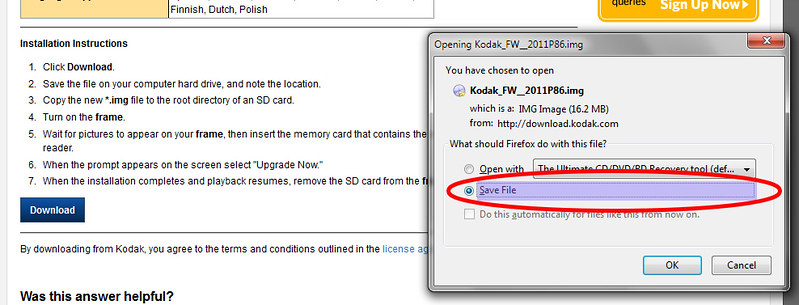
You dont need a program to install it, you Plug you frame into your computer and copy the downloaded img file from your computer to the root of the SD card in the frame itself http://SPAM/cjqrcf2

It says

Installation Instructions

1 Click Download.
2 Save the file on your computer hard drive, and note the location.
3 Copy the new *.img file to the root directory of an SD card.
4 Turn on the frame.
5 Wait for pictures to appear on your frame, then insert the memory card that contains the new file into the frame's card reader.
6 When the prompt appears on the screen select "Upgrade Now."
7 When the installation completes and playback resumes, remove the SD card from the frame.

HTHs
 
Thanks again for your time Dave. This link brings me back to my original problem though and the reason for the post.When i try and download I am told it does not know which proramme to open it with. The message i get is:
"File Type: Bitmap Graphics, File Extension: .img, Description: This document is a graphic image. Software or information available at: IrfanView32. Paint Shop Pro, CorelDRAW.
You may search the following Web site for related software and information:


Is it maybe just something about my PC that brings up this msge? In my ignorance i done know how to open the proramme.
 
The message i get is:
"File Type: Bitmap Graphics, File Extension: .img, Description: This document is a graphic image. Software or information available at: IrfanView32. Paint Shop Pro, CorelDRAW.
You may search the following Web site for related software and information:


Is it maybe just something about my PC that brings up this msge? In my ignorance i done know how to open the proramme.

You dont need to open it use the option down Save File, details dont forget to remember where your saving it ie desktop, then follow the install instructions

7683854150_00c4454cf4_c.jpg
 
Last edited:
I GET IT at last!
Thanks very much for your help Dave
Warm regards
John
 
Back
Top