Help!

cardiff_gareth

Suspended / Banned
Messages
2,734
Name
Gareth
Edit My Images
Yes
So I turned my desktop on at the plug and the computer booted up without my having to turn it on. That was fine but it all loads in fine and I get to the password screen where I enter that but here's where my troubles start.

The desktop loads but nearly all the icons on the desktop are plain white. The bottom notification won't load in and even though the mouse moved around you can't click anything. The only way of shutting it down is press and holding the power button. When you restart it the same happens again.

Any ideas please how to fix it?

It seems to be alive in some sense as I can see the desktop etc?

Help!
 
I guess you are on Windows (version) since you don’t mention the OS?
 
Okay, had to pop out but back home now.

I've managed to get it into safe mode but it took a very long time to allow me to do anything as it kept with the spinning circle of doom if u tried to click anything.

Now it's performing faster but I can't do a virus scan as it won't load the Windows security window.

I went I to recovery and it says I can reset the PC or go back to a previous version, so I tried previous version and it says it can't go back as the files it needs have been removed from the PC.

There is the option to reset the PC but it says I'll keep my files but it removes all apps and settings.
 
I don’t know anything about Windows now. Could it be a failing hard drive?
 
Doesn't sound good to me.

If I were you, rather than trying to hunt down the problem, get all your un-backed up files (photos, docs, etc) off it and reinstall windows cleanly. It'll probably be quicker in the long run.

Of course if it's a hardware problem that won't help, but your description of the problem doesn't sound good.
 
Can you still access the internet?
 
I have a Chromebook that can but with this machine no. Its got 2 hard drives in and everything saves to the D drive so the C drive is pretty much just the operating system and a load of uni files and projects as well as my business files.
 
Do you have a restore point that you can go back to?

 
You could also try:

Type CMD in the search at the bottom left. Right-click on the Command Prompt that (should) appear at the top. Select run as administaror. When you see the C> prompt, type SFC /scannow

(note the space between SFC and the /).

May or may not help without web access.
 
The light on the front that says the hard drive is doing something is lit up constantly. Everything is super slow or not working.

Trying to do at least a disk clean up but it's not responding.

You sure the drive isn't just full?
 
Also, check the Event Viewer, if you can.

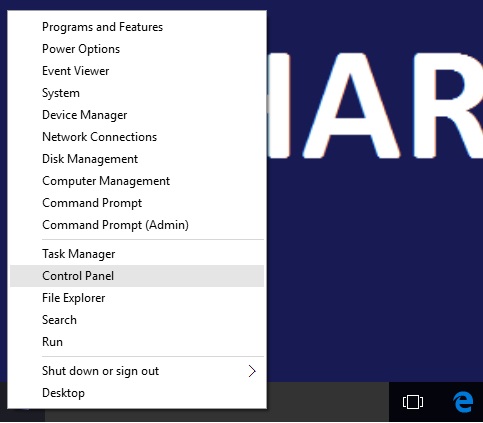
Right click on the Start button and select Computer Management
Double-click Event Viewer, then Windows Logs, them System.
 
And check programs starting on boot. Type msconfig in the search box. Then startup. Then open task manager to view. Right-click any you don't want/recongise and select disable.
 
Well I just remembered that originally it had a 250gb hard drive in that I cloned with a 1tb hard drive I had here and swapped it out for more storage as the 250gb was slow. Been under the stairs and luckily I hadn't slung it out. The swap was done about 4 or 5 months ago.

I've taken the 1tb OS drive out and put the 250gb back in and turned it back on. It was on a black screen with a white circle of dots for ages before going to that turquoise colour screen saying please wait. I have the old desktop up and it was working but now all I have is the blue circle of doom. Its asking me to activate Windows which has caused it to crash in terms of not responding to mouse clicks. On the plus, its going slow but it seems to be alive.
 
Hi Gareth

I`m not a wizz on PC`s but as far as I remember a Family member once told me you need to be careful if you ""Clone"" OR ""Copy"" anything from the drive you`re having problems with because "IF" you have a virus OR malware of any kind that has embedded itself on your Original drive and you clone it to another new drive , in your case a new SSD, then its Possible that you may unwittingly Clone or Copy any Virus/Malware/Trogen etc etc to the new drive ... I dont know how likely or True that could be however ,I would Exercise Caution on your part ""Just in case"" .. I may be stating the obvious here but thought I should mention it given that you may not have considered the possibility of it happening with all the hassle you`ve been having ... Good luck on sorting this out


Coho-Blue
 
That's a very good point. I use Windows own version of their virus protection. Is there a stand alone software I can use to check deeper. I bought this computer used a while back as I couldn't afford the spec new. It was wiped but had stuff on there like speccy that says what's installed hardware wise and the temperatures etc.

This hard drive is working albeit slow (and that's the reason I swapped it out).

I'll purchase a SSD tomorrow and a mounting kit and have the OS drive SSD which'll speed things up
 
Last edited:
That's a very good point. I use Windows own version of their virus protection. Is there a stand alone software I can use to check deeper. I bought this computer used a while back as I couldn't afford the spec new. It was wiped but had stuff on there like speccy that says what's installed hardware wise and the temperatures etc.

This hard drive is working albeit slow (and that's the reason I swapped it out).

I'll purchase a SSD tomorrow and a caddy and have the OS drive SSD which'll speed things up
Malwarebytes premium is well worth the cost....
 
Thanks all for everyone who helped.

The old HDD is back in and it's back up and working but it's not the best HDD so it lags at times and start up is noticeably slower than the other HDD I swapped it over for before it started it's merry go dance.

I have a quick question. Curry's have a 480gb PNY SSD for circa £50 but they're out of stock. My local Argos has it in stock for £25 more! I looked on Amazon and they sell Crucial SSD hard drives I think they were called. They say SATA but are 2.5" so I presume I need the adaptor still to mount it in the PC chassis and to 'wire it up?'

Thanks.
 
Glad you are on the way to getting it sorted.

FWIW i swapped out my OS drive a while back using a Crucial MX series drive......and yes you need an adaptor 'tray' to fit it in a 3.5inch HDD space. As I recall I either used Macrium Reflect or might have been Crucial's own transfer software. Again thinking back my boot time went from about 2mins 15seconds to approx 45seconds
 
They say SATA but are 2.5" so I presume I need the adaptor still to mount it in the PC chassis and to 'wire it up?'
The wired connectors on SATA 3.5" & 2.5" drives are exactly the same so no adaptor will be need.
 
Just a thought, The fact that everything is running so slowly, could the memory (ram) be failing.
 
Thanks all, so the existing connectors just plug and play the 2.5 drive.

Is here a way to test the ram? It has 32gb ram but it's DDR2 from memory
Re: the connections ~ if the current drive is a SATA one then AFAIK the connectors are the same but (and sorry if I have missed it?) if the PC is a much older one and uses the PATA connectors then that is a hurdle which I have a recall cannot be 'simply' overcome :thinking: :thinking: :thinking: as the both the data and the power ports are different.

As for RAM testing....................it has been so long since I did this I cannot recall the application I used to do it?

PS IMO a good step with ram can be to simple remove each stick and then re-insert it. This ensures that the connections are not in some way the issue.

PPS are you able to tell us the full spec of the PC......and when it boots do you hear the POST (Power On Self Test) beep or beeps???
 
Back
Top