Help with Printing Please

Clot on the Landscape

Suspended / Banned
Messages
438
Name
Alan
Edit My Images
Yes
Hello all, a ridiculous newbie plea for help! Im trying to print a 16 x 9 ratio landscape onto an A3 paper with Light room as a christmas gift, im having allsorts of problems! Im either getting a tiny 16 × 9 or a full page A3 but my image is cropped...can somebody point me in the right direction please :(
Thanks, Alan
 
Assuming you have defined a page size in Page Setup ...

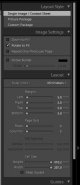
In the Print module, under the Layout Style, select Single Image/Contact Sheet. Under the Image Settings select Rotate To Fit and deselect Zoom to Fill. Under Layout make sure that the margins are set to sensible proportions (e.g. 5mm) and that in the Page Grid part you have 1 row and 1 column, the Cell Size part should reflect the available print area.

That should work fine (again assuming the necessary print driver settings have been made)
 
Hi Alan.

I am no expert and unfortunatly don'tuse lightroom. I use photoshop and send files off for print. What I would do when I want odd sizes like this is create a new blank document sized A3 with the same resolution as your landscape.
Then paste your landscape image into the A3 one I am assuming the landscape is allready 16 x 9 format. This will then be a 16 x 9 landscape sat in the middle of an A3 sized print obviously you will have a white border top and bottom or a colour of your choice if you fill the A3 layer with another colour. Save the image as a jpeg and print however you like.

Not sure if this is of any help as you may not have pshop and might not be want you want to do.

Gaz

Posted before Paul had posted. His solution should solve your problem just fine :-)
 
Last edited:
Hello mate, thanks for your help. Iv tried this and on my print preview its still showing as a small 16x9 in the top left corner? My paper is set to A3.....
 
Thanks Gaz, its definately an option, im sure its pretty straightfwd on LR though...I can definately try yrs if all else fails,
Thank you
 
Hello mate, thanks for your help. Iv tried this and on my print preview its still showing as a small 16x9 in the top left corner? My paper is set to A3.....
Alan can you screen grab the right hand side like below?
LR Print.JPG
 
Ok...mine is the same but the cell size is maxed out at 91.3mm and 142.4mm?
Also Iv got 5mm on 3 margins but when i try to input 5 on the 4th one i get this " a number between 5.3 and 91.7 must be specified. Closest value inserted" which is 5.3mm???
 
Sounds like you haven't set the page up correctly. Click the Page Setup ... button :
LR Page.JPG

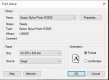
And you should get this:
LR Page1.JPG

Make sure to select the correct page size (A3 here) and click ok, the go and reset the layout.
 
Kabooooom!! That seems to have fixed things, I had it set on A3 art. Iv had to leave for work now (Saturday night shift:() but i managed to get the settings as per your first screen shot so I think Im all but there, I did a quick preview before I left and the orientation was wrong....im guessing I go with landscape on mine?
Thanks very much for your help mate
 
Kabooooom!! That seems to have fixed things, I had it set on A3 art. Iv had to leave for work now (Saturday night shift:() but i managed to get the settings as per your first screen shot so I think Im all but there, I did a quick preview before I left and the orientation was wrong....im guessing I go with landscape on mine?
Thanks very much for your help mate
Yep, if the rotate to fit option hasn't sorted it, try unchecking that, otherwise just change the orientation on the page setup. Glad it seems sorted :)
 
Back
Top