Help with PP

ScubaSteve

Suspended / Banned
Messages
86
Name
Steve
Edit My Images
Yes
After looking through some of the photos on here, i feel like i need a bit of help with my post processing.
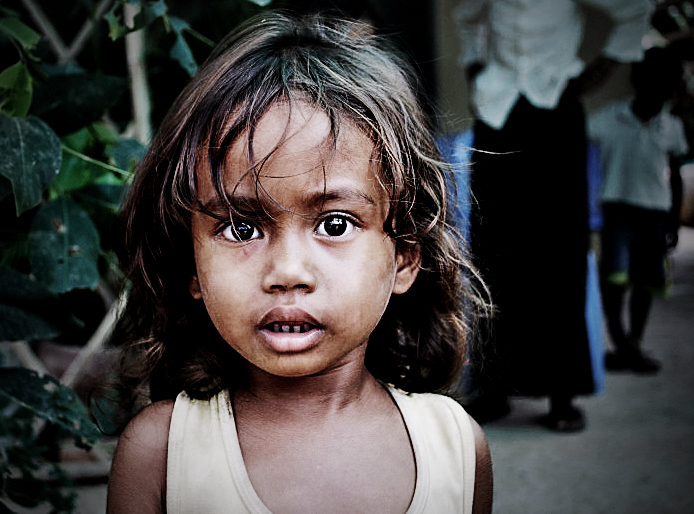
This is one of the photos i took when i was travelling, i like it, but feel it could use a bit of a boost to make it more eyecatching.

DSC_1163.jpg


Ive tried adjusting the curves and cropping it but cant seem to get it right.
Thanks in advance. :thumbs:
 
Im not sure if I even like this effect myself, its not the greatest, basicly its just playing around untill you happy sometimes.

256gtvs.jpg
 
Loverly picture but boring is how I would describe it... Andy crops it better but hius PP makes it look worse for me.. i think a harsh crop is in order... my taste..we all have our own taste in pictures so what looks good to me prob wont to a lot of people :)


croppedtp.jpg
 
Here's my take on it Steve. :) I'm not on a calibrated monitor atm, so not quite sure how this'll look to you! My version is slightly desaturated - just my taste... :shrug:


Nice to see the edits above - good work - interesting to see how people tackle images differently. It's crying out for a cracking B/W conversion imho, as Kipax has already shown. ;)
 
Well as I can't sleep I have had a play too :)

scubasteve.jpg


Cropped
Adjusted curves
Duplicated layer
Masked out the girl (quick & dirty; hair needs much more care)
Applied lens blur to the original layer
Applied some burn to the green shirt in the background (the blue could do with some too but due to poor masking made it too much effort :))
Sharpened the masked layer (girl)
 
A quick edit from me, no artsy farsty stuff done, just levels/contrast/sharpening. Not to sure about the right eye though :thinking:


PPedit.jpg
 
It was made by free software.
Enjoy everybody )))

6645833e7324.jpg
 
I tried a crop and then had a fiddle with some things. Here is the before and after image, after cropping....

20090611_132917_1163_LR-2.jpg
20090611_132917_1163_LR-3.jpg
 
Thanks a lot for all your replies, a really interesting mix of different views. I loved the the B/W conversion and also liked some of the crops. Its great to see so many different ideas.
I will keep having a play around with it and see what i can come up with.
Cheers
 
elektro, not sure if its supposed to... but yours reminds me of avatar :lol:
 
Couldn't resist a tinker, here's my effort:

DSC_1163%28edit%29.jpg
 
heres my effort on this one tried to get an editorial look.. used a slight curve brightened eyes blurred background dodge and burn on the face and a few other minor tweaks.
4252264590_9b6b27f010_o.jpg

cheers Andy
 
thanks for the replys chaps,

Shutterman and Banath, what did you do to give the photo that "dirty" sort of look.
Its the effect i was thinking of when i first wanted to edit the photo but dont really know how to achieve it.

Andy your picture isnt showing up unfortunately :thinking:
 
thanks for the replys chaps,

Shutterman and Banath, what did you do to give the photo that "dirty" sort of look.
Its the effect i was thinking of when i first wanted to edit the photo but dont really know how to achieve it.

Andy your picture isnt showing up unfortunately :thinking:

sorry id uploaded it to flickr but the thread had no action for 48 hours so figured it had gone dad and removed the image from my flickr account
 
It's a bit long winded to explain here. It's all to do with altering the exposure, Saturation and contrast, multiple blendings with soft light selected, the high pass filter and dodge and burn. I've been playing with a tutorial from Novembers DSLR user magazine the feature is HERE unfortunately the tutorial is missing off the pdf! I've had a quick search on the net but I can find it maybe you could order a back issue :shrug: Your original 300k file is now a 10.7MB psd file!
 
Again thanks for all the replys.

Jay, thanks for the link. I will have a look at that now. I think i need to start brushing up on my pp techniques.

Andy i really love the edit you've done there, thats the sort of affect i was looking for.

Thanks for the response pellepiano. :)
 
Back
Top