

Help with Photo Editing

product reviewer

Suspended / Banned
Messages
2
Name
Matt B
Edit My Images
Yes
Hello Forum, Would someone be so kind to help understand how this picture was taken? I have been trying to reduplicate it without any success. I either get the lighting terribly wrong or I can't figure out how to edit it through photoshop. If I could take into some of your expertise in how this photo was made I would greatly appreciate it. Thank you for any help.
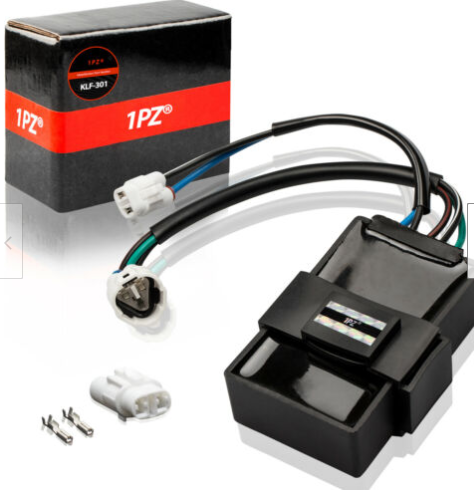
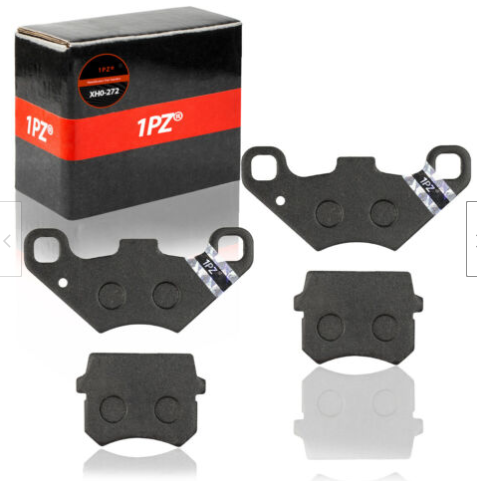
 
Photos taken separately of each item on a white background or light tent and then added onto a single image id guess at.
 
It's commonly referred to as 'high key' photography. There are lots of YouTube videos about the subject, so my recommendation would be to check that out first.

You can cheat by using a 'light tent' as Tom mentioned, but these generally give poor quality results (like the pictures you've shown) and IMO are only really any good for taking low-res images for selling items on the likes of Ebay. It's far better to learn to light things properly - although it's not really an easy journey if you're a beginner.

Good luck learning - it's addictive. ;)
 
Last edited:
Just to add that not all is as it seems - so the 'reflections' are copies of the object photographed, in some cases flipped or faded and sometimes just reproduced directly with a degree of transparency.
 
Just to add some clarity - if you wanted to faithfully replicate those images, you can't do it in camera. they're clearly fairly bad composites.

The good news (if you're not very good) or bad news (if you think they're good) is that it shouldn't be too difficult to do this as they're appalling. Big soft light source, white background / platform and some fairly rudimentary photoshop skills (just search cleaning white backgrounds, then adding reflections)
 
What Phil said. My cat could do a better job, and I haven't got a cat . . .
Please set your sights (much) higher
 
Back
Top