Help with Elements and portrait advice please.

andya700

Suspended / Banned
Messages
6,071
Name
Andy
Edit My Images
No
I have been trying to improve my portrait/people/groups photography, and seem to have hit a brick wall, and even gone backwards in some areas.
I have a Sony A700, which I use with a variety of lenses (old Minolta ones, plus a few manual focus Takumar and Pentacon). I use mainly natural light because I do not have a stand alone flashgun, but this presents one major problem, because I think that the Sony is a bit "ropey" at anything above 800 ISO.
I shoot in RAW, then save to JPEG or TIFF, and I use Elements 9 for the PP.
So, I was wondering if anyone can give me advice (or point me in the right direction) on the best PP settings for portraits, because I either end up with a "china doll" effect, or faces so full of character, that they resemble Robert di Nero on a bad day.
I should point out that the Takumar 55 1.8, 135 3.5 and the Pentacon 50 1.8, seem to be much sharper with better colour contrast than the later Minoltas, but are a bit demanding on the eyes on the Sony because they are manual focus.

Andy
 
Hi Andy

I don't use Elements myself, I'm a Lightroom / Photoshop kinda gal... But just a quick question - are you using some automatic presets for processing? Nine times out of ten, these one/two click processing techniques that are on offer don't normally produce the results you want straight out of the box. They always need some kind of tweaking, even if it's just dropping the opacity down a bit. I've always found the best way to learn is to check out the wealth of tutorials available on Youtube... many a time they've thrown me a lifeline.

I don't think there's any one particular PP 'setting' you can use consistently because this will always depend on the product you've got coming out of camera.

I know this hasn't been very helpful regarding your software, but honestly, I would seriously check out the tutorials on Youtube and learn what tools do what, and how they affect an image. And learn about layers and masking. You'll be glad you did. :)
 
Hi Andy

I don't use Elements myself, I'm a Lightroom / Photoshop kinda gal... But just a quick question - are you using some automatic presets for processing? Nine times out of ten, these one/two click processing techniques that are on offer don't normally produce the results you want straight out of the box. They always need some kind of tweaking, even if it's just dropping the opacity down a bit. I've always found the best way to learn is to check out the wealth of tutorials available on Youtube... many a time they've thrown me a lifeline.

I don't think there's any one particular PP 'setting' you can use consistently because this will always depend on the product you've got coming out of camera.

I know this hasn't been very helpful regarding your software, but honestly, I would seriously check out the tutorials on Youtube and learn what tools do what, and how they affect an image. And learn about layers and masking. You'll be glad you did. :)


Cheers Bethy,
I always start off with presets, but invariably end up changing them for each set (I swap between sports, nature, cars etc), because the demands and look are quite different. I then make individual tweeks - which at the moment are just confusing me.
I will have another look around Youtube and see what I can find.
I recently edited some JPEG's for someone and they came out great - totally natural look, no pixellation, no oversharpening - but then he has a full frame Canon with decent lenses, so I wonder if the kit is the difference (he is very new to photography and doesn't know anything about PP).
 
?maybe if you posted a picture you are not happy with someone may be able to help (probably not me though:), as I am still very much getting there
 
?maybe if you posted a picture you are not happy with someone may be able to help (probably not me though:), as I am still very much getting there


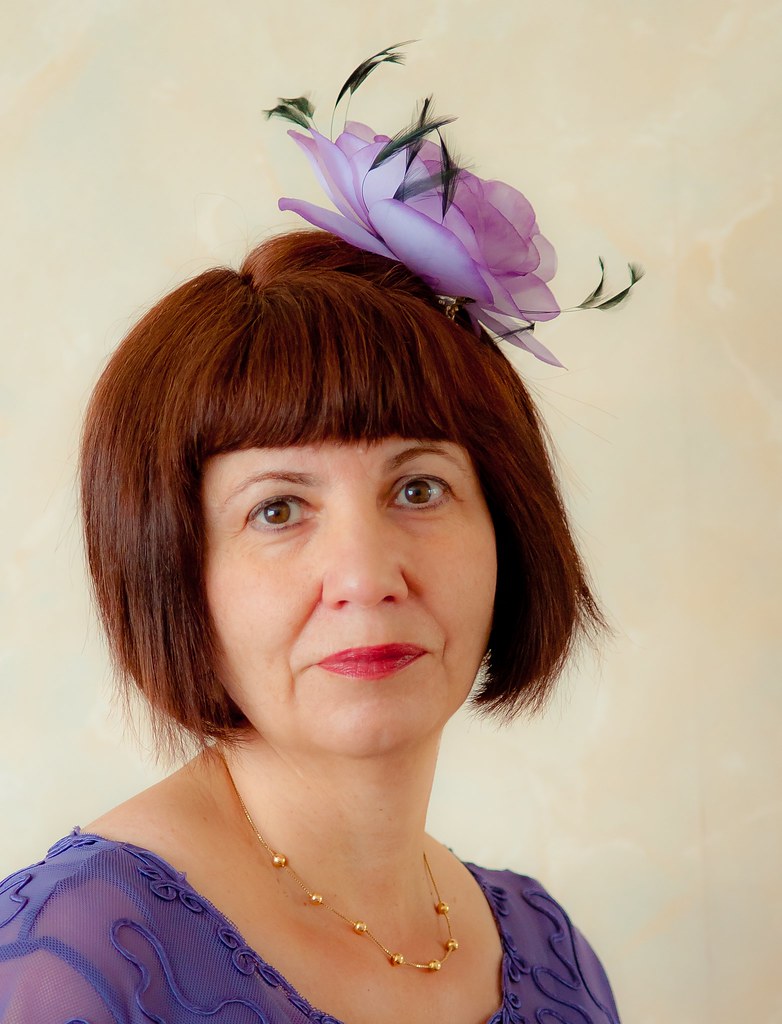
OK Chris, here is a portrait, taken inside at 1000 ISO using just the natural light. When viewed at a small size, the picture doesn't seem too bad, but when you start to zoom in, the pixellation is pretty awful.

10555877225_8c5e41fe3a_b.jpg


I cannot decide if it is the resolving power of the lens (I think it was the Minolta 35 - 105) or the low light capability of the camera sensor.

Andy
 
ISO 1000????????????? why on earth do yo shoot that high? I have previously owed a Sony a700 and yes the ISO is pretty rubbish above ISO 400 in my opinion, so I'd be guessing its the abnormally high ISO you used that caused the problems with the above image

If you shot the above using natural light and a still subject and the camera on a tripod then ISO 100 or 200 and a nice wide aperture would have worked , OK the shutter speed would have dropped to sub 1/100th sec but still a to usable level I'm thinking

I take it you do own a Tripod - if not I'd invest in one Andy

Les ;)
 
Last edited by a moderator:
ISO 1000????????????? why on earth do yo shoot that high? I have previously owed a Sony a700 and yes the ISO is pretty rubbish above ISO 400 in my opinion, so I'd be guessing its the abnormally high ISO you used that caused the problems with the above image

If you shot the above using natural light and a still subject and the camera on a tripod then ISO 100 or 200 and a nice wide aperture would have worked , OK the shutter speed would have dropped to sub 1/100th sec but still a to usable level I'm thinking

I take it you do own a Tripod - if not I'd invest in one Andy

Les ;)


I just checked Les, and that was taken at 1/80th second. I do have a tripod, but I took this shot just before we went out, so there wasn't time to get it all set up. It was taken at F4 which is the maximum aperture of that lens.
I am glad that you think the performance above 400 ISO is pretty bad, because I have always felt that between 400 ISO - 1600 ISO it drops off a cliff in terms of performance.
I think it may be time to think of upgrading to full frame, and/or invest in some lighting.

Andy
 
From your op you said you shoot RAW and then save as jpeg or tiff how do you edit, as a jpeg or RAW. I can understand editing as tiff file
 
I just checked Les, and that was taken at 1/80th second. I do have a tripod, but I took this shot just before we went out, so there wasn't time to get it all set up. It was taken at F4 which is the maximum aperture of that lens.
I am glad that you think the performance above 400 ISO is pretty bad, because I have always felt that between 400 ISO - 1600 ISO it drops off a cliff in terms of performance.
I think it may be time to think of upgrading to full frame, and/or invest in some lighting.

Andy


I have the Sony a99 and as a back up the a77 both excellent camera'sin their own right - I can highly recommend the a99

1/80th sec at f4 it must have been very dark in that room for such a high ISO to have been required


Les ;)
 
Last edited by a moderator:
I have the Sony a99 and as a back up the a77 both excellent camera'sin their own right - I can highly recommend the a99

1/80th sec at f4 it must have been very dark in that room for such a high ISO to have been required


Les ;)


Yes, it is a North facing living room with net curtains, and it was a little gloomy.
Thanks for the recos, re the a99 and the a77 Les. I have to admit, that I really like the ergonomics of the a700 - size, weight, controls - but the low light performance is a real bug.

Andy
 
a77 is loosely based on the a700 well worth a look fella a99 on the other hand is a much better option being full frame

Les
 
Back
Top