

Help with Bridge

On the Huh

Little Ball of Fur
Suspended / Banned
Messages
4,405
Name
Zulfi
Edit My Images
Yes
I get this everytime I open Bridge since renewing my Hard drive (C)
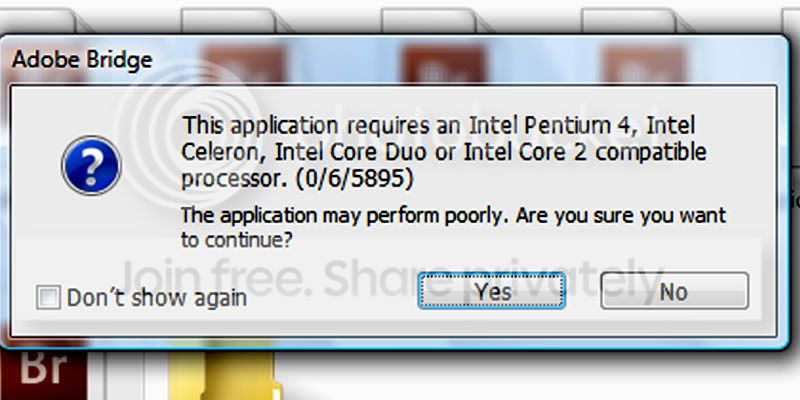
Untitled-1-5.jpg


My processor is this: (copied from System Info)
Processor Intel(R) Core(TM)2 Quad CPU Q9300 @ 2.50GHz, 2497 Mhz, 4 Core(s), 4
So why do I get this message? Anyone can explain Please??
 
It looks like your processor doesn't have any of those things. What OS are you running and do you mean renewing as replacing or reformatting? if you've 'changed' your hard drive that shouldn't affect the processor. Have you even gone anywhere near the processor? If Adobe Bridge still functions properly, your OK for now, but i take it your processor isn't Duo, it's a Quad core, that should still work. I can tell you now (and you already probably knew) that something weird is going on. If you tell me everything you know about the computer and what date this happened and what date you started using Adobe Bridge, i might be able to help. Just tell me everything you know.
 
Last edited:
If bridge works properly after you dismiss that note, just tick the box in the bottom left corner and forget about it.
 
Thanks for the replies guys.

Hugh: I have thought about doing that, but need to know if there is an underlying problem that I need to sort out.

David: The OS was XP before my hard drive packed in. Since the new drive has been fitted the OS is now Vista Premium. I re-installed PS CS3 a couple of weks ago. There are a few updates for CS3 which doesn't want to install??

I can copy and paste the System Info in full if that helps.

Bridge and CS3 still works ok but a little slower than what I like and was use to.

The other annoying thing is pictures that are saved in folders only show up as Bridge Icons and not thumbnails, this include jpegs as well as Raws.

Someone said I should upgrade to Windows 7 64 bit and add another 12 gigs of Ram as files are so much bigger now that I am using a 5D2.
 
If you copy and paste all the System info, that might help, yes. Upgrading to Windows 7 might possibly help, if it doesn't then you've got a better OS anyway. Updates that aren't installing usually point to a compatibility issue or the amount of space on your hard drive and how much RAM you have but it doesn't sound like it is because of everything else that's going on. I'm running a mac so i can't run a error test which i would have done, as long as you haven't touched the processor, i don't see what could be causing the problem. I suggest getting Windows 7 maybe and adding another 12 gigs as well. But just before, you might want to put full system info up.
 
Back
Top