Help with black and white film

Sir SR

Suspended / Banned
Messages
5,635
Name
Shaheed
Edit My Images
No
So as many of you know, I've started a little adventure with film. Loving it.

Now whilst my portra images have been really pleasing I've been a little disappointed with my black and white images with a couple of exceptions.

I don't know whether it's simply a case of getting the exposure wrong or not.

Be grateful for tips and advice!

Ta

Shaheed
 
You could experiment with filters, but I think best results eventually come from developing the film yourself.

Litlle tweeks to exposure, dev. time, agitation, etc, will get you to where you want to be.

That's my personal experience but I'm a million miles from being expert, so others may have better suggestions.
 
You could experiment with filters, but I think best results eventually come from developing the film yourself.

Litlle tweeks to exposure, dev. time, agitation, etc, will get you to where you want to be.

That's my personal experience but I'm a million miles from being expert, so others may have better suggestions.

I do have a few rolls of black and white left! I might do that.
 
(It'd be much better if you uploaded the JPGs rather than taking a photo of your screen - one less possibility of confusion)

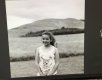
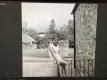
Going to disagree with Simon here - before you introduce variables, I think you need to nail down what issues you're having with the final product. What is it that you don't like about these? My hunch is that you're not "seeing" in B&W. In the second and third ones, she rather blends into the background, which she wouldn't have done in the colour scene you saw. Does that seem possible? I rather like the first one - it's possible that it's underexposed due to the backlighting, but it's hard to tell in these photos-of-photos.

I don't have any suggestions for seeing in B&W, because I haven't learned how yet. Squinting helps a little, because it breaks the scene down into light and dark rather than familiar outlines. Looking at your ground glass upside down (or on its side) might help in the same way.
 
actually, one thing that CAN help for beginners with the whole "seeing in B&W" is actually looking through the B&W filters (yellow/orange/red) ones and because you see everything in shades of yellow (or red, or orange) you get a handle on looking for light intensities rather than colours... it's a quick thing - just hold the lens up to one eye like a (big) monocle... It's also a good way to work out which filter of the set you may wish to throw on the front of the camera - though, I must admit, most of the time if I'm shooting B&W I tend to have the yellow filter in place all the time, and only remove it if it's too damned dark to take the shot without an extra stop of light...
 
Be grateful for tips and advice!


I see no problem here.

All there is to do is tweak the chrominance
sliders.

I would illustrate, with your permission, if I could
get the original scanned data.
 
Personally, to do black and white film photography well, I think 'seeing' in black and white is necessary. By 'see', I mean that you need to understand how colours are rendered in shades of grey and also how to change these renderings (e.g., use filters) to suit your needs and the scene. For instance, while a red rose will stick out from green stems in colour photography, they will be rendered in similar shades of grey in black and white, leading to a garbled, low contrast mess.

The chart at the bottom might prove helpful to give you an idea of how colours render with and without filters. Using my flower example from above, there are a couple of coloured filter options—depending on your aims—that would help to differentiate the flower from the stem, increase contrast, and lead to a more pleasing result in most cases (e.g., red filter produces a white rose with dark stem).

Another issue is that, for me, black and white requires more consideration of light and shadow and creative uses of these.


black-and-white-filter-effects.png
 
Last edited:
(It'd be much better if you uploaded the JPGs rather than taking a photo of your screen - one less possibility of confusion)

Going to disagree with Simon here - before you introduce variables, I think you need to nail down what issues you're having with the final product. What is it that you don't like about these? My hunch is that you're not "seeing" in B&W. In the second and third ones, she rather blends into the background, which she wouldn't have done in the colour scene you saw. Does that seem possible? I rather like the first one - it's possible that it's underexposed due to the backlighting, but it's hard to tell in these photos-of-photos.

I don't have any suggestions for seeing in B&W, because I haven't learned how yet. Squinting helps a little, because it breaks the scene down into light and dark rather than familiar outlines. Looking at your ground glass upside down (or on its side) might help in the same way.

To be fair, I thought I had a reasonable black and white eye. Maybe not. With digital I may have had a reflector/flash but not so with film.

I suspect that it's an exposure issue.

I like my mono to be contrasty with a wide DR.

Deep blacks etc.....

More practice I guess!!
 
More practice I guess!!


No, I don't think so as practice alone is not sufficient.

Understanding is the keyword and skysh4rk is giving
you a fantastic tool here. Most pertinent!
 
I suspect that it's an exposure issue.

I like my mono to be contrasty with a wide DR.

Deep blacks etc.....

More practice I guess!!

It's not necessarily about exposure here, you'll need to consider light values and colour renderings (see chart above) if you want to increase contrast. While many folks nowadays think of contrast as a post-processing tool in Lightroom, for good black and white photography, contrast should be considered before the shot even takes place, in my opinion. As @Kodiak Qc has said, it's not about more practice per se, but more understanding regarding your photographic practice.
 
It's not necessarily about exposure here, you'll need to consider light values and colour renderings (see chart above) if you want to increase contrast. While many folks nowadays think of contrast as a post-processing tool in Lightroom, for good black and white photography, contrast should be considered before the shot even takes place, in my opinion.


I have, not disagreeing with the above, a different approach.

It is, in my book, all about exposure since it includes everything
else…
  • dynamic range
  • tonal ratios —luminance and contrast
  • tonal values — chrominance
With the right exposure come data quality and image flexibility.
You can achieve anything from properly recorded data.
 
Last edited:
Some very good points here. I think it is tough to take a good black and white picture. I'd suggest taking nothing but black and white for 6 months or so!

There is a real difference, IMHO, between black and white on film and on digital. In the latter case, it's a colour image that you choose to post-process into black and white. You choose which images to take down this route, and you choose which filters to apply (effectively) in the conversion process, all after the shot is taken. On film, as said above, you have to make all those decisions before taking the shot.

The guidance about filters is very good, and RJ's diagram is very helpful (although why an orange filter would give grey for orange and white for yellow, I don't understand). In practice, most people use yellow or orange most of the time (at least in terms of landscape type work). Red is very dramatic but loses a lot more light. I don't think I've ever put a green or blue filter on my camera (although it's possible I should have!).

But the "eye" thing is really about choosing where you point your camera for black and white...
 
To be fair, I thought I had a reasonable black and white eye. Maybe not. With digital I may have had a reflector/flash but not so with film.

I suspect that it's an exposure issue.

I like my mono to be contrasty with a wide DR.

For an example, look at the hair in 2 and 3. In colour, the green trees will contrast with the hair colour giving a nice 3d pop. In B&W, it doesn't. That isn't an exposure issue, it's a B&W issue.

It'd probably be a good idea if you took the colour shots you like, and try converting to B&W using the default Lightroom red/green/blue filter settings, to see if you can achieve a result you're happy with, and take that as a basis for filters to use for these types of scene.
 
although why an orange filter would give grey for orange and white for yellow, I don't understand


Maybe because orange, being made of red
and yellow, is affecting the red part of the
spectrum more than the yellow?
 
Excellent info guys and reinforces why i love this place. I understand what you're saying now and that chart is very useful. I'll look at Lightroom and the colour filters to see what I should think about re lens filters.
 
orange filters are also great fun for removing/reducing visible freckles if you've only got a Ginger model to work with... :lol:
 
Somewhere not so long ago we were talking about a filter that the Hollywood guys used to use to view a scene and it was a wratten **...well some guy said a cheap poor man's filter would be an amber filter...Come on Asha have you tried it yet?
 
Somewhere not so long ago we were talking about a filter that the Hollywood guys used to use to view a scene and it was a wratten **...well some guy said a cheap poor man's filter would be an amber filter...Come on Asha have you tried it yet?

Wratten 90. For those who don't know it's a special dark amber that lets you visually assess the brightness of tones in a scene in a monochromatic fashion, so it effectively lets you "see" in B&W. You don't actually use it for photography though.
 
Somewhere not so long ago we were talking about a filter that the Hollywood guys used to use to view a scene and it was a wratten **...well some guy said a cheap poor man's filter would be an amber filter...Come on Asha have you tried it yet?

I've had a tentative "play" with the filter Brian and tbh atm I'm struggling to see the benefits of it when viewing a colour scene with a view to shooting it in b&w.......It seems that i can "see" the monochrome version of a given scene in my minds eye simply from experience of predominantly shooting b&w film, the filter, ftm is confusing what I'm seeing tbh.

As for the OP dissapointment with b&w results.
As others have said, there is a considerable difference in shooting monochrome and colour and having shot more colour film than b&w in recent years ( mainly because I've matered home C-41 home developing!), I'm actually finding it quite difficut to "automatically" see a scene in grey tones.

It is for this reason that I'm running down my colour film stocks ( it's gunna take some time mindst as I have a boatload!! lol) with a view of returning solely to monochrome film shooting and relying on digital for the odd shots that i desire in colour.
 
Probably the most useful filters for black and white use, are yellow_ green. Yellow, orange and red. A very popular filter in black and white days was a blue cut... which filtered out uv and removed the reflected blue in mountain scenes and made them cleaner. It was later adopted to do the same with early colour film.
yellow orange and red progressively darkened blue skys .
yellow and yellow green lightened grass and foliage.
orange and red lightend those colours and darkend all others.

Filters lighten their own colour and close colours, and darken oposites.

probabably a medium yellow or yellow green is the most useful general purpose filter. As it reduces the over sensitivity of b/w film to blue in daylight.
 
I've had a tentative "play" with the filter Brian and tbh atm I'm struggling to see the benefits of it when viewing a colour scene with a view to shooting it in b&w.......It seems that i can "see" the monochrome version of a given scene in my minds eye simply from experience of predominantly shooting b&w film, the filter, ftm is confusing what I'm seeing tbh.

As for the OP dissapointment with b&w results.
As others have said, there is a considerable difference in shooting monochrome and colour and having shot more colour film than b&w in recent years ( mainly because I've matered home C-41 home developing!), I'm actually finding it quite difficut to "automatically" see a scene in grey tones.

It is for this reason that I'm running down my colour film stocks ( it's gunna take some time mindst as I have a boatload!! lol) with a view of returning solely to monochrome film shooting and relying on digital for the odd shots that i desire in colour.

So you are turning into a film snob as well, I cannot believe it.o_O:p:naughty::kiss:
 
Personally, I shoot more black and white than colour. (home processing being far cheaper) I've found that coloured filters are a must for me. Yellow is my standard substitute for a UV/skylight. On sunnier days I'll move up to orange or even red which helps darken blue skies significantly and generally boosts contrast. For portraiture, I tend to use orange, yellow or green depending on the skin type and environment. Blue can be used if you want to bring out the texture of the skin and the underlying blood vessels or freckles but it can be rather harsh. Go onto the hoya site or another filter manufacturer and have a look at the sample photos for each coloured filter, as it helps show what they do. One thing to bear in mind with filters is that they have exposure compensation factors if you don't have TTL metering.

Also try to remember than the negative is only half the process, just like a raw, it needs to be processed to produce the end result. Ordinarily this would be putting it into an enlarger and printing it, but post scanning you can do similar in photoshop/lightroom.
 
I don't think these pictures are about "seeing" in b/w as much as exposure and lighting.
I dunno how useful filters are for portraiture, I know I use a lot of reds and oranges for scapes and architecture, but they are poor for caucasian skin especially, tending to blow detail and tone, whilst darkening greens and blues which can form a substantial portion of the rest of the frame.
I think the biggest improvements to be made with these particular pictures are with the lighting and exposure, maybe some flash to push back the sky/environment or something.
 
Back
Top