
Help with an image

Mozziephotography

Suspended / Banned
Messages
1,850
Name
Stephen
Edit My Images
Yes
I'm wanting to print an image from our recent holiday. I have problems (apart from photography skills) with white balance/ colour saturation. I've cropped this image to give a feeling of "width" to the landscape, tried with the more "normal" formats but it doesn't work as well.
Any thoughts on how to improve in post-processing would be welcome. I have LR and Photoshop.
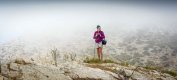
Greece 2017-404-Edit.jpg
 
I like the composition, nice shot.
I presume the quality is better at higher resolution than posted here, in which case personally I'd leave it as is.
 
What is it that you don't like?
Like Duncan I don't really see a problem, maybe tell us what you were wanting to accomplish. :)
 
Thanks for that. As I said, I do have problems with WB and sometimes my images are towards the "blue" end. Just wondered if there was any way of "improving" the mist.
Ignore me, I have no idea what I'm trying to achieve. :banana:
 
Noting to do with the post processing you want. I would try to make it wider (on the left) whilst keeping the subject where it is. All that providing that you have a kind of seamless picture on the left side (or that you have anything at all on the left).
 
To me the wb looks fine, if you what to play around with the mist try adjusting the dehaze slider in lr.
 
Thanks for that. As I said, I do have problems with WB and sometimes my images are towards the "blue" end. Just wondered if there was any way of "improving" the mist.
Ignore me, I have no idea what I'm trying to achieve. :banana:

WB looks okay to me, the mist needs something like Dehaze used selectively in a layer but it depends what available detail you have in the RAW ... I doubt there is sufficient to bring everything back.
 
Noting to do with the post processing you want. I would try to make it wider (on the left) whilst keeping the subject where it is. All that providing that you have a kind of seamless picture on the left side (or that you have anything at all on the left).
Rule of thirds thingy? I wondered about that this morning when I looked at it again. Thanks everyone for your comments. MUCH appreciated.
 
Hi Stephen

I like the image too, as is. I myself would not want to see through that mist as thats what is making the image for me. Myself, I would lighten the top section of the image so it is all very light as i'm not keen on the dark band at the top edge. I would maybe have a play with a clouds layer set to screen and masked out sort of patchy like, just to lighten the whole image and enhance that misty feel. Now I wrote that as though i'm an expert (i'm not, I have just seen the videos like everyone else).

Course you may want rid of the mist :-)

Have fun.
Gaz
 
Maybe a tad orange in the face but only a tad if at all. Personally I think it's nice as is.

Compositionally I'd prefer her on the left third but rules are made to be broken ;)
 
As above poster said, leave as is other than losing the dark tones at top of image.
Nice shot(y)

Ok above post by Cargo!!
 
Back
Top