Help! what've I done wrong?

HopefulM

Suspended / Banned
Messages
3,323
Name
Maria
Edit My Images
Yes
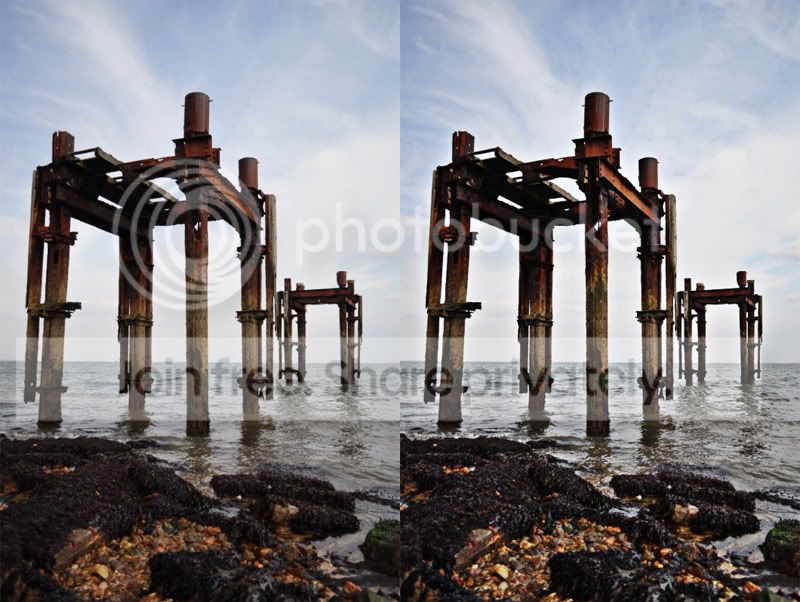
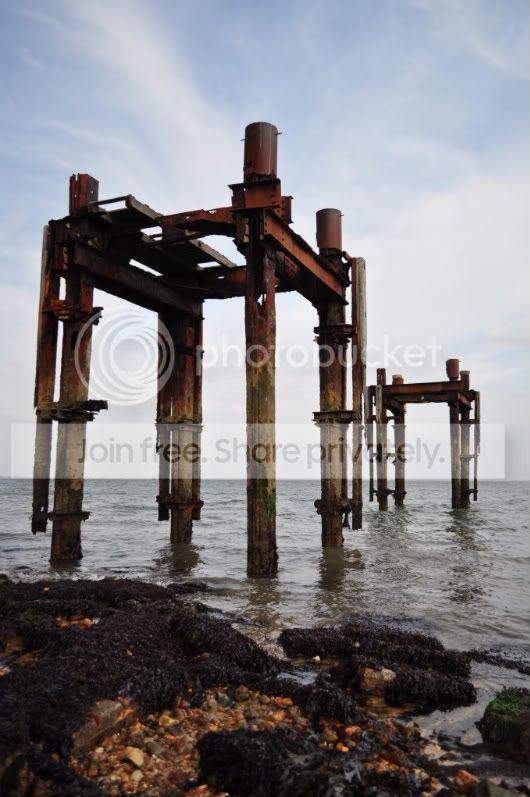
I took a series of pics yesterday using my 18-55 kit lens and they've ALL come out soft!!! :thinking:

All taken on a tripod, VR on, was no more than a pleasant breeze.

is it because the aperture was f/3.5?

(other info: 1/640, iso 250, spot metering)


Help! where've I gone wrong?
thedolphins097.jpg
 
Turn the VR off, drop the shutter speed a bit, up the ISO some and put the aperture at around F8 -F11. If still soft, I'd suggest focussing issues or a bad lens.
 
The only thing you actually did 'wrong' was leave the VR on...

Personally, I'd have dropped the ISO down as low as it goes; bring the shutter speed down a bit and stop down to about f5.6 or f8. Don't stop down any tighter than that 'cos you'll start to get reciprocity failure which will ultimately lead to soft shots anyway.

It needs a bit of a boost in post but there's technically, there's not an awful lot that needs changing. :)

Hope that helps,
Si
 
My thinking was that she put the shutter speed so high to freeze the movement of the water.
 
Sorry if Ive missed anything but what focal length were you using on your 18-55 lens... and were you using RAW?
 
Sorry if Ive missed anything but what focal length were you using on your 18-55 lens... and were you using RAW?


35mm focal length = 27

taken in both jpeg & raw

I wasn't trying to 'arrest' the water, but I wanted to make the best of my time there at low tide hence the fast shutter speed in the hope that if there was any movement it would be limited. :(
 
just done quick high pass filter opacity at 70% and seems to look better?
First original second sharpened

EDIT: hmm doesnt show as much after its been uploaded...but you can see a bit lol

test-5.jpg
 
I've got the same lens, if its f/3.5 then the focus will be at the wide end, 18-22mm'ish I would guess.

Are you using a remote release, even the act of firing the shutter can cause the camera to move slightly.


b****r.........must not get distracted at work while typing on here!!!!!
 
As mentioned, the effect is because you had VR turned on while it was attached to a tripod.

The VR basically vibrates to counteract the shake of your hands, but a tripod doesn't shake so the VR has nothing to cancel out. It creates fuzzy/soft images.
 
I've got the same lens, if its f/3.5 then the focus will be at the wide end, 18-22mm'ish I would guess.

Are you using a remote release, even the act of firing the shutter can cause the camera to move slightly.


b****r.........must not get distracted at work while typing on here!!!!!

yes - was 18mm

I didn't use the remote release as I left it at home :bonk: :lol:
 
If you had the camera on a tripod then the VR will make the lens shake a bit so it needs to be turned off. As said go to f8 or f11 but keep ISO as low as possible to keep quality. Set camera to AV (Aperture priority) and go for it! As the camera is stable on the tripod you can go for longer shutter speeds. If you have a hook on the Tripod on the bottom of the central pole when hang something heavy on it just in case the breeze moves the tripod.
 
The only thing you actually did 'wrong' was leave the VR on...

Personally, I'd have dropped the ISO down as low as it goes; bring the shutter speed down a bit and stop down to about f5.6 or f8. Don't stop down any tighter than that 'cos you'll start to get reciprocity failure DIFFRACTION which will ultimately lead to soft shots anyway.

It needs a bit of a boost in post but there's technically, there's not an awful lot that needs changing. :)

Hope that helps,
Si
 
If you had the camera on a tripod then the VR will make the lens shake a bit so it needs to be turned off. As said go to f8 or f11 but keep ISO as low as possible to keep quality. Set camera to AV (Aperture priority) and go for it! As the camera is stable on the tripod you can go for longer shutter speeds. If you have a hook on the Tripod on the bottom of the central pole when hang something heavy on it just in case the breeze moves the tripod.

Ooh is this true of Mega OIS on Panasonic lenses too? Can't say I've noticed any softness using a tripod without switching it off.
 
Ooh is this true of Mega OIS on Panasonic lenses too? Can't say I've noticed any softness using a tripod without switching it off.

I have used a tripod with IS still on with Canon (It didn't occur to me to turn it off)

I got nice sharp images...

If there is no movement to detect surely the Vr/IS/OIS just does nothing?

Cheers

MIP
 
It depends. More recent IS systems are smarter and switch off when they detect no movement.
 
Turn the vr of when using a tripod, it fools the camera into thinking its moving so actually ads blur instead of reduce it. thats all that matters in this case.
 
Turn the VR off, drop the shutter speed a bit, up the ISO some and put the aperture at around F8 -F11. If still soft, I'd suggest focussing issues or a bad lens.

thanks I wondered whether this had something to do with it ;)

The only thing you actually did 'wrong' was leave the VR on...

Personally, I'd have dropped the ISO down as low as it goes; bring the shutter speed down a bit and stop down to about f5.6 or f8. Don't stop down any tighter than that 'cos you'll start to get reciprocity failure which will ultimately lead to soft shots anyway.

It needs a bit of a boost in post but there's technically, there's not an awful lot that needs changing. :)

Hope that helps,
Si
:thumbs:

just done quick high pass filter opacity at 70% and seems to look better?
First original second sharpened

EDIT: hmm doesnt show as much after its been uploaded...but you can see a bit lol

test-5.jpg

I'm going to have another go at taking the shots - I wanted to print some of these out fairly large for a project, and I'm not sure this edit is going to hide my mistakes - but thank you for trying! ;)

As mentioned, the effect is because you had VR turned on while it was attached to a tripod.

The VR basically vibrates to counteract the shake of your hands, but a tripod doesn't shake so the VR has nothing to cancel out. It creates fuzzy/soft images.

thanks :)

If you had the camera on a tripod then the VR will make the lens shake a bit so it needs to be turned off. As said go to f8 or f11 but keep ISO as low as possible to keep quality. Set camera to AV (Aperture priority) and go for it! As the camera is stable on the tripod you can go for longer shutter speeds. If you have a hook on the Tripod on the bottom of the central pole when hang something heavy on it just in case the breeze moves the tripod.

I'm going to try the f/8 & f/11 - and I'll have a go with the 50mm too to see if that makes any significant difference.

Turn the vr of when using a tripod, it fools the camera into thinking its moving so actually ads blur instead of reduce it. thats all that matters in this case.

thanks :)

thanks everyone for all your replies - I'll be having another go at this when the tide is out again (I think there's a 3.5 metre difference, which nearly covers them!) so watch this space......
 
I didn't use the remote release as I left it at home :bonk: :lol:

Use the self timer if you've forgotten your remote release. This gives a few seconds after pressing the shutter button for any vibration to subside before the shutter fires.
 
If the camera has it, consider using mirror lockup as well. I get nice sharp pictures when using mirror lockup - I'd say it does make a difference.
 
I agree with the others. Turn the VR off, use a remote release and mirror lockup if you can.
 
I disagree with the others :lol: ;)

At 18mm and 1/640s I doubt shake from either hands or stabiliser would be noticeable, tripod or not.

Get the ISO down as low as it goes, aperture between f/8 and f/10, stabilisation off just cause it's not necessary, and that's the best you'll get :thumbs:
 
Vr on will have caused the above problems.

I agree with the others. Turn the VR off, use a remote release and mirror lockup if you can.

I disagree with the others :lol: ;)

At 18mm and 1/640s I doubt shake from either hands or stabiliser would be noticeable, tripod or not.

Get the ISO down as low as it goes, aperture between f/8 and f/10, stabilisation off just cause it's not necessary, and that's the best you'll get :thumbs:

thanks again for the advice - I've locked the mirror anyway, I guess it must be down to the VR OR because the aperture was too big :bonk:

however.....

I've been out tonite with the 50mm, tripod, remote release, and NO VR!!!!!!!

so watch this space!!!!:thumbs:
 
well you learn some thing new everyday on here i never knew about the vr on a tripod cheers nice one
 
well you learn some thing new everyday on here i never knew about the vr on a tripod cheers nice one

even if you don't know it doesn't take long to figure out when you get really fuzzy images :)

Same as me when I was using studio flash units and I was left wondering why I was getting a dark patch right across the bottom of the photo. Shutter was too fast :D
 
I have a little sticker saying 'IS' on my tripod release lever to remind me to turn IS off when using the tripod :)

(though the last time I used it at a wedding was 14 months ago lol)
 
As mentioned, the effect is because you had VR turned on while it was attached to a tripod.

The VR basically vibrates to counteract the shake of your hands, but a tripod doesn't shake so the VR has nothing to cancel out. It creates fuzzy/soft images.

Canon do not need to turn off, apart from saving the batt, are you sure its not the same with Nikon?
 
Canon do not need to turn off, apart from saving the batt, are you sure its not the same with Nikon?

Not true! Some Canon lenses do not need to have their IS turned off on a tripod, but it is advised for the majority of IS lenses!
 
Back
Top