Help to save this photo

Vic

Suspended / Banned
Messages
1,067
Edit My Images
Yes
Hi guys,

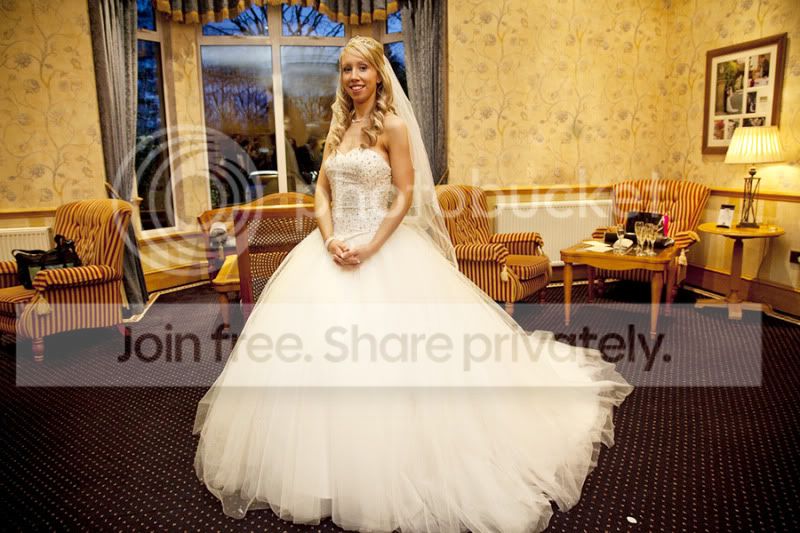
I did some photos for my cousins wedding on saturday and all went one however I have one photo that I quite like however there are reflections on the window and a distracting table on the right. I would ideally like the keep this in colour.

Any idea in how to fix this? I have used the clone stamp but it has made it look quite dirty.:thinking:

EDIT: Here is a larger version http://www.flickr.com/photos/22277921@N04/4109432960/sizes/l/

4109432960_94dd5e493e.jpg


Thanks
Vicky.
 
I'd just crop the table out. To be honest, she looks too far left in the photo anyway. In regards to the window I'd be tempted to mirror the other window across onto it using a new layer, remove the bits that fall on top of the bride, and just carfully blend it in using heals/touchups etc.
 
I'd tend to crop so that it's a vertical rather than landscape. This'll get rid of most of the chair. Try to clone the window from the left hand pane to the right. Then selectively darken both.

The table is a problem, It could be removed if time and skill allowed, but as an alternative, why not vignette around the bride to remove most of the annoying background.

I've learn't over the years to watch the background as much as the foreground. Still make the odd mistake though
 
Thanks karmagarda and keriok, I am just in the process of (slowly) trying your advice.

Thanks also chappers

I've learn't over the years to watch the background as much as the foreground. Still make the odd mistake though

You are 100% right. :) This will hopefully be a lesson learned and Ill make sure to pay more attention next time :bang:

Sure will Yv, Ill just go edit my first post :thumbs:
 
Put a night-time landscape shot in the background, also applied a vignette to reduce the glow of the lamp on the right.

Tweaked colours slightly aswell.
fixphoto.jpg


Slightly rough edit, but just a thumbnail anyway, so not much point spending any longer on it - You get the idea.
 
Nice shot I reckon and not too much to worry about. The strong tungsten cast is the major issue. When I open it in Paint Shop Pro though, the white balance looks much better straight away which usually means you're running the wrong colour space in your photo editor - probably Adobe RGB? You need to have your colour profile set to sRGB for web viewing of images.

What it means is you'll also be seeing completely different versions of all these edits to everyone else.
 
That does look much better, nice work. I agree with CT on the white balance, you should check that out.
 
That looks a lot better now. It is a really nice shot, I can see why you want to save it.
 
Back
Top