
Help to give sky impact

markyboy.1967

Suspended / Banned
Messages
8,171
Name
Mark Molloy
Edit My Images
Yes
I would like to know how to adjust the sky in the below two pics to give it more impact. It has been commented upon a few times about the sky which could help improve the overall pic.I would like to get a big print of each and frame them but would like the skies adjusted first of all.

Each time i try with my limited knowledge of Photoshop ( CS4 ) I end up making it worse or adjusting the whites of the snow. A tutorial would be great if possible or if not i could send larger jpegs to someone.
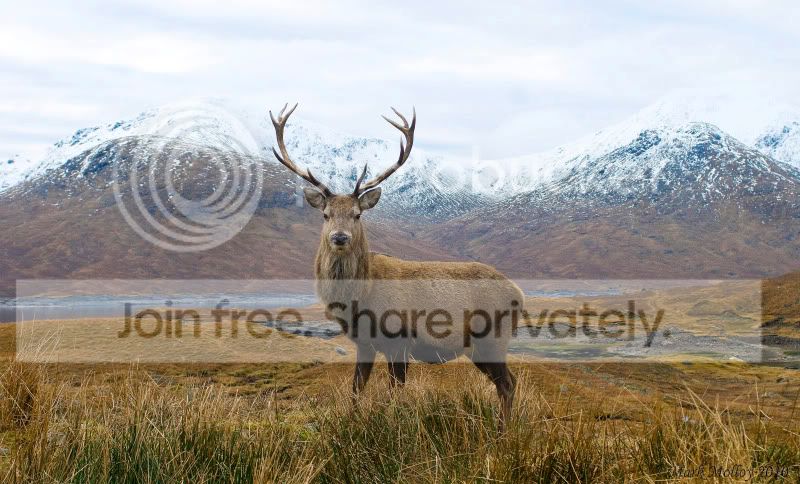
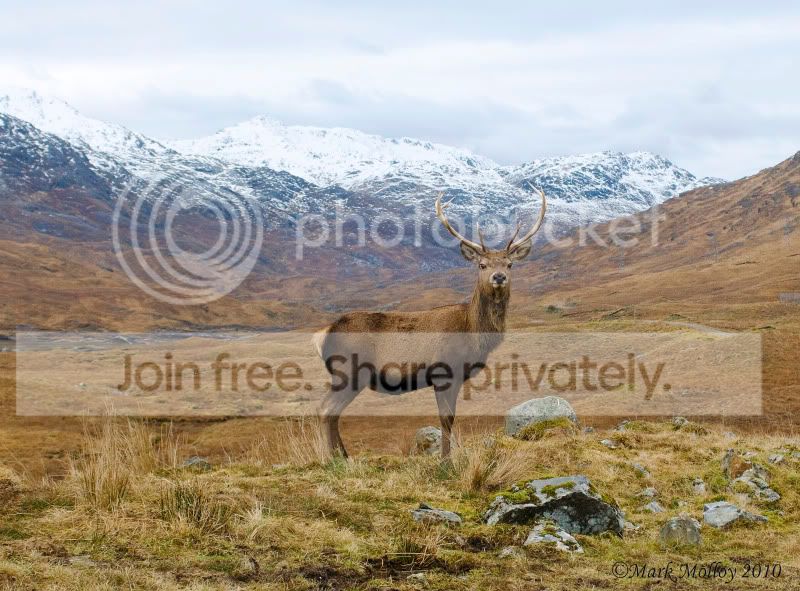
DSC_87531.jpg


DSC_87541-1.jpg
 
Here's a suggestion:

Open the image in ACR in Photoshop. ( Photoshop ACR will work on JPEG and TIFF.) You can set this up in Bridge Prefs or simply right click on the image in Bridge and select "open in camera Raw".

Now select the Graduated filter option, ( Keyboard press G) You can now select some negative exposure, or some negative brightness ( or a bit of both ) . Now drag the cross down the screen to add some density to the sky.

You could also add some blue to the grad to tint up a bit more, or add some Vibrancy or Saturation. To get colour click on the button on the next to colour. It'll scroll through some pre set colours. If you need to select a different one just click on the colour box.
 
For scenes like this I would strongly recommend the use of a 2 stop soft edged ND grad.

Rgds


5mins work and that included downloading the image Meant to add to post but pressed wrong button
 
I would suggest it would be so much better to get it right in camera as far as possible, have you considered a set of ND Grads
 
I prefer the more natural look that Contrast Masking gives.
This image is as per the thread with the mask set to 66% opacity (my default setting)
I've automated this as a Photoshop action - took two mouse clicks :)
I think all this needs is a bit of extra punch on the deer and jobs a good un..
DSC_87531.jpg


Edited to add: Just remembered my settings assume full frame resolution
I thought it looked a tad dull compared to what I usually get.
It normally makes grass look like I've been using fill-in light from a softbox
Try the technique on the original and see what happens
 
I'd be tempted to change the sky to b&w to give some contrast against the mountains. Thoughts?
 
Try making a selection of the sky and copying the selection to a new layer.

Then either merge the two layers using Multiply or you could try using the unsharp mask on the sky layer with a massive (250px) area.

Both are quite extreme and you will very quickly get a sky that looks unnatural against the snow capped mountains.
 
wouldn't they affect the background

graduated filters is designed to slide up and down inside their holder so that the start of the graduation can be positioned on the horizon
 
I would second the advice about an ND grad, the results are immediately obviously better than doing it in post.

However, you can use an ND grad simulation in ACR, or, just slide the 'Recovery' bar all the way to the right and you'll probably get good results.
 
open in Ps
ctrl+j to duplicate the layer
adjust curves on top layer to bring out sky
merge curves layer down
erase everything but the sky with a soft edge brush
done :)

this is always easier with a skyline such as this one, if you have trees etc its much more time consuming.


25367005622972193637.jpg


EDIT: I tried it with the first one but I can't get as much out of it as the second.
 
Does one have time to set-up a ND grad when photographing a stag :shrug:

And that's why you should always walk with one attached to your camera...at all times! Especially when photographing stags! :D
 
Someone posted this link a few days ago for the same thing, great step by step tutorial:

Skies

HTH
 
That last one looks nice :)
 
Played about with the curves a little, and added some sharpness. Edited the sky section on it's own and softened it in.
Great shot btw!

marksdeer.jpg
 
My quick edit

Untitled-1-1.jpg


There would have been no problem with using an ND Grad on the second shot as the stag is below the skyline, the trouble starts when the stag is half in sky and half in landscape.
 
Back
Top