Help!! Quick Question. Viewfinder Problem..**Got Image Up**

TinySpark

Suspended / Banned
Messages
874
Name
Melissa
Edit My Images
Yes
Quick question....

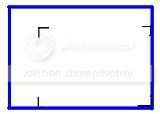
When i look through the viewfinder of my old compact Nikon camera, there's also a smaller rectangle outline... well, 4 curved corners to the bottom right that would off a good bit of the entire viewfinder... if you know what i mean.
Anyway, my question is- Is it the full image you see in the viewfinder or the smaller rectangle that the photo will be?

Please help!

:help:

I'm hoping I haven't messed up my pictures for tech class... :(

PS- Its a Nikon Zoom 100
 
No idea what they are for, but if they are all in the bottom right I doubt they would reduce the size of the image - keep your fingers crossed for tomorrow that all is well :)
 
thanks for your reply, I really am panicking! lol

Well, although it is to the bottom right, it's still about 2/3s of the viewfinder, which makes me think that's gonna be the image produced.
Hmmm...

Thoughts anyone?
 
i did this on paint really quickly, so excuse the crappiness...

But here's what i see when i look into the viewfinder (blue is all of viewfinder)
What are those black corners doing?

viewfinder.jpg
 
hmmm not sure? is there anything in the manual??
 
We've had the camera for years so have no clue where the manual is... I can't even find anything on the net. Hmm..
 
i would guess its a guide for where the image cuts off, but i wouldnt swear it
 
looks like the prism has dislodged yes compacts do have prisms just not like the one on your dslr as long as the lens isnt damaged it should be alright i guess youll know soon enough i'll come round and sort it out for you:bat:
 
how about you take a pic of it so we can see the front
 
Id give it a small tap in the opposite direction to see it frees it self and relines back to its original position.

If not give it a big tap...

If not give it a wallop...

If not give it a big wallop.......


If not take it to bits,well thats what iv done in the past with my Panasonic FZ8 all the way to the sensor and i only had one screw left and works fine.........:suspect:
 
The black corners define the frame, you can still use it with the wonky prism, I don't think it effects the shot, you'll just have to imagine the frame centred in the viewfinder.
At least there's nothing else but that and composition to think about..:lol:
 
Is it a zoom?

I suspect that the Blue markers show where to frame when using full zoom.
 
Good News!!!

The photos (or atleast what i can make out out from the negatives) came out fine! Got all the frame in it.

Sorry for my desperation displayed in this thread, I was really panicking!! :lol:

Thanks again though, you guys always help me out! :)


Oh Chilli, yep it's a zoom and i think you might be right about that!
I'll post a pic of the camera tommorrow when i can sure.
 
Back
Top