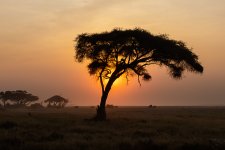
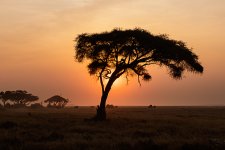
Help processing photo with sunset behind tree

DrPips

Suspended / Banned
Messages
310
Name
Dom
Edit My Images
Yes
Hi all,

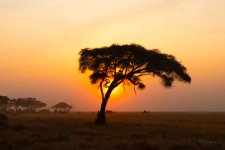
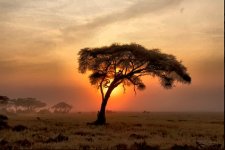
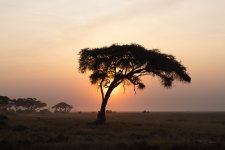
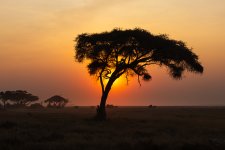
I'm trying to edit a photo I took in Kenya last year and think I've bitten off more than I can chew. I really like the shot, how atmospheric it is etc, but as you can see, the sun is setting directly behind the tree, and I'm not sure how I can recover any detail in the tree itself. I've tried using luminosity masks, but I wasn't very successful. Should I keep trying with this? Do I need to resort to HDR? Or should I stop trying to recover detail from the tree and aim for something more atmospheric?

Thanks,
DomIMG_9039-3.jpg
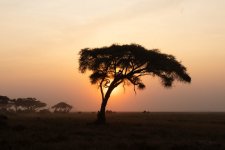
 
Honestly, I think it looks great as it is, but I understand not exactly seeing the outcome you were hoping for. I don't have any advice to offer, but just wanted to say I think it looks fantastic as it is. I also can only imagine how incredible that trip was!
 
You have a lovely silhouette of the tree in the greater landscape IMO to try to turn what is in effect deep shadow to visible tree details is not what would work visually even if you could achieve it.

Were it my picture I would be looking to boost the effect by bringing out the colours in the sunset.
 
Haven't we already been there with this image in the past?
 

I thought I recognised it.
 
I wouldn’t actually try and recover any shadow detail on the tree in this case - trying to do so will make it look naff. As it is, it’s got a whole bunch of contrast and it looks visually very striking.

If you wanted to lift anything, I’d lift the ground just a little to separate it from the tree and see what it looks like, but I would keep it looking natural. It’s a great shot, it doesn’t need much more than what’s been done already.
 
Last edited:
I think that it is a superb image. I wouldn't want detail in the tree. Just be proud of it.
 
You have a lovely silhouette of the tree in the greater landscape IMO to try to turn what is in effect deep shadow to visible tree details is not what would work visually even if you could achieve it.

Were it my picture I would be looking to boost the effect by bringing out the colours in the sunset.
Thanks, what would be the best way to achieve this?
 
I think the shot is good as it is. However, if I had wanted to capture the amount of detail you suggest, I would need a much larger dynamic range capture. I would have taken 3 shots of RAW two stop spacing then edited in LR using Photo-merge HDR.

Dave
 
To be fair - keep tree as a silhouette, slightly tighter crop, a little bit more saturation but not crazy and it's done
I'm not in front of my computer at the moment, but when you say increase the saturation, do you just mean using the sliders in the basic panel, or a more sophisticated method?

Also, with the tighter crop, would you recommend I change the aspect ratio to reduce the proportion of sky, or just a proportional tighter crop.

I second guess myself way too much!
 
Thanks, what would be the best way to achieve this?
If you are using LightRoom, I cannot point you to the right tools as I have not used LR for some years.....

Perhaps best state which program(s) you have so that those with the know how can on that/those programs can chime in?

But in general, a contrast increase, used carefully, will make the sunset that bit punchier.
 
Last edited:
If you are using LightRoom, I cannot point you to the right tools as I have not used LR for some years.....

Perhaps best state which program(s) you have so that those with the know how can on that/those programs can chime in?

But in general, a contrast increase, used carefully, will make the sunset that bit punchier.
Good point, I always forget that there are other options. I mainly use Lightroom Classic, but use PS a little too. Not very good at either to be honest!

Thanks for the advice.
 
I think the shot is good as it is. However, if I had wanted to capture the amount of detail you suggest, I would need a much larger dynamic range capture. I would have taken 3 shots of RAW two stop spacing then edited in LR using Photo-merge HDR.

Dave
Go on, make it complicated. How do you know what the dynamic range of his capture was?
 
I think this is what LLP and other were suggesting, though I also likes it like is was.

The sunsets/sunrises in central Africa do tend to be very red.


IMG_9039-3a.jpg
 
Did you shoot bracketed exposures? I would think something could be pulled back from a raw file but, and it's a biggie, it would ruin the feeling of the image. I love it as iy is if I'm honest.
Had a quick go, got some detail back, you could probably do better from the original.
 

Attachments

  • IMG_9039-3xxx.jpg
    IMG_9039-3xxx.jpg
    132.9 KB · Views: 7
Last edited:
The original is def worthy of displaying. Its a keeper all day long....
 
Ok, so I've had a few goes in a few different ways. I've attached them all here for your feedback. I really appreciate all the feedback so far, thank you. I didn't expect such a positive reception to it! The first is the original, then 3 versions. I've gone blind to the differences, but I think I pushed it too far with the first 1. The other 2 are better IMO.Tree Original.jpgTree1.jpgTree2.jpgTree3.jpg
 
Go on, make it complicated. How do you know what the dynamic range of his capture was?
You can measure by using spot metering but from experience, I would expect the dynamic range to be over 15 stops. There is no need to make the final image look as if it is taken in full daylight which is why I suggested that it was good as it is. A few years ago, when I used a camera with only 11 stops dynamic range I almost always bracketed landscape. More recently I have cameras which have dynamic ranges close to 14 stops so now rarely need to bracket. Snow capped mountains within a sunlit landscape are usually 13-14 stops so I can now get away with a single Raw shot. However, inside a cathedral or night/street photography will usually require bracketing.

Dave
 
Last edited:
I love the shot but I'm not sure you can recover detailes realistically. The sun is behind the subject, so it's only natural it's going to change some details about it. Maybe, just maybe, it will seem a little more sharp if you try a black and white effect on it, but I'm not sure it'll give you the result you're looking for. However, I'd also want to say the image is stunning as it is!
 
The original is a nice shot and IMO nicer than the edits but the edits do have more impact (and so [probably] will look nicer to some people.)
 
The Win11 welcome photo today is... a touch overprocessed from my taste. It's the Sunrise Over a Tea Plantation one.
 
Back
Top