weybourne
Suspended / Banned
- Messages
- 1,223
- Name
- Adrian
- Edit My Images
- Yes
Hi
I'm hoping someone can give some guidance/tuition/awe-inspiring edit on the image below.
It was shot with a Canon SX120 compact camera and I have cropped a small strip off the top to cut out the quayside top, white van etc. My biggest gripe with the image is the over-exposure on the loose bit of wood (prow deck, I think) at the front of the shot. I use Gimp 2.6; I tried some 'burn' but the result looked awful (so I binned it).
Thanks,
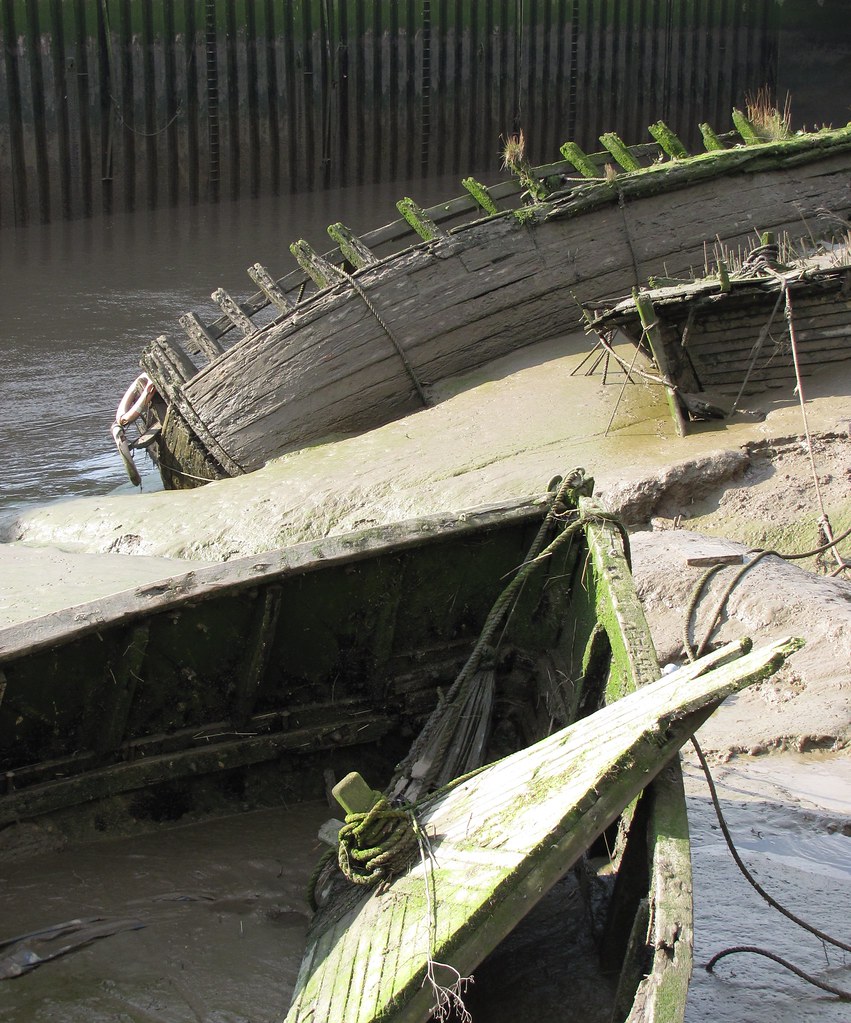
IMG_1832crop by felix rufus, on Flickr
I'm hoping someone can give some guidance/tuition/awe-inspiring edit on the image below.
It was shot with a Canon SX120 compact camera and I have cropped a small strip off the top to cut out the quayside top, white van etc. My biggest gripe with the image is the over-exposure on the loose bit of wood (prow deck, I think) at the front of the shot. I use Gimp 2.6; I tried some 'burn' but the result looked awful (so I binned it).
Thanks,
IMG_1832crop by felix rufus, on Flickr