Hi,
I'm very new to photoshop but have gained a basic understanding from online tutorials and a lot of messing about.
What I'm trying, and failing, to do is blend 2 photos together. I have a landscape shot I really like but the sky was completely gray and monotonous. So what I've tried to do is pinch the sky from another shot where it's more dramatic and merge the 2 together.
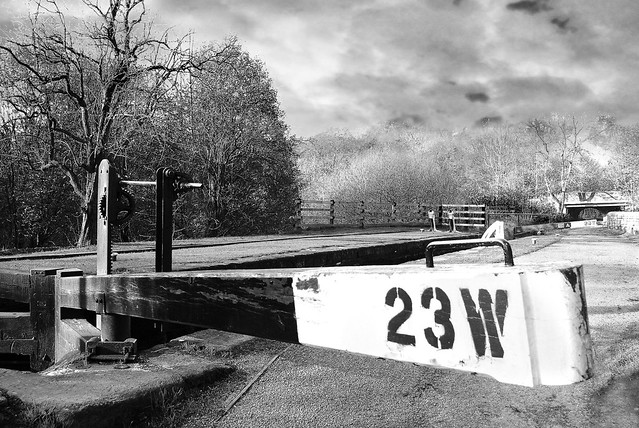
I used the background eraser tool to remove the gray sky, and them put the decent sky underneath it in a separate layer. The problem is there's loads of trees on the horizon and the eraser tool hasn't done a very good job. It's quite obvious that something's gone on across the horizon. It was even more noticeable before I went monochrome.
Now there must be a better way of doing this but I can find anything online (trust me I've looked hard ha ha). Here's the shot so you can see what I mean.

Locks 2 by LeonJB, on Flickr
Cheers guys
I'm very new to photoshop but have gained a basic understanding from online tutorials and a lot of messing about.
What I'm trying, and failing, to do is blend 2 photos together. I have a landscape shot I really like but the sky was completely gray and monotonous. So what I've tried to do is pinch the sky from another shot where it's more dramatic and merge the 2 together.
I used the background eraser tool to remove the gray sky, and them put the decent sky underneath it in a separate layer. The problem is there's loads of trees on the horizon and the eraser tool hasn't done a very good job. It's quite obvious that something's gone on across the horizon. It was even more noticeable before I went monochrome.
Now there must be a better way of doing this but I can find anything online (trust me I've looked hard ha ha). Here's the shot so you can see what I mean.
Locks 2 by LeonJB, on Flickr
Cheers guys