

You are using an out of date browser. It may not display this or other websites correctly.
You should upgrade or use an alternative browser.
You should upgrade or use an alternative browser.
Help needed with USB3
- Thread starter razer
- Start date

- Messages
- 5,943
- Name
- Darran, Daz or ****
- Edit My Images
- Yes
Providing your computer has a spare PCIe (express) port then yes you can.
According to the specs, it does: http://www8.hp.com/h20195/v2/GetDocument.aspx?docname=c04136945
According to the specs, it does: http://www8.hp.com/h20195/v2/GetDocument.aspx?docname=c04136945
Last edited:
- Messages
- 5,943
- Name
- Darran, Daz or ****
- Edit My Images
- Yes
16X is PCIe is for a graphics card, 8x is for other devices.
An 8x PCIe card (which a USB card will be) will not fit into a 16x slot so you will be fine.
It made more sense when we had AGP for graphics and PCI for other devices but that's the computer industry for you
An 8x PCIe card (which a USB card will be) will not fit into a 16x slot so you will be fine.
It made more sense when we had AGP for graphics and PCI for other devices but that's the computer industry for you
Last edited:
- Messages
- 5,943
- Name
- Darran, Daz or ****
- Edit My Images
- Yes
It depends how many USB ports you need, if 2 is enough then this will do:http://www.currys.co.uk/gbuk/comput...4100!&ef_id=VNa4owAAAC2SvIQ-:20150302142854:s
The 4 port version: http://www.amazon.co.uk/Dynamode-4-Port-USB-Express-card/dp/B00AHS0CIK
The 4 port version: http://www.amazon.co.uk/Dynamode-4-Port-USB-Express-card/dp/B00AHS0CIK
16X is PCIe is for a graphics card, 8x is for other devices.
An 8x PCIe card (which a USB card will be) will not fit into a 16x slot so you will be fine.
It made more sense when we had AGP for graphics and PCI for other devices but that's the computer industry for you
It was even better when all the slots were ISA, Expansion & Graphics all went in the same slot type.
Showing my age again

- Messages
- 5,943
- Name
- Darran, Daz or ****
- Edit My Images
- Yes
It was even better when all the slots were ISA, Expansion & Graphics all went in the same slot type.
Showing my age again
Well at least you didn't mention IDE, serial and parallel ports

- Messages
- 5,943
- Name
- Darran, Daz or ****
- Edit My Images
- Yes
Or vesa local bus, or even MFM
NOW you are REALLY showing your age!


petersmart
Suspended / Banned
- Messages
- 5,000
- Edit My Images
- Yes
I recently installed this one:
http://www.amazon.co.uk/gp/product/B007SJGGAE?psc=1&redirect=true&ref_=oh_aui_detailpage_o03_s00
on my Core 2 Quad PC together with this:
http://www.amazon.co.uk/gp/product/B006TOMSCO?psc=1&redirect=true&ref_=oh_aui_detailpage_o03_s00
So I now have 2 USB3 ports at the back and 2 USB3 ports at the front - much easier than keep plugging things in at the back.
EDIT I had already installed the front panel on my i7 PC which already has a 20 pin USB3 header 3 months ago and it works fine there also
Even on the Core 2 Quad I get speeds of up to 150MB/sec transferring from SSD to external SSD so the speeds are also good.
On the Core 2 Quad it was plugged into the 1x PCIe slot.
.
http://www.amazon.co.uk/gp/product/B007SJGGAE?psc=1&redirect=true&ref_=oh_aui_detailpage_o03_s00
on my Core 2 Quad PC together with this:
http://www.amazon.co.uk/gp/product/B006TOMSCO?psc=1&redirect=true&ref_=oh_aui_detailpage_o03_s00
So I now have 2 USB3 ports at the back and 2 USB3 ports at the front - much easier than keep plugging things in at the back.
EDIT I had already installed the front panel on my i7 PC which already has a 20 pin USB3 header 3 months ago and it works fine there also
Even on the Core 2 Quad I get speeds of up to 150MB/sec transferring from SSD to external SSD so the speeds are also good.
On the Core 2 Quad it was plugged into the 1x PCIe slot.
.
Last edited:

robj20
Suspended / Banned
- Messages
- 3,216
- Edit My Images
- No
16X is PCIe is for a graphics card, 8x is for other devices.
An 8x PCIe card (which a USB card will be) will not fit into a 16x slot so you will be fine.
It made more sense when we had AGP for graphics and PCI for other devices but that's the computer industry for you
An 8x will fit into a 16x. There just the number of lanes, the interface is identical you can even put a 16x in a 1x but you will get a much reduced bandwidth and require a converter.
Last edited:
OP

razer
Suspended / Banned
- Messages
- 883
- Name
- Ray
- Edit My Images
- No
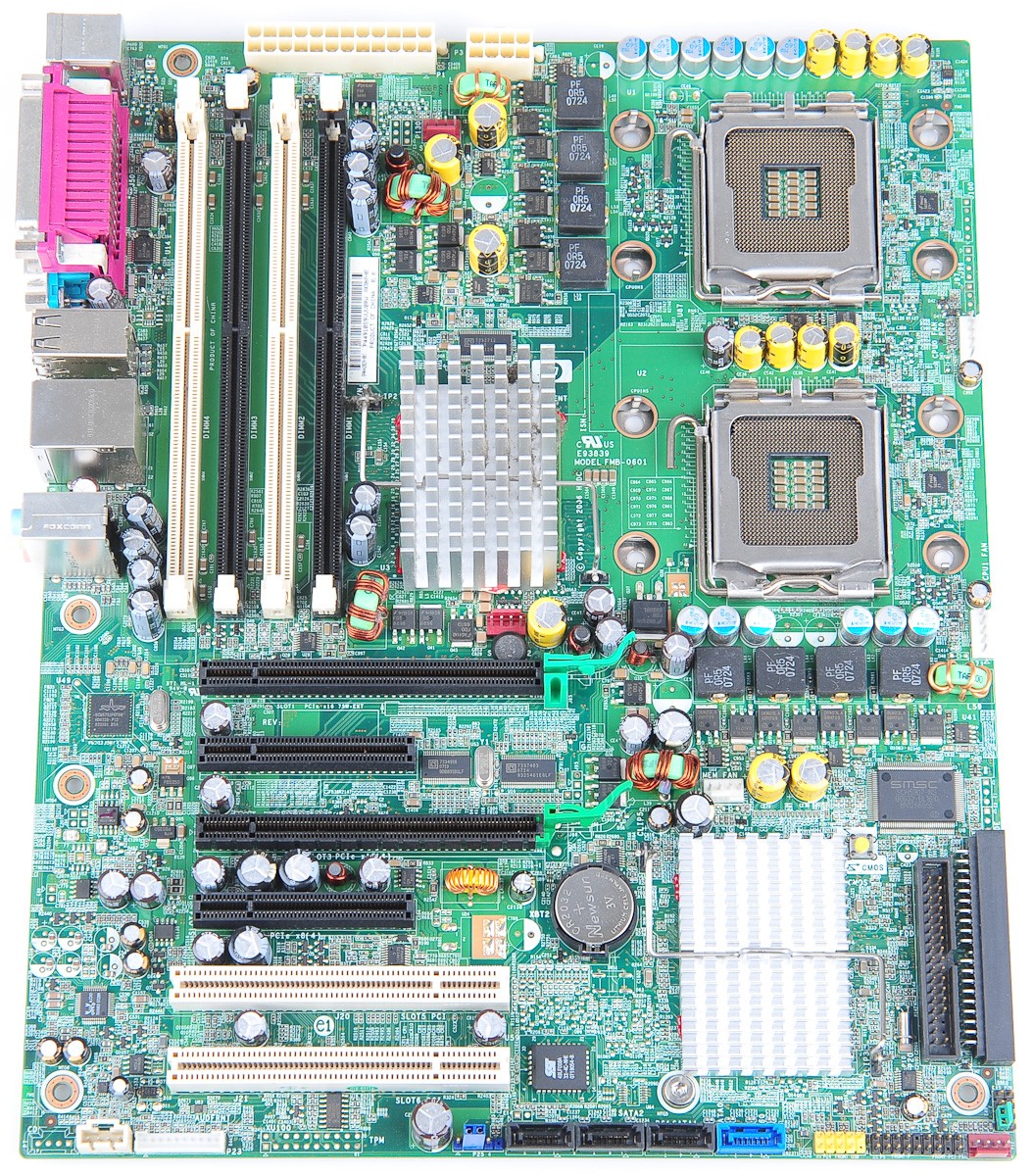
Thanks all , I have no idea, when it comes to the inside of a pc, all I have done is installed extra usb2's in the lower slot, I just needed to know what slot to add the USB3 card into. I have not got a clue, I have two longish black connectors, and two shorter connectors, and I did not know what one to plug it into.
OP
razer
Suspended / Banned
- Messages
- 883
- Name
- Ray
- Edit My Images
- No

Pookeyhead
Suspended / Banned
- Messages
- 11,746
- Name
- David
- Edit My Images
- No
An 8x PCIe card (which a USB card will be) will not fit into a 16x slot so you will be fine.
Yes it will. You can fit a 8x card into a 16x slot. It just ignores the other lanes. You can not however, fit a 16x card into a 8x slot.
robj20
Suspended / Banned
- Messages
- 3,216
- Edit My Images
- No
Yes it will. You can fit a 8x card into a 16x slot. It just ignores the other lanes. You can not however, fit a 16x card into a 8x slot.
Technically you can fit a x16 into a x8 slot, can either go nuts and cut it down or use an adapter.

arad85
Suspended / Banned
- Messages
- 9,438
- Name
- Andy
- Edit My Images
- Yes
If you have any other cards in there, I'd check what the board does when the slots they are in are populated. Often manufacturers will put on multiple PCIe slots but with shared lanes between them. When certain combinations are enabled, the PCIe lanes are switched around, reducing the numbers on other sockets. What is the motherboard (make/model) and what other cards do you have in there (and in which PCIe slots)?
arad85
Suspended / Banned
- Messages
- 9,438
- Name
- Andy
- Edit My Images
- Yes
PS. I was right, the lower 3 PCI-e sockets are x4 electrically.... Only the topmost x16 is actually an x16.
PS2: I've also seen physical PCI-e sockets that are x4/x8 with the rear plastic section deliberately removed so you can fit a longer card in. PCI-e will use however many lanes it can - you are supposed to be able to put a x16 board into an electrically narrower slot (assuming it will physically fit) and use it. You won't get ultimate bandwidth, but it should work.
PS2: I've also seen physical PCI-e sockets that are x4/x8 with the rear plastic section deliberately removed so you can fit a longer card in. PCI-e will use however many lanes it can - you are supposed to be able to put a x16 board into an electrically narrower slot (assuming it will physically fit) and use it. You won't get ultimate bandwidth, but it should work.