

Help needed, Screen issue (Windows 7 Starter)

MWHCVT

In Memoriam
Suspended / Banned
Messages
28,464
Name
Matthew
Edit My Images
Yes
So I've turned my netbook on this morning to find I a rather odd issue, I run Windows 7 Starter on the netbook and today when I turned it on (working fine at 1.30am this morning) the viewable area has shrunk leaving a large area blank on the right of the screen, and then a duplicate of the top of the screen is displayed at the bottom of the screen :shrug: I'm totally lost as to 1. what I've done and 2. how to fix it :shake:
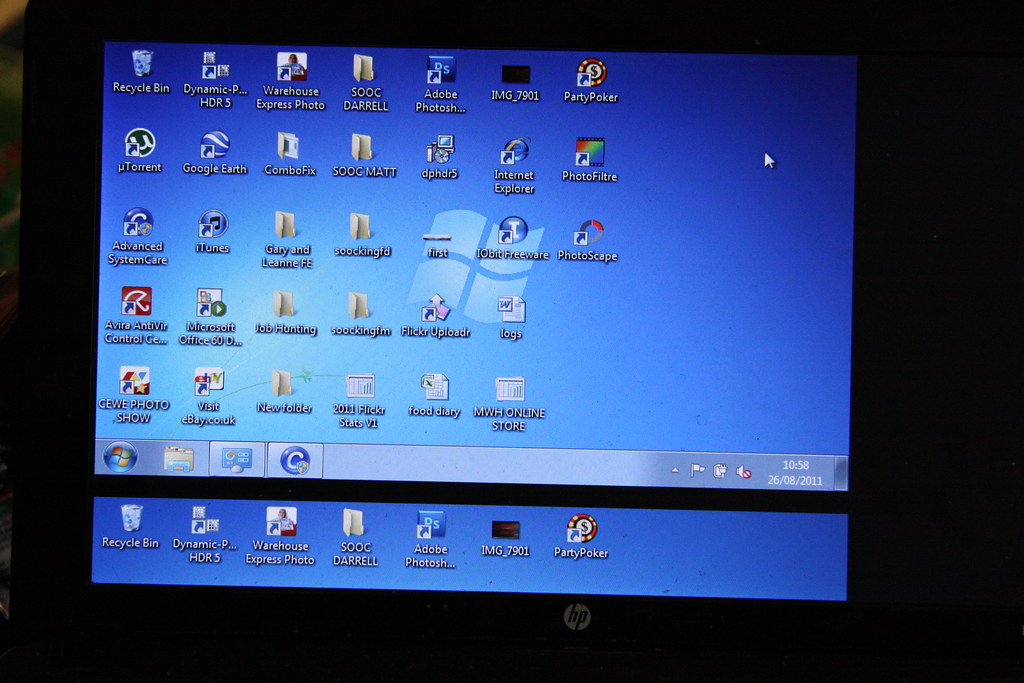

HELP NEEDED!!! by mwhcvt, on Flickr

Thanks for any help

Matt
 
Hiya Matt,

I have commented on your Flickr about this ... but thought I would post here too.

Have you ever had your netbook connected to a monitor? I find this sometimes happens to me when I disconnect the large screen monitor and visa versa. If you right click on the desktop, go to properties, click on the 'Settings' tab, adjust the screen resolution, Apply, OK ... you may find this helps.

If that doesn't work ... check what the Graphic Properties and Graphic Options are set to ... following the same procedure above, i.e., right click on the desktop, select Graphic Properties check if set to Notebook.

Hope that helps ... if not I am sure there will be someone along shortly with more technical knowledge.

Cheers

Dawn :)
 
Hiya Matt,

I have commented on your Flickr about this ... but thought I would post here too.

Have you ever had your netbook connected to a monitor? I find this sometimes happens to me when I disconnect the large screen monitor and visa versa. If you right click on the desktop, go to properties, click on the 'Settings' tab, adjust the screen resolution, Apply, OK ... you may find this helps.

If that doesn't work ... check what the Graphic Properties and Graphic Options are set to ... following the same procedure above, i.e., right click on the desktop, select Graphic Properties check if set to Notebook.

Hope that helps ... if not I am sure there will be someone along shortly with more technical knowledge.

Cheers

Dawn :)

Hi Dawn, just tried your suggestions to no avail :shrug: I'm hoping to sort it if not I'll have to take to Darrell(Thedodo) to have a go at sorting it for me tonight :bonk:

Thanks for your ideas

Matt
 
Well I looks like I have a particularly nasty virus that has infected both the standard and backup/restore partition on the HDD this is going to require a complete system restore, if only I could find the git responsible for this virus :bat:
 
Tried removing the display drivers and then re-installing them?

What virus is / was it? Are you sure that it's the cause / you're actually infected?
 
Hi guys thanks for all you help on this matter, just waiting for the new software to arrive :bang: but in the mean time I upgraded to a rather nice new mobile outfit :thumbs: 2.63Ghz i5 Processor, 1GB Dedicated Graphics, 4Gb RAM and 650Gb HDD :thumbs:
 
You might be infected, but I've never seen malware cause this kind of issue. Who told you it was malware and what infection? MBR infections can be fixed, as can a large amount of "nasty" malware - we can take a look at it if you want?
 
As others have said, my first thought was a graphics card driver issue.
 
I too would hardly think it was a virus Matt. I did have something similar the other day when I had the pc linked to the Tv, it was the first time I had done this with a replacement Graphics card I had installed. The only thing Id do is run through the display settings, try changing the resolution, then changing back again, possibly updating the onboard graphics card driver as well.

Also worth checking you have all the windows updates etc. :shrug:
 
Back
Top