Help me out of the doghouse

michaelg

Suspended / Banned
Messages
564
Name
Michael
Edit My Images
Yes
So, I thought I was doing well. I bought a new SSD to upgrade my wife's old Dell laptop and despite my limited IT abilities managed to clone the old hard drive and get it installed and booting up. So far so good. So the battery on the laptop was at the end of its useful life and I couldn't find a genuine replacement. To make matters worse, the power supply was starting to wear through to the wires underneath so I ordered what appeared to be a genuine replacement on yes, ebay. So despite appearing genuine only supplies power intermittently.

My question is, other than taking another gamble with a 3rd party power supply what are my options? Any relatively cheap way to transplant the SSD into a new home?
 
Oh and my wife conveniently binned the old power supply on bin day!
 
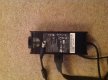
Can you find me apic of the power supply. I might be able to help as we have a spare from our Dell XPS that we've just upgraded.
 
Can you find me apic of the power supply. I might be able to help as we have a spare from our Dell XPS that we've just upgraded.
f0c032e7add74bd905962d5594a72e38.jpg

This is the possibly fake one. Don't have any of the one that got binned sadly
 
Is the power connector from the cable to,the the laptop loose?
 
If the cable has been stressed whilst plugged in that most likely the issue.

If you want a genuine one then I'd be happy to put this in the classifieds for you?
 
If the cable has been stressed whilst plugged in that most likely the issue.

If you want a genuine one then I'd be happy to put this in the classifieds for you?
If I can confirm it's compatible then that would be great. But ideally I'd like to check it's compatible first or else I might end up buying everyone's old power cables haha! I wonder if the problem might be the input itself as why the old cable ended up worn was cos the input is on the left of the laptop but most of our plug sockets are right of where we sit.
 
Check the link above for Amazon. It is a PA-10 DPN DF266
 
Yes, I'd check that first. Let me know and hope you get it sorted but if not, shout!!
 
Anker do good replacement batteries and power suppliers for Dell - better a genuine third party than a fake original... (always a risk with Dell spares not direct from Dell)
 
Yes, I'd check that first. Let me know and hope you get it sorted but if not, shout!!
Thanks - nothing I've found on my Google searches so far suggests it's compatible unfortunately. Will keep looking though!
 
Anker do good replacement batteries and power suppliers for Dell - better a genuine third party than a fake original... (always a risk with Dell spares not direct from Dell)
Thanks! Will check them out. Where is best to buy them - Amazon?
 
Yeah the mains side of the brick, normally they're 90 degree plugs like on bucks photo.

Otherwise looks legit.

Could be a sketchy socket on the laptop.
Yeah it says 250V and XIEKANG on it so you might be right. If it is the socket can it be fixed? It's only really for browsing the net although I did consider putting LR on it. [emoji1]
 
Looks like the DC board can be replaced but its a complete teardown..

https://www.ifixit.com/Guide/Dell+Inspiron+1525+DC+Power+Board+Replacement/8300
Thanks, Neil. I'm thinking that's more hassle than its worth possibly as my wife wasn't using the laptop much anyway. Which brings me to a follow up question. If I were to move the SSD into my desktop computer to have the photos there (and possibly add some of my own on it as there's lots of space), is there any danger of the computer trying to boot up from the OS on the old laptop HD? If not how would I go about safely removing it whilst keeping the pics still accessible?
 
Thanks, Neil. I'm thinking that's more hassle than its worth possibly as my wife wasn't using the laptop much anyway. Which brings me to a follow up question. If I were to move the SSD into my desktop computer to have the photos there (and possibly add some of my own on it as there's lots of space), is there any danger of the computer trying to boot up from the OS on the old laptop HD? If not how would I go about safely removing it whilst keeping the pics still accessible?


Are you thinking of installing as a second drive or the primary ?
 
Just be weary of anything that's encrypted or under secure sections in the OS. I did that once and was unable to access any of the files.
In essence if the file is under a password protected user name, be a bit careful.


On the other hand, i have done loads of fixes of power socket issues in laptops, i ALways tend to replace with an external socket on a bit of cable soldered to the old location of the socket. Stops it from breaking again and is quite a bit cheaper.
 
Are you thinking of installing as a second drive or the primary ?
Would be a secondary drive. Have a 128gb SSD for OS and programs and a 960gb SSD (identical to the one in the laptop) for photos (and 2x1Tb HDD for mp3 and backup. Main problem is finding the right shape of power connection - I presume there are converters? )

Just be weary of anything that's encrypted or under secure sections in the OS. I did that once and was unable to access any of the files.
In essence if the file is under a password protected user name, be a bit careful.


On the other hand, i have done loads of fixes of power socket issues in laptops, i ALways tend to replace with an external socket on a bit of cable soldered to the old location of the socket. Stops it from breaking again and is quite a bit cheaper.

Don't think anything is password protected thankfully. Soldering is a bit beyond me. I'm lucky not to have electrocuted myself as it is!
 
Would be a secondary drive. Have a 128gb SSD for OS and programs and a 960gb SSD (identical to the one in the laptop) for photos (and 2x1Tb HDD for mp3 and backup. Main problem is finding the right shape of power connection - I presume there are converters? )


Don't think anything is password protected thankfully. Soldering is a bit beyond me. I'm lucky not to have electrocuted myself as it is!
Its not for most, and i am okay when i can keep my hands still.

If its a second drive, jst make sure you have the bios settings to not boot from that drive.

If you have a problem finding the internal connections, contemplate buying an external drive enclosure for it. I just use a USB to SATA cable (but thats a bad idea as the drive is open)
 
Its not for most, and i am okay when i can keep my hands still.

If its a second drive, jst make sure you have the bios settings to not boot from that drive.

If you have a problem finding the internal connections, contemplate buying an external drive enclosure for it. I just use a USB to SATA cable (but thats a bad idea as the drive is open)
Thanks! I ended up using a power supply from the cd drive as I don't use it now to power my 2nd SSD but will maybe try to find a converter from the square type of ending for the power cable to the thin rectangular one I need for the SSD as there are a few of the square ones free still. I do have an internal enclosure if I need it though as that's what I used to clone the laptop's original HDD. Might be the easier option longterm to have the photos easily accessible. Cheers!
 
Back
Top