
Help me get this look

fingerz

Suspended / Banned
Messages
1,100
Edit My Images
No
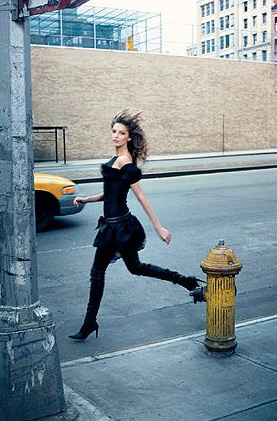
This pic is from Chanel's website. I first saw it in their current catalogue (the missus' copy, I hasten to add).
chanel_example01.jpg


How would you go about getting that look? I really like it but I don't know why or how to achieve it. It looks almost desaturated and oversaturated at the same time. The yellows jump out but the rest seems almost dull. And it's still sharp throughout.

With film, you could get something similar with cross-processing. But how would I do it with digital?
 
Coloured tinted layer masks. Or something like that.
One adjustment layer with oversaturated yellow fire hydrant and taxi, and another with blue colour tint to it (Im colour blind so check that one :p)

Steve wrote a tutorial about colour tinting, that would be a good place to start.
 
is it a cooling filter then sharpened?
 
Using Photochps'' Saturate Tool, you can increase or decrease saturation on individual colours within the tool.

saturation.jpg
 
Bachs said:
Using Photochps'' Saturate Tool, you can increase or decrease saturation on individual colours within the tool.

saturation.jpg

ahhh...we have a winner!
 
you never know. It may just have been the light on that particular day. It is more likely that it's been chopped though. I would imagine the saturation was played with, but some masking must've been used as the brickwork is still washed out, as is the background. You could always find out who took the photograph and ask them? the worst that can happen is they'll say no!
 
I don't think you could achieve that effect just with the hue saturation slider alone. Whichever colour you chose to reduce/increase, there would be some impact on the other colours which will all contain elements of it.

I'd say it's definitely been done by desaturating selected areas with individual masks, and would be pretty easy to do by using feathered masks which we've discussed several times. ;)

It could also be done very easily by making a 1:1 copy toned in that blue grey tone overall and then just clone in the colored bits as required from the original.
 
Back
Top