
HELP i need to resize this for print !!

Colin Port Images

Suspended / Banned
Messages
502
Name
Colin
Edit My Images
Yes
I don't know what i did but it looks like i saved this in photoshop & now when i go to print it it chops the front & back wheel off, i have been here for 3 hours now & can't sort it. I want to print it at 7x5 but when i set it to that it seems to squash the photo up so it doesn't look right. Hope someone can help, thanks Col
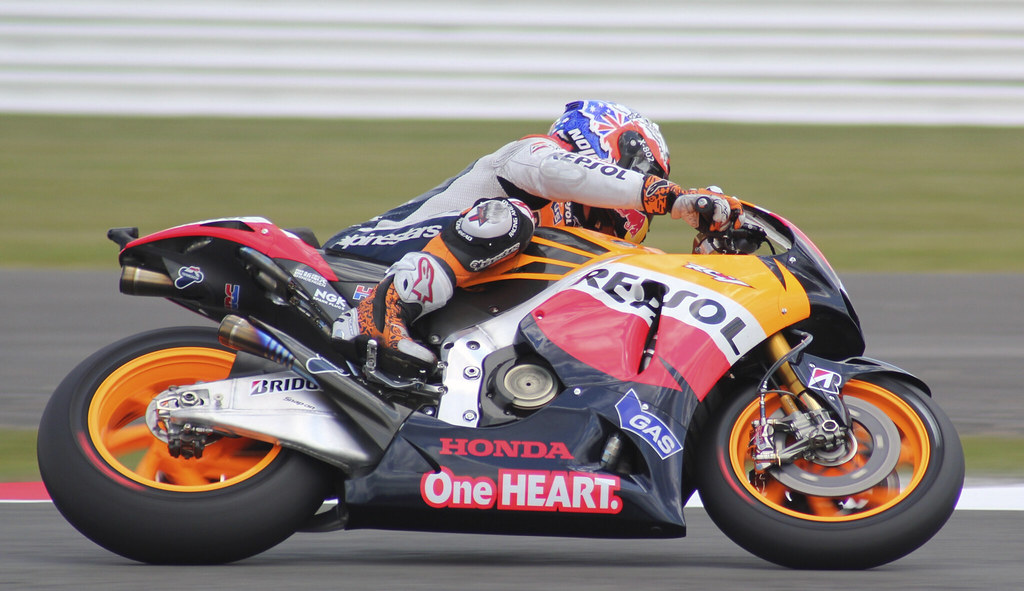

Casey 2 by colspics1, on Flickr

 
Your photo is at a different ratio to the size you are trying to print. (Think sticking a rectangular block in a square hole.)
You will need to re-crop to the right ratio, print at a different ratio or add a border to fill the blank space and keep the whole image. (Letter box like watching a widescreen movie on a normal tv.)

Edit to add:
6244126909_feac5a5b6e_b.jpg


Was beaten to it though.
 
Last edited:
Your original file is not in proportion to a 7x5 crop

colspics_7x4_04.jpg


This a 7x5 crop from your file

colspics_crop_7x5.jpg


So to get a print from your file to 7x5 is not possible,

this is what it would look like printed to 7 inches wide.

col_7x5_canvas.jpg
 
Open in Photoshop (or similar)
Set background colour of your choice,
Top menu, Image - Canvas Size. Change the measurement to pixels. Take the number of pixels wide and divide by 7, then multiply by 5. Set the answer as the height, leaving the original width.
Click done.
Should look as my edit above.

HTH.
 
If you have content aware fill then just increase the canvas size to a 7x5 ratio. Then fill the white boxes
 
Or.. here's a possibility

Col_possible.jpg
 
Thank you all, Joan, Andy, Mark & Dale, I used the measurements Andy gave me & used the background as grey, cloned the track at the bottom & left the top above the Armco grey it look great, i am not sure if i have content aware fill & if i have don't know where it is !! Thank you all again i really appreciate the time you all took to help. I always seem to have a problem after cropping but i'm not sure if i saved the original in Photoshop so that is why i couldn't do anything with it as Joan said, anyway thanks again Col
 
Open in Photoshop (or similar)
Set background colour of your choice,
Top menu, Image - Canvas Size. Change the measurement to pixels. Take the number of pixels wide and divide by 7, then multiply by 5. Set the answer as the height, leaving the original width.
Click done.
Should look as my edit above.

HTH.

Easier than that in my opinion, if you are ready to print, is to use the crop tool. Type 7in for width, 5in for height, and enter 300 for ppi.
Then click drag (and it can be outside of the image, if you zoom out).
To me, it is a little easier than canvas size for allowing you to choose where you want the gaps to be.


i am not sure if i have content aware fill & if i have don't know where it is !!

Content aware fill will be in CS5 and above.

I am almost convinced on getting the upgrade from CS4 to CS5 after seeing examples of it. Although, the next version might have de-blur in it, which would be really worth it.
 
Easier than that in my opinion, if you are ready to print, is to use the crop tool. Type 7in for width, 5in for height, and enter 300 for ppi.
Then click drag (and it can be outside of the image, if you zoom out).
To me, it is a little easier than canvas size for allowing you to choose where you want the gaps to be.


Content aware fill will be in CS5 and above.

I am almost convinced on getting the upgrade from CS4 to CS5 after seeing examples of it. Although, the next version might have de-blur in it, which would be really worth it.

Elements 9 has Content Aware Fill. Cost about £50 - £60.
 
Back
Top