
Help I have messed up my sharpening

jomantha

Suspended / Banned
Messages
1,309
Edit My Images
Yes

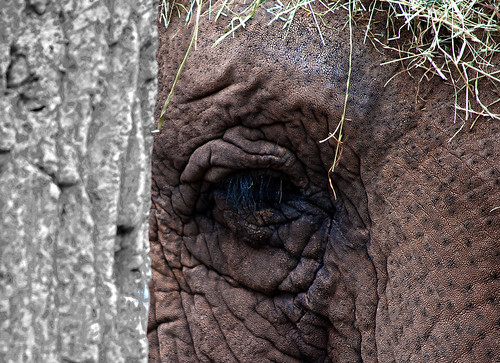
elephant thirds_edited-3 by jomantha, on Flickr

I have gotten the elephant to look how I want it - but some how this has led to the black and white on the tree looking over sharpened, I dont know how to unsharpen just this part?? But not the edge where it meets the elephants face.

Can anyone advise me please.

Thanks

Sam
 
It looks over sharpened, have you sharpened it twice? what sharpening are you using?
 
Ok here's what I would do.

1. Open up the original file (unedited) along side your sharpened version.
2. Quick select the tree trunk (stopping short of your hard edge)
3. copy/paste into a new layer
4. remove the original version form editing software

This should now show the original tree trunk against your sharpened elephant.
You will have to do some tweaking to the tree trunk layer to blend it into the sharpened image.

Note - step one may involve renaming the original file to allow them open side by side.
 
Last edited by a moderator:
It may just be me but the elephant looks more oversharpened than the tree trunk.
 
Thanks.

I am brand new to this really and am more or less guessing at what I am doing using a book!!.

Have i got it all wrong then??

Its going to be printed to A4.
 
Last edited:
Ok I used unsharp mask at
amount 75/5
Radius 2
threshold 3

then duplicated this background layer, reapplied the sharpening
created a transparent layer between the 2, grouped this layer with the copy that had had the second sharpening applied.

Then using a round brush sharpened the edge of the tree, the elephants trunk etc.

Then on the original layer, I used magnetic loop tool and sharpened the eye.

Hope that makes more sense.
 
Ok I used unsharp mask at
amount 75/5
Radius 2
threshold 3


then duplicated this background layer, reapplied the sharpening
created a transparent layer between the 2, grouped this layer with the copy that had had the second sharpening applied.

Then using a round brush sharpened the edge of the tree, the elephants trunk etc.

Then on the original layer, I used magnetic loop tool and sharpened the eye.

Hope that makes more sense.

On what sized image? the original full size or the size here.did you apply the sharpening when you had the selection active for the elephant?
 
on the original sized file, resizing was done afterwards - I applied the sharpening on the original background layer, then I applied it to the second copy layer, but I had the transparent layer selected when I drew around all the edges.

I went back to the original background layer to sharpen the eye
 
Thanks, thankfully it just means deleting layers
 
You should only sharpen once and as the very last thing you do.

Not necessarily, some people favor a 3 fase sharpening system, a capture sharpen (mild) just to replace sharpness lost to the AA filter, a creative sharpen, maybe just the eyes or forground, and an output sharpen, after resizing and choosen for output type web/print etc.
An excelent book on sharpening is called "real world sharpening" by the (sadly) late Bruce Fraiser and Jeff Schewe.
 
Hi Sam, why not approach it from a different direction and blur as well as sharpen, hope you don't mind but I have copied the elephant from your flickr account (is there any reason you don't watermark them :) )

jomanthaelephant.jpg


1. Duplicate original layer and sharpen then mask out the tree
2. Duplicate original layer again so it is below sharpened/masked layer and apply gaussian blur
Re-do edge of mask if required and change opacity of the top two layers to suit

One thing I might do is introduce a tiny catchlight (small white irregular spot and then erase parts that eyelashes would cover)

jomanthaelephant2.jpg


I disagree with Vaughan, usually you only sharpen once and as the last thing but sometimes it works if you sharpen lightly twice instead of heavily once and I would sometimes do it during work on an image so I can edit around any artifacts it introduces.
 
Wow thanks everyone for the detailed responses, I like the idea of blurring the tree

Should I be watermarking them? I have never given it a second thought - I didn't think they were good enough to warrant it.

I don't mind you playing at all - I will take a look from my laptop later it's hard to see properly from the phone.
 
swanseamale47 said:
Not necessarily, some people favor a 3 fase sharpening system, a capture sharpen (mild) just to replace sharpness lost to the AA filter, a creative sharpen, maybe just the eyes or forground, and an output sharpen, after resizing and choosen for output type web/print etc.
An excelent book on sharpening is called "real world sharpening" by the (sadly) late Bruce Fraiser and Jeff Schewe.

I should have known there was a lot more to this than I thought.
 
I should have known there was a lot more to this than I thought.

To be fair not many people bother with all 3, most only tend to sharpen at the end or with some creative sharpening.
The book is worth a read though.
 
To be fair not many people bother with all 3, most only tend to sharpen at the end or with some creative sharpening.
The book is worth a read though.

Ill see if I can get a copy from library ordering in, I have 3 weeks in the South of France in May so will be looking for reading material.

Thanks for your help. It is very much appreciated.
 
To be fair not many people bother with all 3, most only tend to sharpen at the end or with some creative sharpening.
The book is worth a read though.

I use 3 stage sharpening also usually, but only on RAW images I find most if not all raw images benefit from a capture sharpen as they are a tad soft (anti a filter partially to blame I'm led to believe)

There's definately no right or wrong :)

The only crucial part is sizing correctly for the output as you've rightly said.

I use PK Sharpener by pixel genius, probably the best plug in I've ever used and would highly recommend :thumbs:
 
I use 3 stage sharpening also usually, but only on RAW images I find most if not all raw images benefit from a capture sharpen as they are a tad soft (anti a filter partially to blame I'm led to believe)

There's definately no right or wrong :)

The only crucial part is sizing correctly for the output as you've rightly said.

I use PK Sharpener by pixel genius, probably the best plug in I've ever used and would highly recommend :thumbs:
I argree, have you tried the new version? even better with a preview and more options.
Wayne
 
Back
Top