Help and advice

Cmt23478

Suspended / Banned
Messages
3
Edit My Images
No
Hi
So im trying to take some pictures for a horror project and im trying to take a picture of blood covered hands on a window which I could later edit onto a different window. However it’s not gone well and non of them are tiring out good any advice to help?
 
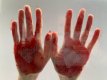
I took a pic on a window of hands covered in fake blood with a white background. I kept getting a bad glare on each photo and this is probably the best attempt I got but I’m still not sure about it
 

Attachments

  • 529E5869-7848-4434-A8D2-A0C3C47341F3.jpeg
    529E5869-7848-4434-A8D2-A0C3C47341F3.jpeg
    86.4 KB · Views: 27
From what I can see, it looks like it is your own reflection that is interfering with the image, so you need to stop any light falling on to you somehow - by changing shooting position or lighting position. I could be wrong, but that’s what I’d try.
 
I have two thoughts on how you might try to reduce the glare. I presume it’s the reflection you don’t want in your shot. Use a large sheet of non reflective black card. Cut the smallest possible hole for the lens to shoot through. Basically keep the side you are shooting from as dark as possible. Alternatively try a polarising filter in front of the lens and try angling the light too see if this helps.
 
Last edited:
I would also think about the covering of the hands with fake blood, it looks far too uniform in the picture, as if you have had a plate of fake blood and dipped your palms in there - it should be more random and 'drippy' to have the desired effect.

With the others on the lighting.
 
Back
Top