Help and advice on Post Production

EspressoJunkie

Suspended / Banned
Messages
2,886
Name
Greg
Edit My Images
Yes
Hi all

I've been struggling lately to get to grips with PP in Photoshop (CS5). Ive been using a book (CS5 for Digital Photographers), and I think I'm getting the hang of the basics, but I still find my results aren't what I want.

Should I be getting more right 'in camera'?

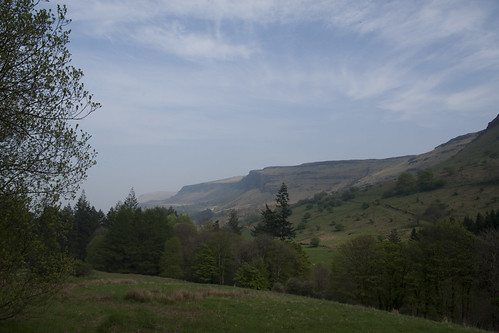
Below is a shot from today, which I found quite tricky because it was really hazy and sunny. I've done what I usually do in PP(ie all I can), but I'm not really sure if I like the end result.

I'll take any advice going, and if anyone's really bored and wants to take a stab at the original RAW file let me know! Id be interested to see what someone who knows what they're doing can make of it.


Thanks :-)


Original

glenariff original by dubbleyu, on Flickr

My PP attempt!
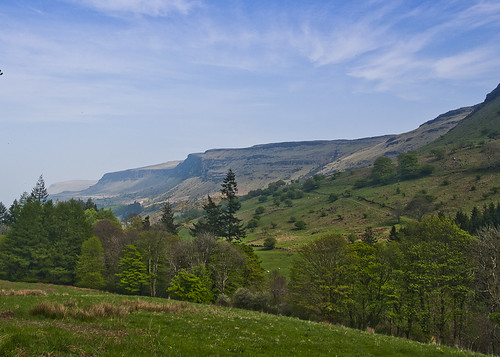
glenariff1 by dubbleyu, on Flickr
 
Pretty good I'd say. I cant see the bigger size as flickr just crashed on me, but from that size looks good. Maybe a touch more saturation to the sky and clone out the annoying leaf on the top left
 
As Tom has said, a good edit from the original with the sky just requiring a tad more saturation. Would also be tempted to boost the tonal contrast of the sky slightly to bring out some more of the cloud detail.

Otherwise looking good!
 
Last edited by a moderator:
Looks very over saturated on my screen - a good effort but I think you need to be more subtle.... not always easy when starting out, I know! My two minute effort below for comparison....

dbsh0i.jpg
 
Last edited:
Love the wok of dekhog, sky looks great, always wanted to climb up over waterfoot (if I'm remembering the scene right) will have to do it next time I'm back in co Antrim and get a panoramic from up there. Nice picture, made me homesick though!
 
TBH, I think you're probably trying to do too much..... what you need is a vision of how you'd like it to look, or how it should look, and try and work from there. Just for starters, when you open the image in PS, just go to Image > Auto Tone, and see the huge difference straight away - it won't work for every image, but for images like this one, it will every time.

Do you want the sky to be a darker blue? Ten minutes on Youtube will give you plenty ideas how to go about it. Concentrate on one task at a time, and it comes together, but if you're just moving sliders, etc without knowing exactly why, you'll always struggle.

Learn a couple of things; get good at them, then move on to something else - it's Photoshop; you'll always forget more than you remember.... :D
 
Hi all

I've been struggling lately to get to grips with PP in Photoshop (CS5). Ive been using a book (CS5 for Digital Photographers), and I think I'm getting the hang of the basics, but I still find my results aren't what I want.

Should I be getting more right 'in camera'?

Below is a shot from today, which I found quite tricky because it was really hazy and sunny. I've done what I usually do in PP(ie all I can), but I'm not really sure if I like the end result.

I'll take any advice going, and if anyone's really bored and wants to take a stab at the original RAW file let me know! Id be interested to see what someone who knows what they're doing can make of it.


Thanks :-)


Original

glenariff original by dubbleyu, on Flickr

My PP attempt!

glenariff1 by dubbleyu, on Flickr

I was thinking if Lightroom wouldn't be more suitable for your needs? I've started using it few months ago and getting quite good results. Try the Trial version, you can download it from Adobe web page.
 
I'd echo the subtlety suggestion. The PP version looks like a HDR image, which in this instance I think is unnecessary. DekHog's is a good example of how to make it a lot more punchy whilst keeping it look lifelike and as if no PP may have been done.
 
Wouldn't it be nice if the OP came back and gave his own thoughts on it? Don't know why people bother posting at all sometimes, especially when they've been on the forum various times since posting, the last time just a few hours ago.... :shrug:
 
DekHog said:
Wouldn't it be nice if the OP came back and gave his own thoughts on it? Don't know why people bother posting at all sometimes, especially when they've been on the forum various times since posting, the last time just a few hours ago.... :shrug:

Two words for you -head and wall!
 
Wouldn't it be nice if the OP came back and gave his own thoughts on it? Don't know why people bother posting at all sometimes, especially when they've been on the forum various times since posting, the last time just a few hours ago.... :shrug:

I was very impressed with your PP, the reason I've not replied yet is because I was trying to get a result close to it myself before I replied to the thread!

I've not managed, and was going to ask if you could briefly give me a very rough idea of what you did to achieve it?
 
Nik Colour Efex Pro.... can't beat it.

Pro Contrast (whole image) > Graduated Neutral Density (sky) > Graduated Blue (sky) > Tonal Contrast (everything but the sky). You can do the equivalent of all this in PS as well, but it'll take much longer.... Nik plugins are the one thing I couldn't live without for my workflow!!

....only thing about the above is that it isn't learning you how to use Photoshop.... :)
 
Last edited:
I am new to DSLR and Adobe products but I echo one suggestion made.
Rather than trying to "do it all" in one go try getting to grips with one aspect until you are completely happy with the result.
This is working for me because I found trying to learn all the basics in one go a bit of a brain fade!

Andy

Sent from my iPhone using TP Forums
 
You allways allways should get the most from your camera, never expect to arrange the photo in post production, if you are able to do kit better just do it in the moment, its better and much faster and less painfull :P
 
stupar said:
You got that right, that plus Nik silver efex....two plugins that give great results imo!


Agree, love the NIK software range, pro contrast, darken/lighten centre and white neutaliser are worth the asking price alone IMO if you do a lot of post.
 
Back
Top