

You are using an out of date browser. It may not display this or other websites correctly.
You should upgrade or use an alternative browser.
You should upgrade or use an alternative browser.
HDR
- Thread starter snapharry
- Start date


- Messages
- 7,312
- Name
- Jeff
- Edit My Images
- No
Kev,
Tripod mount your camera, lock the ISO at lowest setting and aperture to suit with camera in Manual mode.
Take a series of shots at differing shutter speeds till you cover the full range of light on the subject.
Use photomatix to blend the RAW images and then adjust the sliders in the software to try and create something realistic, usually need to dial down the saturation.
What sort of subject where you thinking of trying on?
Tripod mount your camera, lock the ISO at lowest setting and aperture to suit with camera in Manual mode.
Take a series of shots at differing shutter speeds till you cover the full range of light on the subject.
Use photomatix to blend the RAW images and then adjust the sliders in the software to try and create something realistic, usually need to dial down the saturation.
What sort of subject where you thinking of trying on?

planetjamez
Suspended / Banned
- Messages
- 453
- Name
- James
- Edit My Images
- No
How can I do it on my nikon D3200, it doesnt have bracketing?


bobleeuk
Suspended / Banned
- Messages
- 270
- Name
- lee
- Edit My Images
- Yes
hi james, you will have to do it manually, expose for the image correctly and then take a shot, and then take one over exposed by 2 stops and one under exposed by 2 stops and then input in to softwareHow can I do it on my nikon D3200, it doesnt have bracketing?
bobleeuk
Suspended / Banned
- Messages
- 270
- Name
- lee
- Edit My Images
- Yes
hey guys would like to have a go at this HDR thing can anyone point me in the right direction please
This quite helpful kev http://www.photoshopcafe.com/tutorials/HDR_ps/hdr-ps.htm

dave_bass5
Suspended / Banned
- Messages
- 2,457
- Name
- Dave
- Edit My Images
- Yes
It's pretty easy to do, just make sure you don't change the f stop between shots.
Generally it's the shutter speed that you would change.
With bracketing hand held works ok in good light, or if using higher ISO settings, but if you have to manual change settings between shots then a tripod is a must.
I'd also only shoot raw when doing this, although I have seen it done with JPG. As well as doing the usual HDR looking shots you can use software to just combine the shots in to a 32bit image. This will not look like the normal overdone HDR (I actually like a lot of that), but will give you a an image with a lot of latitude to process it however you want. You can still get that over cooked look for it, but also it's easier to get a more traditional, natural look, but with more dynamic range than a single shot could manage.
Photomatix is the software of,choice normally, but there are alternatives. It depends what software you already have I guess.
Generally it's the shutter speed that you would change.
With bracketing hand held works ok in good light, or if using higher ISO settings, but if you have to manual change settings between shots then a tripod is a must.
I'd also only shoot raw when doing this, although I have seen it done with JPG. As well as doing the usual HDR looking shots you can use software to just combine the shots in to a 32bit image. This will not look like the normal overdone HDR (I actually like a lot of that), but will give you a an image with a lot of latitude to process it however you want. You can still get that over cooked look for it, but also it's easier to get a more traditional, natural look, but with more dynamic range than a single shot could manage.
Photomatix is the software of,choice normally, but there are alternatives. It depends what software you already have I guess.
bobleeuk
Suspended / Banned
- Messages
- 270
- Name
- lee
- Edit My Images
- Yes
yeah but you cant beat photomatix software, my camera does it all in camera but its nowhere near as good as putting the images in the software manually. if your in to hdr this is the way to go.The Nikon D7100 does it all in camera.When I use it in the lowest setting it is very useful and does not look like HDR.It is excellent for night time photography.
dave_bass5
Suspended / Banned
- Messages
- 2,457
- Name
- Dave
- Edit My Images
- Yes
My Canon 5DMKIII also does HDR but it's pretty basic. The one good thing is you can keep the raw files so it does have its uses.
It depend what you want.I don't like HDR via photomatrix.In camera on the low setting only the trained eye can tell.It's quick and easy for increasing the dynamic range.I don't want the horrible garish stuff that Photomatrix and adobe produce it looks horrible to me.yeah but you cant beat photomatix software, my camera does it all in camera but its nowhere near as good as putting the images in the software manually. if your in to hdr this is the way to go.

bobleeuk
Suspended / Banned
- Messages
- 270
- Name
- lee
- Edit My Images
- Yes
It depend what you want.I don't like HDR via photomatrix.In camera on the low setting only the trained eye can tell.It's quick and easy for increasing the dynamic range.I don't want the horrible garish stuff that Photomatrix and adobe produce it looks horrible to me.
I think you will find it isn't photomatix that produces the horrible garish stuff you are talking about, but the person using it, with this software you can do anything the camera can do and much more to produce the effect you desire, and have the added bonus of watching your image change as you edit
It depend what you want.I don't like HDR via photomatrix.In camera on the low setting only the trained eye can tell.It's quick and easy for increasing the dynamic range.I don't want the horrible garish stuff that Photomatrix and adobe produce it looks horrible to me.
I do not agree with your statement about Photomatix. Any HDR software can produce garish results in the same way that any non HDR software process can produce garish results. I quickly tonemapped this image from 5 exposures using Photomatix. I would not describe the results as garish?
 I think HDR gets a bad name because of over processing but that is not the fault of Photomatix as this "test" image proves?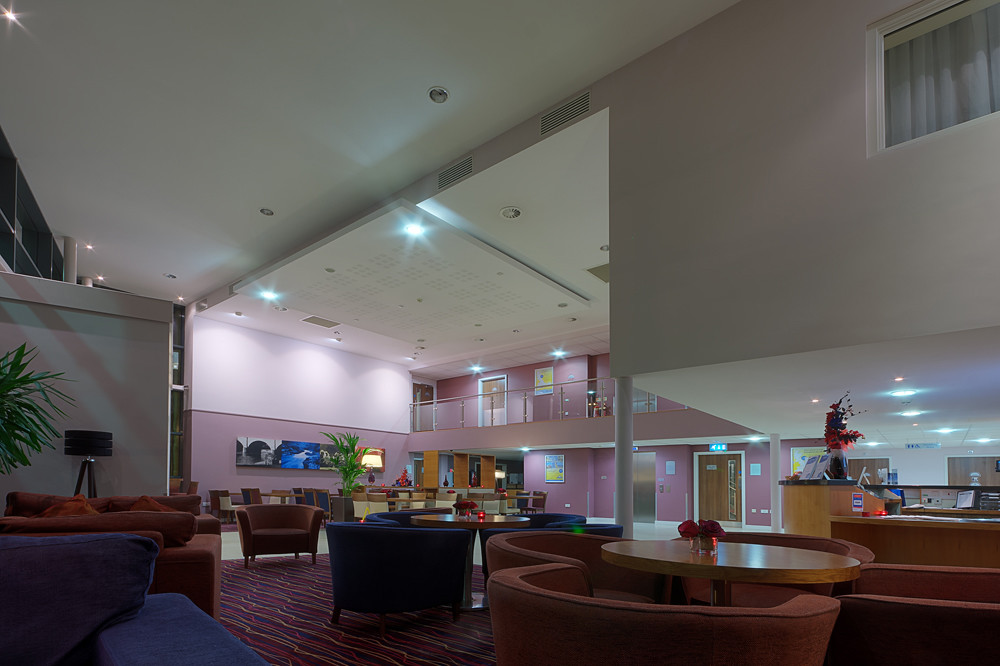
Lobby by 2010kev, on Flickr
Last edited:
The Nikon D7100 does it all in camera.When I use it in the lowest setting it is very useful and does not look like HDR.It is excellent for night time photography.
What should an HDR image look like?
bobleeuk
Suspended / Banned
- Messages
- 270
- Name
- lee
- Edit My Images
- Yes


jockwav
Suspended / Banned
- Messages
- 6,085
- Name
- James (Retired)
- Edit My Images
- No
When it starts looking like a painting i think it is getting away from photography,slight HDR looks really good but anything overdone to me is just not a photo anymore.
Some people might like that,i suppose it is all down to your own taste.
Some people might like that,i suppose it is all down to your own taste.
Like I want it to.What should an HDR image look like?
As I have said I do not use photomatrix.I want it done in the camera. All HDR is an alteration in the dynamic range of a certain extent. When is that range HDR? it is subjective .My D7100 has a facility on it called HDR and it does that to a lesser or greater degree when set low it is just a Camera that has a better dynamic range which is excellent.I then just load the photos onto the laptop and there they are as I want them.

russellsnr
Suspended / Banned
- Messages
- 3,121
- Name
- Russell
- Edit My Images
- Yes
Maybe wrong but I thought HDR was about opening up the shadows/Midtones and Highlights in an image that with just a single exposure they seem to say cannot be produced. Most cameras now can capture at least if not more than 2 stops up and 2 stops down of information in one exposure.
There does seem to be a leaning towards taking 5,6 or even 9 exposures but for realism in a photograph do you really need to take all those.
There is a new offering from the people at Magic Lantern that allows you to take a dual ISO photograph with a canon camera, ISO 100 + 200,400,800,1600 or even 3200
it as I understand it allows the sensor to capture 100 ISO with one half of the sensor and the other chosen ISO then convert to DNG and use a free software program available from there site.
I am trying it out on a 600D but works on many others listed again on there site.
Russ
There does seem to be a leaning towards taking 5,6 or even 9 exposures but for realism in a photograph do you really need to take all those.
There is a new offering from the people at Magic Lantern that allows you to take a dual ISO photograph with a canon camera, ISO 100 + 200,400,800,1600 or even 3200
it as I understand it allows the sensor to capture 100 ISO with one half of the sensor and the other chosen ISO then convert to DNG and use a free software program available from there site.
I am trying it out on a 600D but works on many others listed again on there site.
Russ
Like I want it to.
As I have said I do not use photomatrix.I want it done in the camera. All HDR is an alteration in the dynamic range of a certain extent. When is that range HDR? it is subjective .My D7100 has a facility on it called HDR and it does that to a lesser or greater degree when set low it is just a Camera that has a better dynamic range which is excellent.I then just load the photos onto the laptop and there they are as I want them.
I would repeat that Photomatix does not give garish results if used correctly and in moderation:Lobby by 2010kev, on Flickr
Another Photomatix tone mapped image which is not garish? Created from 3 images.
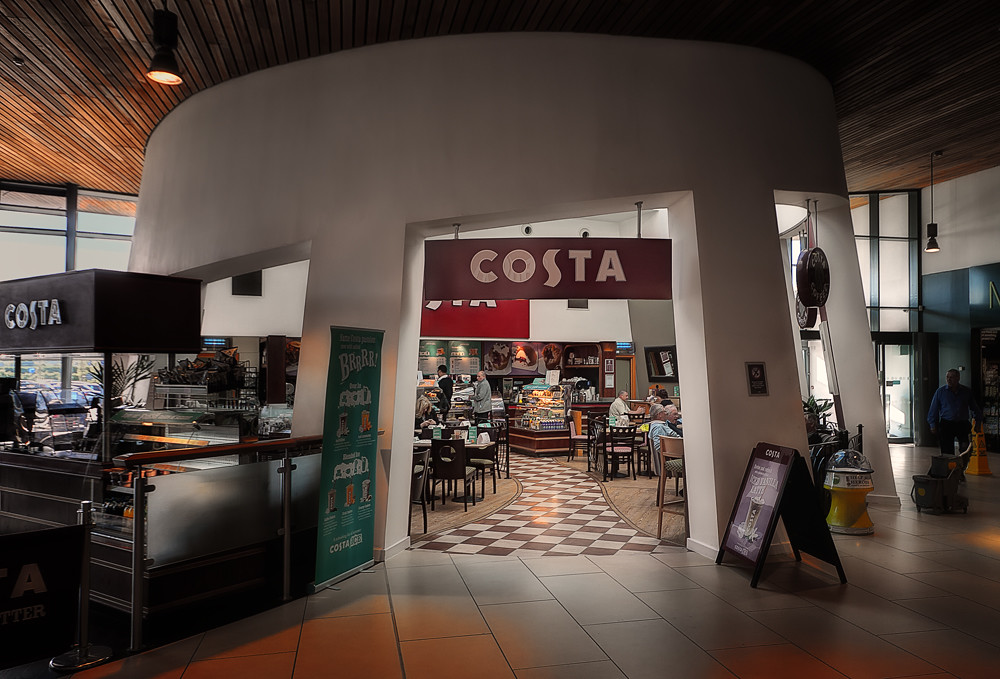
Costa Coffee by 2010kev, on Flickr
I think learning how to use the software properly is a given. I am still learning. But it should not produce garish results. You cannot knock something if you are not using the product correctly?
Last edited:
dave_bass5
Suspended / Banned
- Messages
- 2,457
- Name
- Dave
- Edit My Images
- Yes
Probably not a perfect example but this was made of 3 images, combined in Photomatix into a tif and then processed in LightRoom. In this case Photomatix was just used to combine the shots and nothing else. When the image was imported back in to Lightroom it looks like a normal single shot exposure, but now with a lot more latitude to make adjustments.
As already said, it's the user that produces the end result, you can be as subtle as you like with the sliders. It is easy to go over the top though. I really like the landscape image posted, although I wouldn't go for that look all the time.
The best HDR shots are not just done in one program. Programs like Photomatix can produce a final image but a lot of people go on to process it's output in other programs.
Photoshop also has a very nice merge to HDR feature.
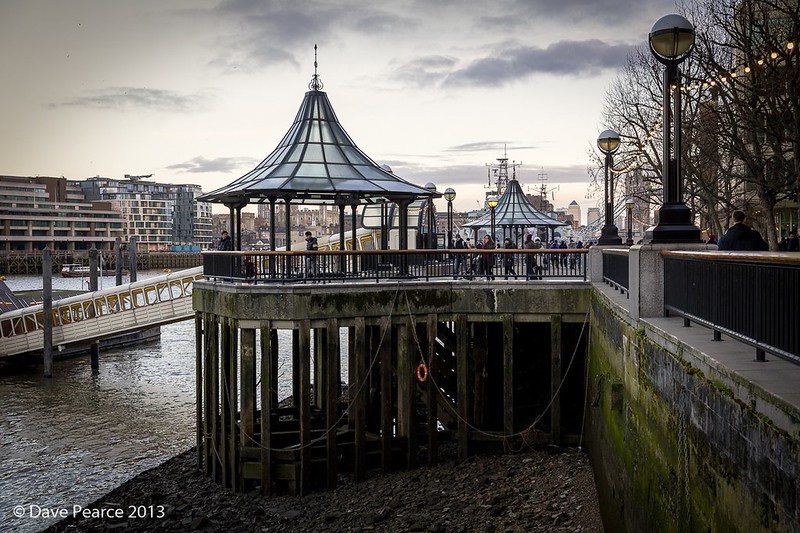
London Bridge City Pier, near the HMS Belfast. by Dave Pearce (London), on Flickr
As already said, it's the user that produces the end result, you can be as subtle as you like with the sliders. It is easy to go over the top though. I really like the landscape image posted, although I wouldn't go for that look all the time.
The best HDR shots are not just done in one program. Programs like Photomatix can produce a final image but a lot of people go on to process it's output in other programs.
Photoshop also has a very nice merge to HDR feature.
London Bridge City Pier, near the HMS Belfast. by Dave Pearce (London), on Flickr
Last edited:
bobleeuk
Suspended / Banned
- Messages
- 270
- Name
- lee
- Edit My Images
- Yes
this is five shots of the image above in my post done in photomatix

test by bobleeuk, on Flickr
To me this doesn't look HDR or overcooked so goes to show you can do low or no processing at all other than combining the exposures.
This is after using a pre-set on photomatix which again I wouldn't consider over the top ?

test1 by bobleeuk, on Flickr
test by bobleeuk, on Flickr
To me this doesn't look HDR or overcooked so goes to show you can do low or no processing at all other than combining the exposures.
This is after using a pre-set on photomatix which again I wouldn't consider over the top ?
test1 by bobleeuk, on Flickr

Martyn D
Suspended / Banned
- Messages
- 1,560
- Name
- Martyn
- Edit My Images
- Yes
It's fairly easy to create an HDR look on LR, plugs are around aswell. I know a lot don't like the vivid look but a lot of the time that's what HDR is about, to completely tone it down until it looks like a standard image seems a bit pointless to me, might aswell just merge 3 bracketed images and edit in PS or LR. Though I'm not personally a fan of vivid highly processed images it doesn't mean they are cr@p, everyone has different tastes.
This is one done with an HDR (ish) preset I made in LR....
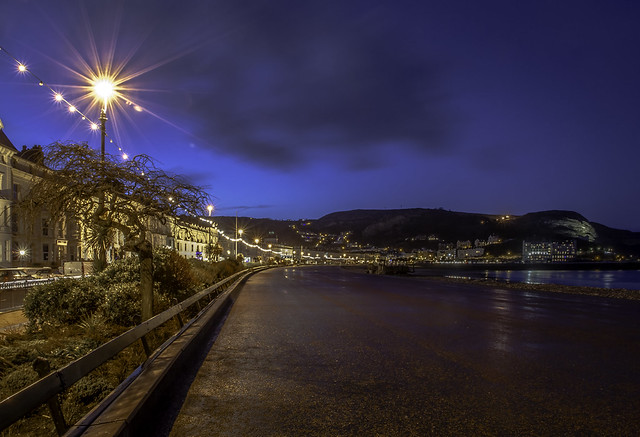
Llandudno Lights by martyndt, on Flickr
This is one done with an HDR (ish) preset I made in LR....
Llandudno Lights by martyndt, on Flickr
dave_bass5
Suspended / Banned
- Messages
- 2,457
- Name
- Dave
- Edit My Images
- Yes
Yes, LR does a very good HDR look, although it's just that, a look.
IIR LR gives you +/- 5 stops exposure adjustment with a single raw file, but put a 32 bit image in it and the slider changes to offer +/- 10 stops. This allows you to bring out a lot more detail int the shadows and so get a much more natural looking shot, without ever going to that HDR cooked look. Of course you can then use LR to over cook if needed.
I should add I'm only use the phrase "over cooked" as we all know what it means. I Personaly don't think it's over cooked, it's just a look.
IIR LR gives you +/- 5 stops exposure adjustment with a single raw file, but put a 32 bit image in it and the slider changes to offer +/- 10 stops. This allows you to bring out a lot more detail int the shadows and so get a much more natural looking shot, without ever going to that HDR cooked look. Of course you can then use LR to over cook if needed.
I should add I'm only use the phrase "over cooked" as we all know what it means. I Personaly don't think it's over cooked, it's just a look.

- Messages
- 6,343
- Name
- Nick
- Edit My Images
- Yes
Most cameras now can capture at least if not more than 2 stops up and 2 stops down of information in one exposure.
I'm not sure I understand you. Are you saying that most cameras can do in-camera HDR with three exposures, at least (-2, 0, +2) or wider, to produce a single image? (Which I imagine is probably the case these days.)
There does seem to be a leaning towards taking 5,6 or even 9 exposures but for realism in a photograph do you really need to take all those.
As many as that, possibly not. But more than one, sometimes yes. If the dynamic range in the scene is greater than the dynamic range the camera can capture with a single image, then you need more than one shot in order to cover the dynamic range of the scene. That is, unless the camera is doing in-camera HDR. But for my cameras that do have in-camera HDR I have found that it is not sufficient for some quite ordinary scenes with bright skies.
There is also the issue as to whether 3 shots covering a wide range (eg -3, 0, +3 or perhaps more) provides enough information for HDR software to work at its best. I just did an experiment. I used Photomatix Essentials to produce the left hand of these two images using five shots one stop apart. The right hand image was produced using the same settings in Photomatix, but using just three of the shots (-2, 0, +2).
(You'll probably need to look at full size versions to see the differences. Click on an image and then right click on the image that you see, and select "Original" size)
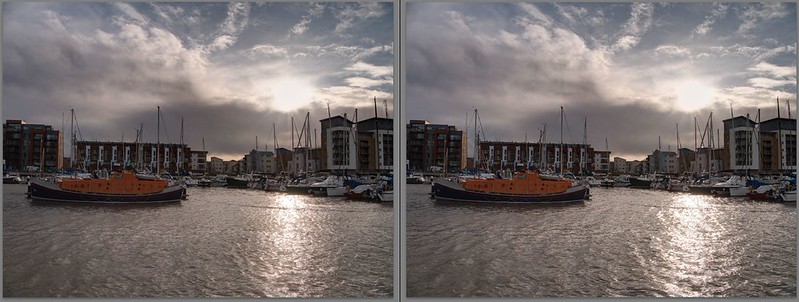
5-shot HDR versus 3-shot HDR comparison by gardenersassistant, on Flickr
At this size they look very similar; identical perhaps.
But look closer, and you can see differences. Here is part of the sky at 4:1. The tonal gradations are better in the 5-shot version.
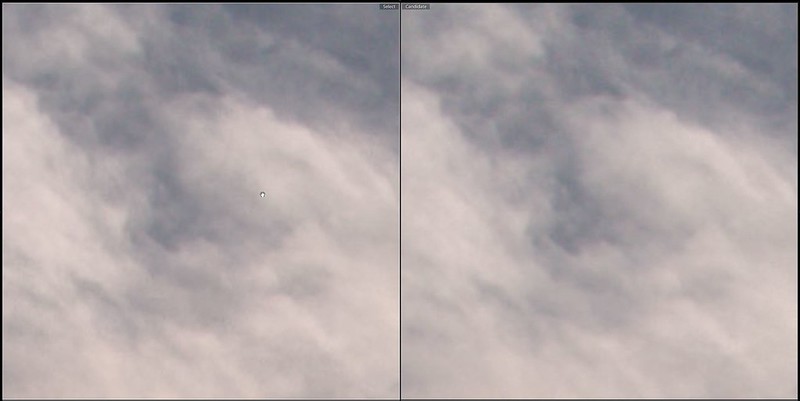
5-shot HDR versus 3-shot HDR detail comparison - sky at 4 to 1 by gardenersassistant, on Flickr
Here we are looking at some windows at 8:1. The 3-shot version has much heavier artefacts.
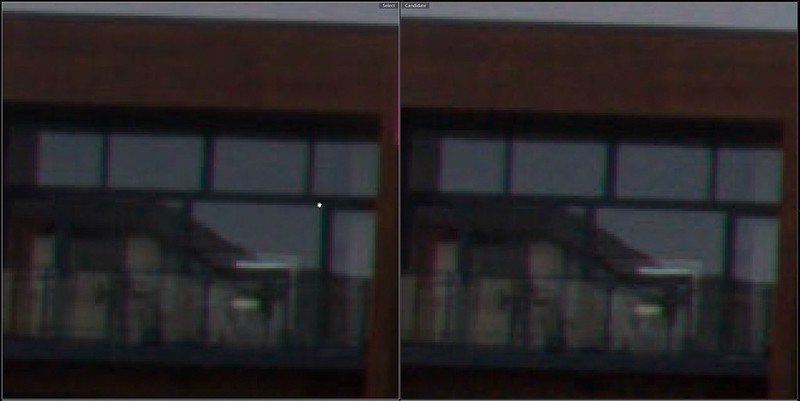
5-shot HDR versus 3-shot HDR detail comparison - windows at 8 to 1 by gardenersassistant, on Flickr
Are these differences significant, given the magnification we are using here? I don't know. The amount of cropping might make a difference Would other images exhibit greater differences between versions based on different numbers of shots? I don't know. But I think that to be on the safe side, and where it is practical, I will continue to use 5 rather than 3 shots. For images with even higher dynamic range I might well use 7 shots.

DerekL
Suspended / Banned
- Messages
- 475
- Name
- Derek
- Edit My Images
- Yes
There are loads of sites giving tutorials etc. This one http://farbspiel-photo.com/ is very good with video tutorials etc. Stuck in customs is another good resource as well.
It depend what you want.I don't like HDR via photomatrix.In camera on the low setting only the trained eye can tell.It's quick and easy for increasing the dynamic range.I don't want the horrible garish stuff that Photomatrix and adobe produce it looks horrible to me.
On the question of what does HDR look like? Some quick edits here, 2 versions of the same bracketed set of images. The first was tone mapped and pushed in Photomatix and indeed looks garish. In fact its absolutely repulsive. But you see a lot of this and it is why HDR gets a bad name. I think this garish look is what folks associate with HDR. "It looks HDR" etc.
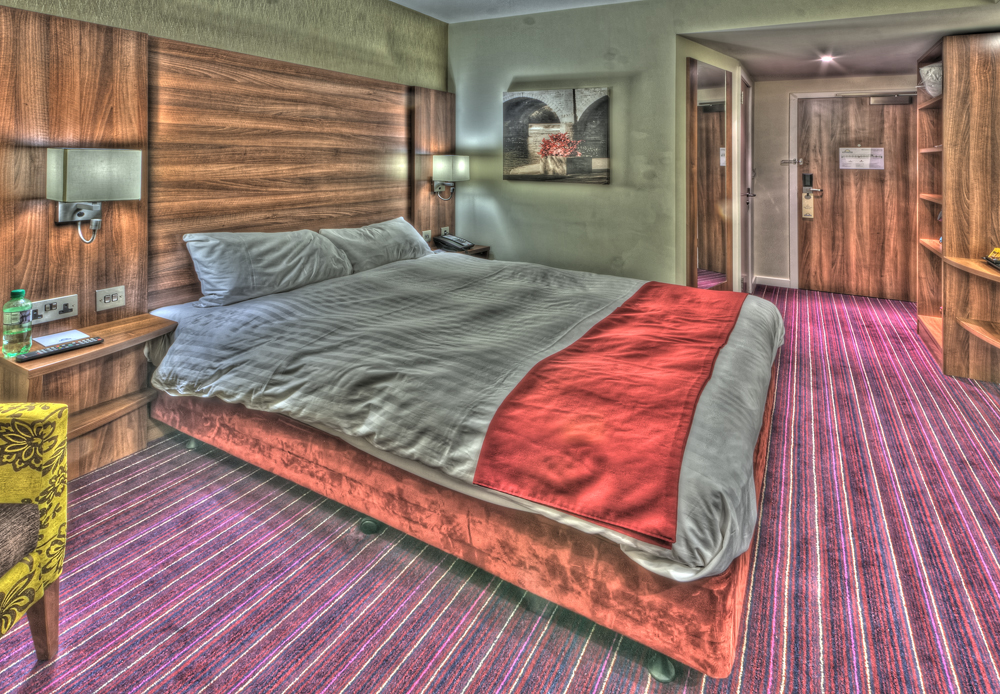
garish by 2010kev, on Flickr
Now down to the same image worked with a little more care. This image is a lot better and is a much more natural rendition. Photomatix has not produced a garish result here. I think you will agree it is not garish? But both have been tone mapped with Photomatix.
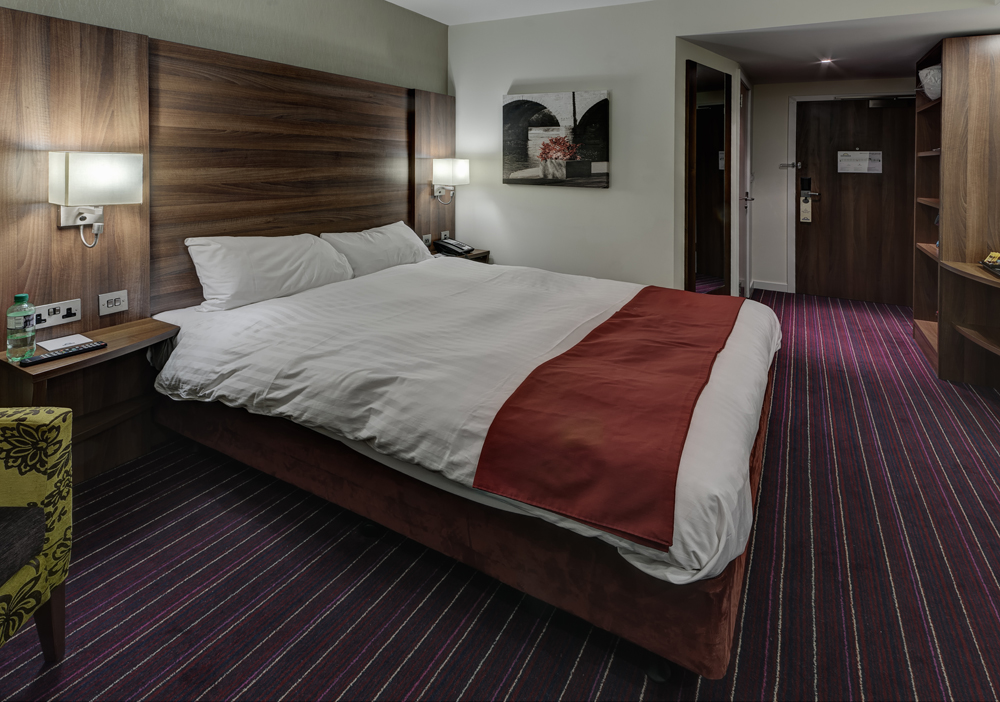
non garish by 2010kev, on Flickr
HDR does not have to look repulsive like some one has put vomit on the monitor.
For me its about learning how to use the software properly. Its not the software at fault. Its the user at fault.
Kev
Last edited:
I think you've loaded the same image twice Kev, both look the same to me
Cheers Martin. Sorted.
Martyn D
Suspended / Banned
- Messages
- 1,560
- Name
- Martyn
- Edit My Images
- Yes
Cheers Martin. Sorted.
Thats better
 ...i was beginning to question my eyes!


barratt1988
Suspended / Banned
- Messages
- 1,013
- Name
- Phill
- Edit My Images
- No
Hdr has its uses but be careful because its very easy to create something ugly and not believable
I'm not sure I understand you. Are you saying that most cameras can do in-camera HDR with three exposures, at least (-2, 0, +2) or wider, to produce a single image? (Which I imagine is probably the case these days.)
I have seen cameras that can record 14 stops dynamic range, which is almost at the limit of what the eye can see without dark adaptation. This doesn't need multiple exposures or tone-mapping. It does need a bright display, low ambient light and a high number of bits per pixel to prevent banding.

Mike Warburton
Suspended / Banned
- Messages
- 798
- Name
- Mike
- Edit My Images
- Yes
I use Dynamic HDR for my high contrast landscape work such as sunrises etc and then finish off in CS2.I stopped using filters years ago as I didnt like the way the hard edged grad would put a definitive dark shadow along the tops of the mountains whilst trying to hold back the sky.
This is how I processed this shot a few years back from three different images.
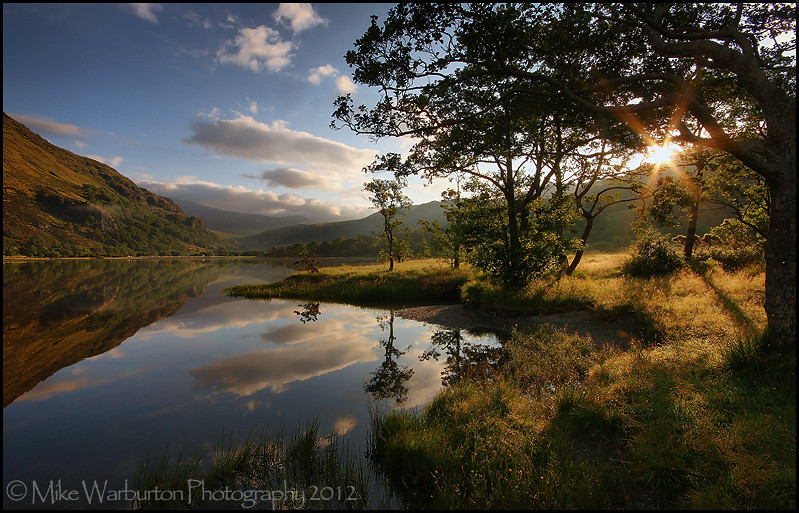
Llyn Gwynant by Mike Warburton Photography, on Flickr
This is how I processed this shot a few years back from three different images.
Llyn Gwynant by Mike Warburton Photography, on Flickr
bobleeuk
Suspended / Banned
- Messages
- 270
- Name
- lee
- Edit My Images
- Yes
I use Dynamic HDR for my high contrast landscape work such as sunrises etc and then finish off in CS2.I stopped using filters years ago as I didnt like the way the hard edged grad would put a definitive dark shadow along the tops of the mountains whilst trying to hold back the sky.
This is how I processed this shot a few years back from three different images.
Llyn Gwynant by Mike Warburton Photography, on Flickr
That's brilliant mike, what a fantastic photo