HDR How?

LensMarc

Suspended / Banned
Messages
63
Name
Marc
Edit My Images
Yes
Hi All,

Forgive me if I have posted this in the wrong place. As a newcomer to photogrophy & really getting into it, I am keen to learn as much as possible, I have seen some shots that are described as HDR & would like to give it a go could anyone explain what this is, & how to do it, is it easy & can it be done "in camera"(Nikon D90) or do I need photoshop to do the buisness?
 
The easiest way yet that I have found, is to use this program: http://www.mediachance.com/hdri/index.html

You can make pseudo HDR images with just one RAW or JPEG, and it works really well. The trial program adds a watermark on the bottom - but you can get around that by putting padding on the bottom, and then cropping it out. You didn't hear that from me though :clap:

As for a basic explanation of HDR, here's an ultra quick crash course.

HDR means High Dynamic Range, and it aims to use multiple exposures (normal method) or clever altering of one photo (psuedo HDR) to achieve ranges that the digital camera sensor simply can't cover. The human eye deals with light and dark areas extremely well, whereas the digital camera just can't cut it - you either get a blown out sky, or an underexposed dark area (unless the light is perfect) - and you can't avoid it unless you either use filters, or HDR.

dynrange.gif


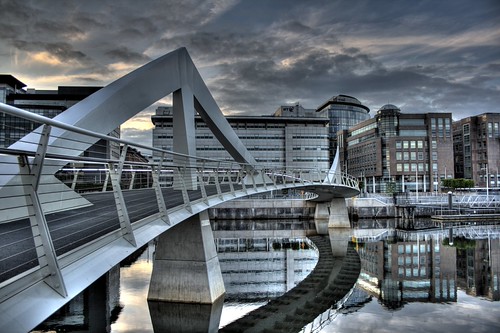
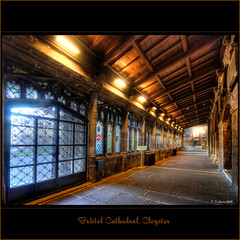
HDR can also be used to add depth to an image, and along with an ultra wide angle lens, proper use of HDR can really make an image have 'WOW' factor. HDR has a bad name because too many people overcook it to the point that the fire alarm is going off, like this:

hdr-holland.jpg
 
Photomatix is probally the best way, however HDR isn't a secret and you'll find substantial information from just simple google searches :)
 
Don't do it. Learn to get it right in camera.

;)
 
Ahem. Got no idea what you are talking about :clap::thumbs:
 
You need Photomatix. Despite other programs on the market P'matix offers best results. You also need a tripod and Auto Bracketing on your camera (BKT for Nikon, AEB for Canon).

Shoot your auto bracketed exposures at 2 stop increments (-2ev, 0ev, +2ev) and best to shoot in RAW. It is best actually to edit each RAW in a RAW editor such as Adobe Camera Raw upping the sharpness, reducing noise (if present), adjust saturation etc, using the same method for each RAW. Save as jpegs and then fire each jpeg into Photomatix.

The idea of putting the 3 RAW files in Photomatix is quicker though not always ideal.

I would like to reiterate that HDR is an artistic style of its own and many styles of HDR exist. It is not a way of producing an evenly exposed image, and therefor 'cheating an image' as some people seem to think. HDR is HDR, simples.

I would look at some of these if you need some inspiration. Personally Jean Michel is one of my favourite HDRtists.

http://www.flickr.com/photos/jimpix/

If you want realistic looking images with a good 'high density range' I would suggest the use of grad filters (for landscape) but I love using HDR for my interior and city dusk shots.

Rgds
 
Digifrog

It is best actually to edit each RAW in a RAW editor such as Adobe Camera Raw upping the sharpness, reducing noise (if present), adjust saturation etc, using the same method for each RAW. Save as jpegs and then fire each jpeg into Photomatix.

Hmm, it will work with jpegs, but everytime I use in CS3, I get a message/warning about using the raws for better output. - Does it really matter?

Photomatix is still really new to me, and TBH I don't really know what I am doing I just play with the sliders until it looks like a HDR and of course improved.

Be nice to have some guidelines or manual, I get to the tone mapping part and I'm lost!!!! :thinking:

Had a look at their tutorial, but doesn't really go deep enough.

Time for more googling no the subject methinks
 
Don't do it. Learn to get it right in camera.

;)

Explain to me how you learn to "get it right" when the scene you want to shoot is FAR beyond any current digital camera's dynamic range? :)

ND grad filters are only useful to a point.
 
Don't do it. Learn to get it right in camera.

;)
I don't think you understand what HDR does for dynamic range, which it enhances beyond what a single exposure can achieve.

Photomatix still seems to be the best software on the market.
 
Digifrog


Hmm, it will work with jpegs, but everytime I use in CS3, I get a message/warning about using the raws for better output. - Does it really matter?

I'm not quite sure I understand. When does this warning appear? My process is, open the -2ev in Adobe Camera Raw, up the CLARITY to 50%, on NOISE REDUCTION set Luminance & Color to 30 and maybe adjust some of the Saturation sliders a little. SAVE AS jpeg, size 12.

Use exactly the same settings for the 0ev and +2ev. When you have saved 3jpegs, fire them into Photomatix. Don't play with the Photomatix settings too much, I would just up the White Point and Black Point and Luminance and have the Light Smoothing set to the tab farthest right (halo's are unacceptable).

When you have tonemapped the final image, save as an 8 bit TIFF then open in Photoshop to achieve the finished look.

Of course oother people have different ways, this is just one of them.

Rgds
 
Photoshop HDR will give you more realistic results - I use it for interiors of churches and get good rendition of shadows and highlights. Photomatix gives a less realistic but more dramatic effect, so you choose what you want depending on the final image you're looking for.

I have some free-to-use PDF files on the use of HDR, PM me if you want a copy.
 
Photoshop HDR will give you more realistic results
That's debatable. It'll give you *different* results, but Photomatix doesn't have a single look. You are able to adjust the settings to give a more "realistic" image. Sometimes Photoshop's methods look better, sometimes Photomatix' results look better. It all really depends on the scene and how it's processed.

But, whatever you use to produce an HDR, the compositing process of several frames into a single image is only one part of the whole process. You don't just fire a bunch of images into Photomatix, click a button and you're done (although far too many people think that's all there is to it, as is evident by the results they produce).
 
A lot of people are confusing "TONE MAPPING" and "HDR".

HDR, in it's most basic form, is combining images to give a greater dynamic range than a single image.

Tonemapping takes more than one (usually 3, 5 or 9) differently exposed shots of the exact same scene and applies various effects to the processing to give results like this:

3679249685_c0947cbcb1.jpg


A simple HDR shot of the same scene would not produce the same results. Pseudo-HDR is when you use the single image to produce something resembling HDR but this does not always guarantee the same results as using multiple exposures.

The most usual process for HDR (as the OP asked, HDR How?) is use your camera on a tripod, turn on auto exposure bracketing, use a shutter release and let your camera fire off multiple exposures.

The best conditions are generally overcast or dull days as the dramatic skies you can create by using tonemapping effects on an otherwise plain sky are stunning. If you are doing landscapes or something with a bit of background, make sure you use a medium aperture to keep the scene as sharp as possible.

Photomatix does tonemapping to get the look of the photo above, and "exposure fusion" which gives a more natural result.

There are plenty of other techniques out there and the best way to learn is to search the web for HDR tutorials - there are hundreds of them out there.
 
Semantics aside. I concur. Photomatix is only part of the process to the final image.

I rarely use Photomatix these days (opting to choose a different technique) but I still use it for some images.

4182052034_313605276d_m.jpg
3941982960_845f0b0cce_m.jpg
3434689049_f8ff54a1b5_m.jpg
3148347478_9d97415a74_m.jpg


I prefer not to use HDR tonemapping to achieve a high Dynamic Range but use it instead to achieve a desired specific effect.

Rgds
 
HDR, in it's most basic form, is combining images to give a greater dynamic range than a single image.

Tonemapping takes more than one (usually 3, 5 or 9) differently exposed shots of the exact same scene and applies various effects to the processing to give results like this:

Which are both essentially the same thing.

Technically, it's all tonemapping once it goes down to 8Bit. Anything that ultimately ends up as a JPG is by definition not HDR.
 
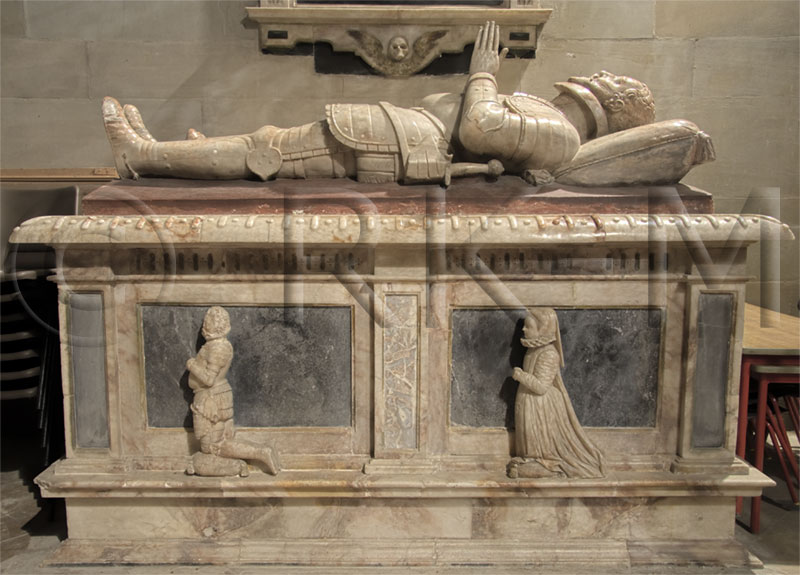
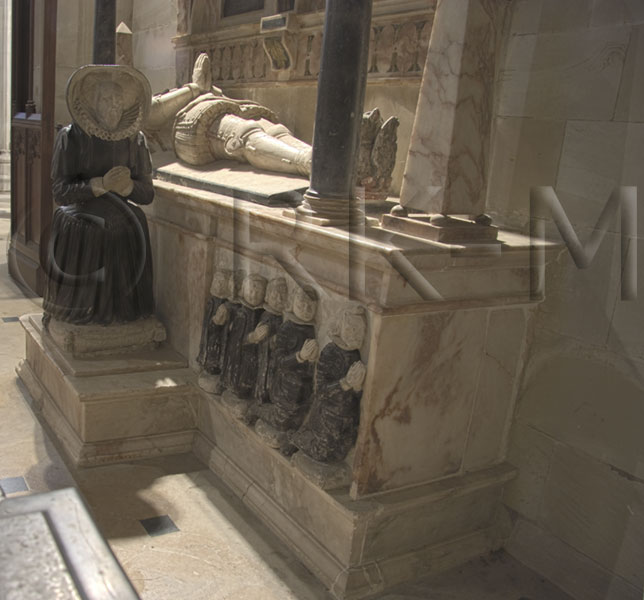
These pics were produced using HDR. There is no way I could have got the detail in the highlights and shadows using the available light.

charlecote_coffin_01.jpg


charlecote_coffin_02.jpg
 
You can produce HDR images in your D90 by using the camera's multiple exposure settings.
Linky
 
I think JackSparrow is correct. In its simplest form increasing the 'dynamic range' - HDR - is about bringing out detail in areas where the camera would struggle to do it in a single capture. Tone mapping can produce a more ‘processed’ output.

So a basic example would be a picture where to get a detailed foreground you over expose the sky or to get detailed sky the foreground is under exposed.

I have achieved favourable results by using a graduated filter to get around this problem – so you can get more detail from the dark foreground while limiting the light from the bright sky. So it is possible to capture more detail ‘in camera’.

I have also got around this same problem by using layers in Photoshop CS to blend two shots (Exposure optimised once for sky and once for foreground) together; again, using the software version of a graduated filter. In both these example Jpeg works as well as a jpeg can.

For tone mapping - getting that 'processed' quality - I use photomatix.
I do shoot in raw most of the time as it allows me to adjust the WB, exposure etc., post shot if necessary.
 
Which are both essentially the same thing.

Technically, it's all tonemapping once it goes down to 8Bit. Anything that ultimately ends up as a JPG is by definition not HDR.

What you are [correctly] saying is that a jpg cannot contain as much colour depth information per pixel as a 32 bit file such as RAW, TIF, etc and converting a 32bpp image down to 8bpp (jpg), you will have some calculation going on to work out what each pixel should look like. Saving a file with a lower pixel depth is not tonemapping in the sense of generating the effects we have been discussing here.

Bear in mind that you can perform tone mapping and save your resulting image as a 32bit TIF file in photomatix!

The OP is going to be flummoxed reading all this. He asked about how to do HDR, I felt that what he meant was the 'tonemapped' images such as the one I posted rather than the more subtle 'exposure blended' images like Somelier's.

Perhaps we can keep it simpler for him by forgetting pixel/colour depth and telling him to get a tripod, bracket his shots and try some of the tutorial techniques for processing HDR images in Photomatix or with Photoshop's "merge to HDR" function
 
Perhaps we can keep it simpler for him by forgetting pixel/colour depth and telling him to get a tripod, bracket his shots and try some of the tutorial techniques for processing HDR images in Photomatix or with Photoshop's "merge to HDR" function
:thumbs:
 
Photoshop HDR will give you more realistic results - I use it for interiors of churches and get good rendition of shadows and highlights. Photomatix gives a less realistic but more dramatic effect, so you choose what you want depending on the final image you're looking for.

I have some free-to-use PDF files on the use of HDR, PM me if you want a copy.

Photomatix will give very realistic results if that`s what you want, it`s very versatile. I`ve posted HDR stuff without mentioning it and the so called HDR haters have liked them.
 
I`ve posted HDR stuff without mentioning it and the so called HDR haters have liked them.

Exactly. Most people just think "HDR" is a particular look (due to the fact so many people screw it up then post 'em on Flickr), and saying they hate it is a bit like saying "I hate curves adjustments", or "I hate soft light layer modes". It's just a tool, not the end result.
 
:clap:

Now, do you have anything constructive you'd like to bring to the conversation?

yes i do, HDR is high dynamic range. this is essentially getting an equal exposure in foreground, mid ground and background, this is to achieve a result that what it would look like in real life. sometimes its overdone shown in my last post and can make it seem horrible but when its used in a mild amount it can be hard to notice but it makes the photo more pleasing.
 
yes i do, HDR is high dynamic range. this is essentially getting an equal exposure in foreground, mid ground and background, this is to achieve a result that what it would look like in real life. sometimes its overdone shown in my last post and can make it seem horrible but when its used in a mild amount it can be hard to notice but it makes the photo more pleasing.


The DRI technique achieves far better results and more closely resembles what our eyes see more than HDR can ever do.

A process combining both DRI and HDR is quite pleasing but takes a little application.
 
The DRI technique achieves far better results and more closely resembles what our eyes see more than HDR can ever do.

A process combining both DRI and HDR is quite pleasing but takes a little application.

Is DRI ("Dynamic Range Increase" Googled :)) the same as layering two pictures using a gradient filter? Damn TLAs!
 
Is DRI ("Dynamic Range Increase" Googled :)) the same as layering two pictures using a gradient filter? Damn TLAs!

Almost, but not quite. It's taking several bracketed images (usually a minimum of 3) sometimes including a tonemapped image and then using the Layer Mask and Brush tool to manually blend images together. Sometimes the Gradient tool is used if you are working with just 2 images.

It can be a straight forward process or it can be a lengthy few hours in Ps, depending on the complexity of your desired result.

Rgds
 
Almost, but not quite. It's taking several bracketed images (usually a minimum of 3) sometimes including a tonemapped image and then using the Layer Mask and Brush tool to manually blend images together.

Which is why I say that "HDR" (or whatever you want to call the combined tonemapped file that Photomatix, photoshop, or whatever spits out) is only part of the process. This is what should be done anyway, and what I do.
 
Which is why I say that "HDR" (or whatever you want to call the combined tonemapped file that Photomatix, photoshop, or whatever spits out) is only part of the process. This is what should be done anyway, and what I do.

Surely in any artform, whether it is painting, recording music, photography, there is nothing that "should" or "must" be done - it is all down to the individual?

I think you mean "That is what I do because I find it produces results that I wanted"...
 
Surely in any artform, whether it is painting, recording music, photography, there is nothing that "should" or "must" be done - it is all down to the individual?

Yes and no, there are certain things that *should* be done, for example, singing or playing an instrument in tune in the case of music. Otherwise it's not art, it's just crap.

Clicking the "Default Settings", then "OK" in Photomatix and calling that it, all finished, it might be ok to the individual, but to the rest of the world it still looks like crap the vast majority of the time. :)

Art aside, as a technical process it should be done.

You wouldn't take your car in for a service and be very pleased if he said "Hey, it's got 4 wheels on it, what more do you want? they don't need to be balanced. Bleeding the brakes? what's the point? you've got brakes, job done! Oil change? don't make me laugh, it still chugs along doesn't it?" would you? :)
 
Yes and no, there are certain things that *should* be done, for example, singing or playing an instrument in tune in the case of music. Otherwise it's not art, it's just crap.

Jimi Hendrix wasn't crap and his live performances were rarely in tune, both vocals and instrumentals. He did what he wanted and produced results that he (and his fans) wanted. Most live acts are not 100% perfectly in tune all the time whether it's vocals or bum notes, but that doesn't make it crap.

Conversely, the pop/RnB artists you see on the generic music channels today all sound "perfect".... their producers do what they and the fans of these artists want using all sorts of auto-tuning and harmonizing software to process the vocals and instruments and target the human hearing for maximum listening pleasure - you could even say they are the musical equivalent of the overdone Photomatix HDR picture!

I suppose within reason, either is acceptable and in a roundabout way we are agreeing. And when did car repairs become artform?!? :bonk:
 
Jimi Hendrix wasn't crap and his live performances were rarely in tune, both vocals and instrumentals.

I'm a fan of Hendrix, but he did produce some crap. :)
 
Back
Top