hard drive for Dell XPS 8300

LCPete

Suspended / Banned
Messages
9,785
Edit My Images
Yes
Hi
Going to replace the hard drive in my desktop
its an XPS 8300
i7 2600 3.4 gz 64 bit

with a WD Caviar Black 2TB
But as far as I know (not opened it up yet) the XPS 8300 has two hard drives, 2 500 gb ones can I replace it with a single 2TB one or do I need to install 2 drives?

Ive got problems with my PC think its hard drive related
I made a mirror image backup of the drive 6 weeks ago so am planning to put a new drive in and put everything back with mirror image

The problems are that the programs like photoshop and canon zoombrowser cant access the 2 external hard drives that are connected to it
when I look using computer I can access them but the location says cmd(c windows\system32)
the files are there

EDIT now Im really confused !
Ive tried doing 2 system restores to an earlier point which does not work it crashes out and

Ive tried connecting my other 2 external drives and they are fine not sure whats going on
 
Last edited:
You wouldn't have to have 2 hard drives installed.

Sounds like you might have managed to mount the external hard drive in your primary hard drive.
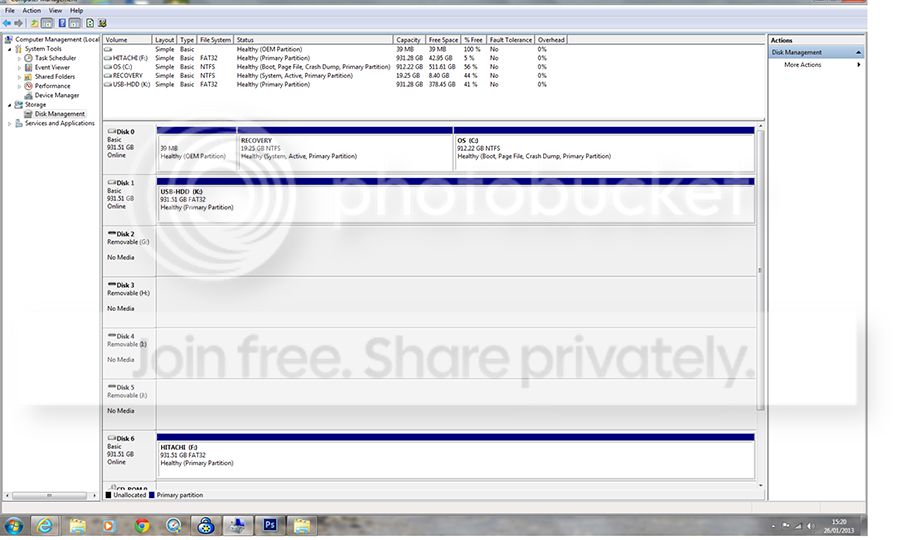
Can you please click Start, right click My Computer, click Manage, then click on Disk Management under Storage and post a print screen of the Disk Management utility so we can see what's going on.
 
Doc1_zpsc3602b1e.jpg


Hi here is a screen print
whats is happening is that I cant access the external drives (disc6 Hitachi and disc1 usbHDD on the screen print) with programs like photoshop or canon zoombrowser
but if I go to computer ( am on windows 7) I can access them
I have tried 2 different external drives and they are fine so I suspect that there is a problem with the external drives disc6 and disc1
 
The problems are that the programs like photoshop and canon zoombrowser cant access the 2 external hard drives that are connected to it
when I look using computer I can access them but the location says cmd(c windows\system32)
the files are there

how do you mean the location says cmd? screenshot please.
 
Doc1_zpsc3602b1e.jpg


Hi here is a screen print
whats is happening is that I cant access the external drives (disc6 Hitachi and disc1 usbHDD on the screen print) with programs like photoshop or canon zoombrowser
but if I go to computer ( am on windows 7) I can access them
I have tried 2 different external drives and they are fine so I suspect that there is a problem with the external drives disc6 and disc1

if you can access them fine with computer then i doubt the disks are faulty.
 
Doc2_zpsf76312f1.jpg


this is the screen when I go onto computer from start
its showing the contents of the external drive (toshiba)
you can see where its says the location is cmd c: windows system 32?
its may be something simple that Ive done without realising it :D
but am concerned that theres something wrong with the externals am saving photos directly on to the desktop hardrive at the mo , it all works fine working from there can access files using photoshop and zoombrowser is they are on the desktop hardrive but not on the external drives
 
Doc2_zpsf76312f1.jpg


this is the screen when I go onto computer from start
its showing the contents of the external drive (toshiba)
you can see where its says the location is cmd c: windows system 32?
its may be something simple that Ive done without realising it :D
but am concerned that theres something wrong with the externals am saving photos directly on to the desktop hardrive at the mo , it all works fine working from there can access files using photoshop and zoombrowser is they are on the desktop hardrive but not on the external drives

ah that looks like a bit of malware ive seen before..

hang on i'll try and find it.
 
that may explain why Ive been getting trojans found on my AVG anti virus/firewall from skype :bang:
I have now deleted skype
I did do a full scan with the anti virus did not find anything
 
thanks very much neil will do that now:)
 
Sorted :):):):)
Thanks very much Neil thats brilliant :clap:
I can now access the files from photoshop and zoombrowser
Had me completely puzzled am really glad its OK now
AVG as you say cant be very good if it missed the malware will look at avast

edit have now got avast antivirus
can now carry on going through my old shots and re editing them
 
Last edited:
Back
Top