Hard drive copying to another hard drive

realspeed

Suspended / Banned
Messages
8,827
Name
Bazza
Edit My Images
No
General misconception is that by mirroring from one hard drive (C) to another hard drive will save data if drive C packs up. Well it won't the other hard drive will not keep the data either.

There is a program called Acronis true image 2013 which actually save files independently from Drive C. On top of that there is Acronis true image 2013 plus Pack which goes further and saves everything ie windows program printer etc etc.

Not exactly cheap but not that expensive either if you consider the time it takes to reinstall everything.

Thought it worth a mention as it does auto copy as well depending on the shedule you set for it


Realspeed
 
If hdd A was corrupted then the problem would still be there when mirrored to hdd B??
 
Been using Acronis for years and it has saved my bacon on a number of occasions, having an image schedule to restore from means that your pc can be up and running exactly 'as was' in the event of a disaster.
A few years ago they got it very wrong with a new version and there were many problems but they have been back with a very good product for a while now.
 
What's the difference to making a system image backup with windows?

You can mount the image backup as a virtual hard drive in computer management/disk management if you only want a file or two off it.
 
Psyence33 said:
If hdd A was corrupted then the problem would still be there when mirrored to hdd B??

If its raid mirrored then normally corruption will occur on both sets. If you have a sync routine or clone/image that overwrites the last copy then the corruption will occur on both also.

You should be factoring your multiple copy backup so that at least one doesn't overwrite/delete.
 
Last edited:
RobertP said:
What's the difference to making a system image backup with windows?

You can mount the image backup as a virtual hard drive in computer management/disk management if you only want a file or two off it.

If you're just imaging then nowt. Other than its free with windows.
 
If you're just imaging then nowt. Other than its free with windows.

If you've got the right version of Windows.

However, if you've got a WD or Seagate/Maxtor drive in your system (can be an external drive) you can use a free cut down version of Acronis which gives the basic functionality of generating an image backup or cloning a drive:

Acronis True Image WD Edition
Seagate - Discwizard
 
Last edited:
For Macintosh users, Carbon Copy Cloner is a brilliant piece of software for cloning files & boot systems. It also does timed backups and will save multiple versions of files and groom backup sets if needed

Nick Froome
 
What's the difference to making a system image backup with windows?

You can mount the image backup as a virtual hard drive in computer management/disk management if you only want a file or two off it.

I've not used Windows imaging as I'm a long-term Acronis user - I like being able to schedule and forget ... just let it get on with regularly doing new images and deleting the old images, so don't need to manually delete for space creation etc.
 
I'm over-cautious and do an incremental image currently twice a week.
 
why? nothing possibly changes that often

Nothing changes on your PC daily ... really? :thinking:

For me having a very near to 'as is' image available is an important safeguard ...
eg in case of drive fail or other serious issue.

Option 1
Replace/format drive, re-install os, re-install all software, (if easily available and no downloaded software mis-placed), restore backups of all data, email etc.

Option 2 Replace drive if necessary otherwise just insert Acronis recovery disc, select restore and go make a coffee. When restored carry on as before the problem occurred with PC restored to 'as was'.
 
why? nothing possibly changes that often
Your user data does. If you are imaging to make sure you have a backup of that, twice a week is too infrequent IMHO.... (I'm not saying it is the best method, but it is A method...).
 
Nothing changes on your PC daily ... really? :thinking:

not really from a system point of view unless youre installing programs every 5 mins.

i should probably clarify that im talking system imaging and not data backup though. which it seems is what youre using for a backup of your data too.

Your user data does. If you are imaging to make sure you have a backup of that, twice a week is too infrequent IMHO.... (I'm not saying it is the best method, but it is A method...).

right, but data in the documents etc can be backed up rather than imaged (which is what im getting at). appdata etc i guess depends on what progs are depending on data in there, personally ive got no problems with starting that from the fresh build image.

horses for courses though depending on your setup i guess.
 
If you are imaging to make sure you have a backup of that, twice a week is too infrequent IMHO.... (I'm not saying it is the best method, but it is A method...).

I agree ... it is a compromise, however I think a 'fool-proof' method is probably more than I or most people need.
I've worked this way for many years now and find the risk/benefit about right for my requirements and machines.
It's got me back up and running on about 3 occasions over the years on two different machines IIRC and all without unnecessary stress and time delay.
 
not really from a system point of view unless youre installing programs every 5 mins.

i should probably clarify that im talking system imaging and not data backup though. which it seems is what youre using for a backup of your data too.

Correct.

right, but data in the documents etc can be backed up rather than imaged (which is what im getting at). appdata etc i guess depends on what progs are depending on data in there, personally ive got no problems with starting that from the fresh build image.

horses for courses though depending on your setup i guess.

I just like the 'do it all in one' approach that Acronis provides, I don't have to do all sorts of backups to bring everything together, Acronis does that for me and lets me get on with using the PC (s) rather than spending excessive time backing them up or restoring them.
 
"old dog - new tricks" :D
 
Since I bought a HP N40L and set it up with windows home server I've kind of forgotten about backup. The server does it for me once a day and backs up other computers in the house at the same time.

The restore procedure seems pretty straightforward but I suppose I should try it out sometime just to make sure.

A nice thing about the way it backs up multiple computers is that it doesn't store multiple copies of common files so the backup size is much less than I expected.
 
I would be very nervous about backing up all machines to one point (unless extracting backups to another device/media at various intervals), I have individual backup/imaging for each machine.
 
I would be very nervous about backing up all machines to one point (unless extracting backups to another device/media at various intervals), I have individual backup/imaging for each machine.

That would be the server backup on usb drive kept at my daughters house then :)

I work on the basis that if it can go wrong it will sometime. I lost a hard drive full of work data that wasn't backed up back in the days of 286 computing. Having learned the hard way I've since had hard drives fail and NAS devices pack up and not lost anything yet.
 
That would be the server backup on usb drive kept at my daughters house then :)

I work on the basis that if it can go wrong it will sometime. I lost a hard drive full of work data that wasn't backed up back in the days of 286 computing. Having learned the hard way I've since had hard drives fail and NAS devices pack up and not lost anything yet.

:thumbs: even when you know it's there, it's still a sinking feeling for a moment :)
 
I can't reccomended carbonite enough. It's on an online backup solution. It automatically backs up all your files and folders to thier servers. My H&S died last week, so I bought a new one, redownloaded all my files back to the new drive and carried on as normal.
In the top package, it does full drive mirroring, including program's and OS. The package I'm on just does folders and files. It was a lifesaver... Especially as in the same week, my external home server which has dual drive mirroring of my of my pc also failed! I'd have lost everything.
 
Even more important i suspect if you run a Solid State drive, no warning of failure i think they just die !
I expect future SSD's will have some sort of development where by a built in safety warning may be needed eventually.
 
Even more important i suspect if you run a Solid State drive, no warning of failure i think they just die !
I expect future SSD's will have some sort of development where by a built in safety warning may be needed eventually.

Think I read someone saying that they don't "die", you just can't write to them any more but you can read from them, hence being able to recover any data.
 
SSD's do die and die completely. They can fail just like any electronic kit can. The failed one I looked at (corsair force 3 series) just stopped working. You often don't get a failure warning with a traditional drive either.
 
SSD's do die and die completely. They can fail just like any electronic kit can. The failed one I looked at (corsair force 3 series) just stopped working. You often don't get a failure warning with a traditional drive either.
Oh...that's what i'm running Robert, it's only a 60gb but later on i'm thinking of going the OCZ 120gb route, imagine paying mega bucks for a 256gb if it has a short life, probably not worth the money hence all my images/files are directed to HDD :)
 
It was a 128Gb version in a friends PC that I helped him build. Turned on one day and no boot drive anymore.

As to SSDs wearing out by exhausting write cycles, its not something I worry about. As I understand it the controller software balances wear and tear across the whole memory not constantly writing and erasing one area over and over again. The drive would be pretty old before it becomes a problem.
 
Just to say I use Acronis, and have done for years. It's superb. I run incremental back ups of my entire system nightly. These are backed up to a RAID6 server. That server is then mirrored to another RAID5 server using AllWay Sync. This second server is in my garage to mitigate against a house fire.

That's probably overkill, but I once lost data that cost me around £3K. I see it as a good investment.
 
Any electronic component can fail but SSD's I read have a limited write life and that's the failure that most people refer to when talking about SSD's failing?

It's a limited number of write cycles.

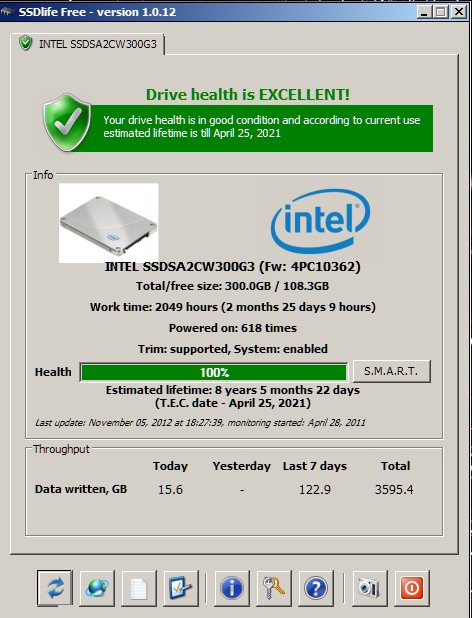
Yup. That's going to be a real problem on April 25 2021 when mine reaches the end of its usable life.

SSD%20Life.jpg
 
Mines is 6 months before yours as well as being a Force 3.

Mind you, must be worth a wee wager on never getting anywhere near that far!
 
SSDs are no more likely to fail than HDDs... in fact, they're far less likely. I've had 3 HDD failures this year, and no SSD failures.

They may have a write cycle life span of several years or more, but let;s be honest, will you still have it then? 5 years ago, we thought a 1TB HDD was MASSIVE! Now it's decidedly average. How many of us have a HDD more than 5 years old? Very few I wager.
 
i have just purchased a 2nd external hard-drive 1tb. the 1st hard-drive has all my doc's and pictures and music on it. the hard-drive in the laptop only has the software programs on it.

i'd like to get the 2nd external drive to back up the 1st external drive. can someone advise on how to do this please.

also are there any programs which can protect the material on the drives. something with a password so if the drive was taken and someone tried to view it on another machine they would need a password etc.
 
The Freecom mentioned above has a password protection built in and Acronis can do the backup for you.
 
Ah sorry I thought you were looking for one ... you will need a third-party product, Google is your friend :)
 
Yup. That's going to be a real problem on April 25 2021 when mine reaches the end of its usable life.

Well don't PM me on 26th and say I didn't warn you! :D
 
Back
Top