Gutted! My new EOS1Ds MKIII has focussing problems!

HIMUPNORTH

Suspended / Banned
Messages
5,178
Name
Gary
Edit My Images
Yes
This is a sore one. I bought a 2nd hand 1Ds MkIII out of Ffordes on Thursday. I have been very busy since then making sure I had this morning off to take advantage of the fine, clear weather, so never checked camera other than usual stuff; battery charged, ISO settings, C-Fns, etc.

I take to the air and start a flight in -6 degrees (and it only got colder!) I was in the air for 50 minutes and took what should have been one of my best days in the air.

I chimped a little during the flight and thought it looked a little soft but with watery eyes and a new screen I thought nothing of it (well the nag got bigger as the flight went on).

Here is an example shot:
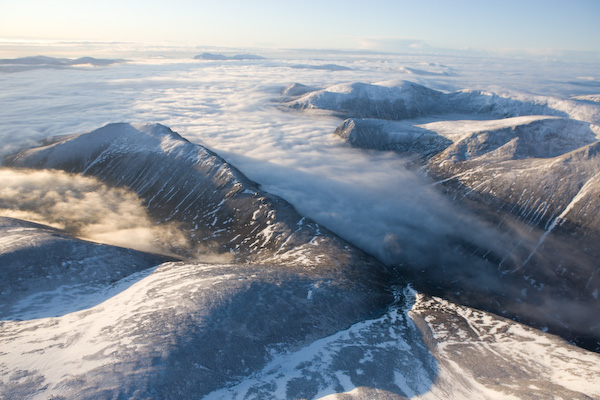
3068128872_693444e1ee_o.jpg


When viewed closer it looks like this:
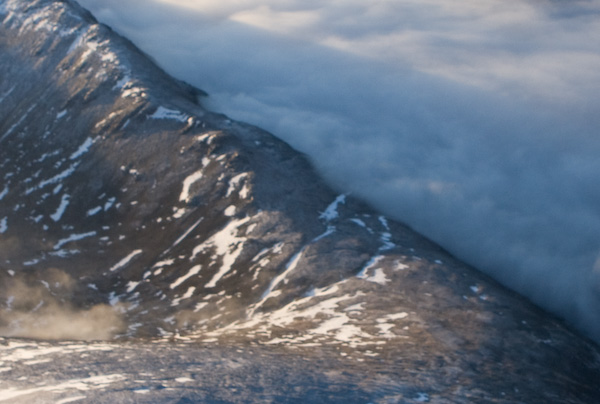
3067292903_e20cb4ff6d_o.jpg


and they are all the same!

I have upgraded the firmware which was 1.0.4. (since I landed) and am now on 1.1.2. but test shots at home seem to reveal the same problem.

Micro adjustment is set to 0. All C-fns are 0 in fact.

HELP! Am I missing something or will Ffordes be seeing the return of this camera?

Any pointers greatly appreciated.

Gary
 
Sorry can't help, Gary but
What a bummer!they look as though they should have been real crackers too :(
 
Sorry to hear that mate. Very odd but endemic of Canon's Mark III production line. As you know I have told more than enough people about the problems with these cameras, which range from poor focus, to sloping view finders, incorrect skin tones - and that is across the range 1Ds, 1D and 40D.

If you are not getting it with custom focus, get it back to em. Just confirm you are uing Canon L glass as sigma lenses really struggle with 1 series cameras.

Pete.
 
That looks pretty normal when you take shots through a window to me...
 
He has a gyro-copter without windows....:'(

Seriously? Is he Batman?

Not convinced these sort of shots can be used to conclusively prove mis-focus tbh. I've certainly taken in-flight shots myself that look like that...
 
i took some pics last year with my DSLR through a plane window .... mine were crap ... yours look pretty good considering the poor quality glass in a plane .. what are the images like normally ?
 
Seriously? Is he Batman?

Not convinced these sort of shots can be used to conclusively prove mis-focus tbh. I've certainly taken in-flight shots myself that look like that...

Cripes, nearly 2000 posts and you dont know this guy can fly? :D
 
He isnt in a plane ..... he is out in the open air and they should be as sharp as a sharp thing.
 
Have you tried the microadjust on something other than 0 and checked focus on other lenses?
 
Just a thought, the shot was taken at 24mm @ f/8, given the distance everything should be tack sharp so I really don't think it's an AF issue :thinking:
 
Having look at the EXIF, hmm.. at that shutter speed and focal length it should be shaper.

Is anything sharp? Bit strange, as shooting this sort of thing is just going to at infinity.
 
why not try a newspaper and also the front/back focus test card
 
Knowing the standard of your usual shots this is definitely below par from what you usually produce so it must be a problem with the camera. I presume the lens is the same that you usually use and don't have any problems with?

I'd be seriously peed off having spent all that cash on a pro spec camera for it to behave like this.
 
He isnt in a plane ..... he is out in the open air and they should be as sharp as a sharp thing.

oh rite ... didnt realise he was in a micro ... just looked at his website which gives it away really ... Aerial, Landscape & Sports Photography :)
 
3rd point that may have a bearing, the spec says operating temp. is 0-45 deg c :(
 
Does look soft Gary

Heres a shot I took yesterday with same model

RAW no sharpening, just reduced for web
Nosharp.jpg


Minimum sharpening

Sharp.jpg


Exif f/5.6 @ 1/1600th +0.33, ISO 400
 
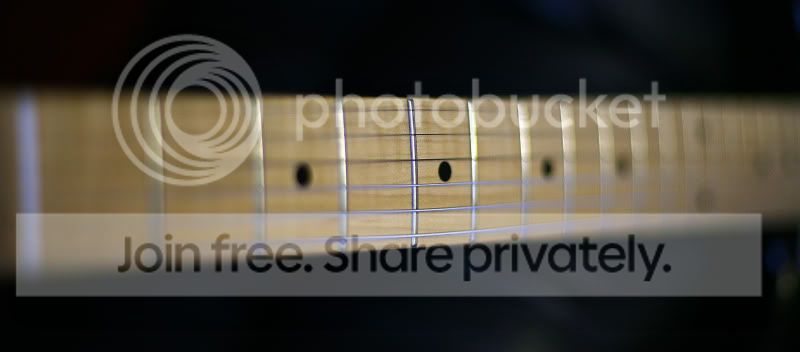
I use a guitar neck to check front and back focus. If you focus on one of the frets midway up the neck you can easilt see if the lens/camera has a tendancy to front or back focus.

Example below is the EF 50mm f1.4 I bought this week from ps2user, looks good to me on my 5D. Focus point was on the 4th fret, 3rd string!

GuitarNeck.jpg
 
first one looks fine to me to be honest :shrug: Suppose it should at that size though :)

Is the crop at 100%?
 
Gary

I've a 1Ds lll and I think the problem may be down to sharpening, as I had a problem when I first got the camera.

Due to the high pixel count on the 1Ds chip Canon fit a very aggressive anti-aliasing filter. It gives the impression of un sharp images.

You need to really increase the amount of capture sharpening you apply to the image to get the best results. Canon have published a document about this here's the link.

http://www.usa.canon.com/uploadedim...S1D_1DsMark_IIIoptimizingAFsettings_Final.pdf

However if you are using Lightroom go to the sharpening options in develop and increase the sharpening level there. I found that a reasonable amount of sharpening and adding detail improve result dramatically. The settings tend to vary a bit from shot to shot but try about 50 sharpening and 30-40 detail to start with.
 
Thanks for all the replies people! :thumbs:


It appears that the camera focuses significantly in front of where it says it is focusing. I went out this afternoon to try to test it. As an example, with my 24-70mm f2.8L lens fitted, a scene where the camera auto-focuses and sets the lens focus at 3ft I need to set the camera to about 7ft to get the image sharp.

This is not just sharp in the viewfinder, downloaded photos prove to be sharp only when I focus manually on the chosen point.

This difference seems to be well out of the range of the micro-focus adjustment which the MkIII has as a custom function.

Sharpening is not the reason for this softness as I can get sharp images using manual focus - although I appreciate the link, I can see it will more of an issue with a III than it was with my II.

For the same money I could have bought a new D3 and some money down on a lens (just so you don't have to tell me :lol:)

This shot answers a lot of questions. My feet are in focus - but were not the focus point used! Click small image for a 2,000 pixel wide version.


http://farm4.static.flickr.com/3175/3068548522_ed17391319_o.jpg
 
Have you checked the AF with another lens? If it's showing similar results then it looks like you were sold a duff body and it needs returning :(
 
The left foot could do with a bit more shadow detail, but if you're happy.......


:D
 
Gary,

I have a 1D MkIII which is a blue spot running on Firmware ver.1.2.3

Since the last update I have NEVER had an OOF shot (I do lots of golf photography)

The camera does need setting up properly to get optimum results and it will take time, however this document is the the dogs "biscuits" and worth printing out and reading through!

http://www.usa.canon.com/uploadedim...S1D_1DsMark_IIIoptimizingAFsettings_Final.pdf

Best of luck :)

Chris Gill
 
Just to prove that it can take an in-focus shot:

3068677812_3a68cc598e_o.jpg


This was focussed manually and ignoring the camera's indications of what it thought was in focus.

The version given over to auto-focus is way OOF.

Thanks for the link Chris and good to hear it is giving you good service. I will be reading it, but must get this fixed as this is too far out to be a minor set-up glitch.:thumbs:
 
Here is the photo that I will probably take to Ffordes. The camera is on a tripod and a single AF point is selected and placed over the red USB stick. The shutter is fired after the autofocus registers this as in-focus. You can see for yourself:

3068766820_b448c9a62f_o.jpg


:(

Edit : BTW another lens - this time an 85mm f1.2L
 
Thats rough Gary, have you asked Ffords if it had had the fix from Canon? and is it running the latest firmware??

It deffo needs to go back for a check up! im not 100% sure but i think the focusing issues were to do with tracking! so i would have thought a static shot should have been fine (I could be wrong though) but your shot of the USB stick is a no brainer.. it needs looking at..

I hope they sort it for you.. Quickly!!


Btw, i bought a 1D MkIII from Jacobs, it developed a problem that showed up as Error99 VERY often, i took it back and they sent it off, Canon replaced a board and some stuff and i had it back within a couple of weeks.. just ask for a loaner when you return it!!

Good luck..
 
Here is the photo that I will probably take to Ffordes. The camera is on a tripod and a single AF point is selected and placed over the red USB stick. The shutter is fired after the autofocus registers this as in-focus. You can see for yourself:

3068766820_b448c9a62f_o.jpg


:(

Edit : BTW another lens - this time an 85mm f1.2L

Just a thought, but is it possible the camera has some fine tune adjust settings that were put in the previous owner.

Is everything reset? That some uber front focus going on!
 
Micro adjustment is set to 0. All C-fns are 0 in fact.

HELP! Am I missing something or will Ffordes be seeing the return of this camera?

Any pointers greatly appreciated.

Gary

Gutted for you mate. Don't take any ****, get your cash back.
I am sure (hopeful) they will sort it. Today is lost however.

Thats rough Gary, have you asked Ffords if it had had the fix from Canon? and is it running the latest firmware??
.
As said the firmware was upgraded but no dff. Ffordes do not open on a saturday so it will be Monday for resolving this.


Just a thought, but is it possible the camera has some fine tune adjust settings that were put in the previous owner.

Is everything reset? That some uber front focus going on!

As above all C-fns are 0 and micro-adjust doesn't get close to the error.

:thumbs:
 
I think you need to cut your loses and send it back.
 
Back
Top