Got myself a Cooler Master HAF, so....

Major Eazy

Suspended / Banned
Messages
1,150
Name
John 'Jack'
Edit My Images
No
Well, I just bought a new case for my next computer, a Cooler Master HAF XM, so of course I still got to get the rest of the stuff, motherboard, CPU, etc., etc., anyway, the case comes with a 200mm fan at the front for air intake, and have a 140mm fan at the back for heat exhaust, there is a 200mm fan at the top for heat exhaust with the option to add another 200mm fan (or with the option to add a 140mm or change the fans to 2x 120mm), and there is an option to add either a 200mm fan or 2x 140mm fans on the side for air intake.

All I want to do is just major graphic design work, major photo editing, heavy word processor work (I meant as in hours of typing, like trying to write a book), with the option of some minor video-editing work which is not really my field of area, but I consider that I may do a bit of video-editing work once in a while. (And of course, Internet, database, Minesweeper, etc.) Since I am out of work, I expect to spend hours while the kids are at school, just doing graphic design work and photo editing, got to keep my skills up and also got to keep making new examples for portfolio, so computer can be on for as much as 6 hours a day, well plus few more in the evening for the kids to use.

I'm not really into heavy gaming like Tomb Raider, Call of Duty, and such games, although I may be tempted to try Fligh Simulator. My kids may want to play those but they do have their own XBoxs and PlayStation so there's no need for those games on the PC. Won't be watching movies or anything alike on the new computer, not going to be using 3D or such.

So as far as I can tell, assuming I opt for a 4 or 6 core AMD CPU (I'm not asking about CPUs or heatsinks and CPU fans or anything like that), so I assume the fans that comes with the case is enough for my needs?

Do you think the fans are enough? Should I add just one more? Should I go for fans on the side to draw in more air?

I figure that if it was to be used for gaming, then yes, more fans would be needed, but graphic design, well don't need it. Actually I do graphic design on my 14 years old Windows 98 computer, although it's slow work, so I assume doing graphich design don't need that much cooling like gaming do, but then I thought what about the hours of doing work, so do it still need more cooling?

Many thanks.
 
Depending on what PSU and CPU cooler you have, I'd probably be looking at running the case without any fans. The PSU is mounted at the bottom, the top looks like it is designed for radiators so will have open mesh at the top. Convection (provided you do not try and put it in a closed space) will be more than enough for the CPU and PSU as long as you have a decent cooler and efficient PSU. If you have HDDs in there as well, I'd blow air across them with the largest fan that will fit wound down as slow as it will go.

If you haven't bought the components, the AMD CPUs are not good value for money IMHO....
 
Depending on what PSU and CPU cooler you have, I'd probably be looking at running the case without any fans. The PSU is mounted at the bottom, the top looks like it is designed for radiators so will have open mesh at the top. Convection (provided you do not try and put it in a closed space) will be more than enough for the CPU and PSU as long as you have a decent cooler and efficient PSU. If you have HDDs in there as well, I'd blow air across them with the largest fan that will fit wound down as slow as it will go.

If you haven't bought the components, the AMD CPUs are not good value for money IMHO....

Hang on a moment. Please could you explain this "do not try to put in a closed space" thing.

Do this mean like placing the tower in the corner of my desk next to the walls? Surely that I tend to leave a gap big enough to drop a baseball down the side, it gives good airflow for the tower to take in?
 
Hang on a moment. Please could you explain this "do not try to put in a closed space" thing.
A closed space would be something where you are venting out of the back or top of the unit into a closed cabinet without much clearance. Even worse would be with a cupboard door which shuts.

Basically, if there is nowhere for the heat to escape, it will just build. If it builds in the external environment, the air inside the case will become warmer, the heatsink then has less temperature differential to dump the heat into, so the chip temperature rises. The biggest "problem" (which may not be a problem at all!) is above and behind the unit. Hot air rises - you need to let it have somewhere to rise to....
 
I have that exact case running i7-2600k fitted with a Venom heatsink/fan, a GTX660 graphics card, 4 hard drives and 2 SSDs running in it.
The case fans never get off their slowest speed doing anything except playing Crysis 3 for a long time and even then they aren't exactly whizzing.
I have been tempted to wire them all through a switch to knock them off unless playing games, mainly to extend their life as noise isn't a nuisance even when playing games. I haven't done it due to a combination of procrastination and the knowledge I will probably forget to flick the switch. Maybe I should use a thermostat instead of a manual switch .....
 
Just to put my "no fans" into context, I have now built 3 either completely passive or near enough passive PCs which are on 24/7.

Two of them use a NoFan cooler and either a passive or very efficient power supply that doesn't spin it's fan unless very heavily loaded (which never happens as it is a server). They are not cheap (heatsink is ~£85 and the PSUs are > £100) but one is completely silent, the other only has fans lightly blowing across the 8 HDDs that are in the box simply to cool them. Unless you were listening for it in a silent room, you wouldn't know it was there.

The third is built with a decent system builders PSU (around £40) and only has a £30 heatsink in it (with a fan that is controlled by the BIOS). There are NO other fans. Even flat out it doesn't get close to overheating and it is a 95W TDP AMD processor (which isn't known for being particularly power efficient). It is definitely louder than the other two, but is still quieter than most PCs I know of.

What all three boxes have in common is that I have removed as many obstructions as possible to convection working. I'm 95% sure you could keep whatever processor in the coolermaster cool enough with NO fans running (other than the one on the CPU and possibly the one in the PSU) if you are careful with your component purchase and placement of the complete box. If you don't game, you could also go for a passive graphics card (all the graphics cards I have are passive)... The stuff you are doing is not graphics intensive.

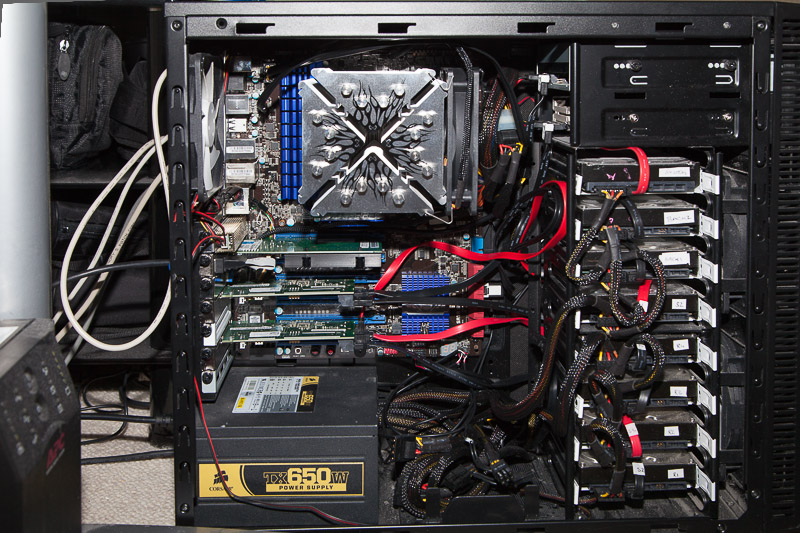
For context, this system:

IMG_0037-800.jpg


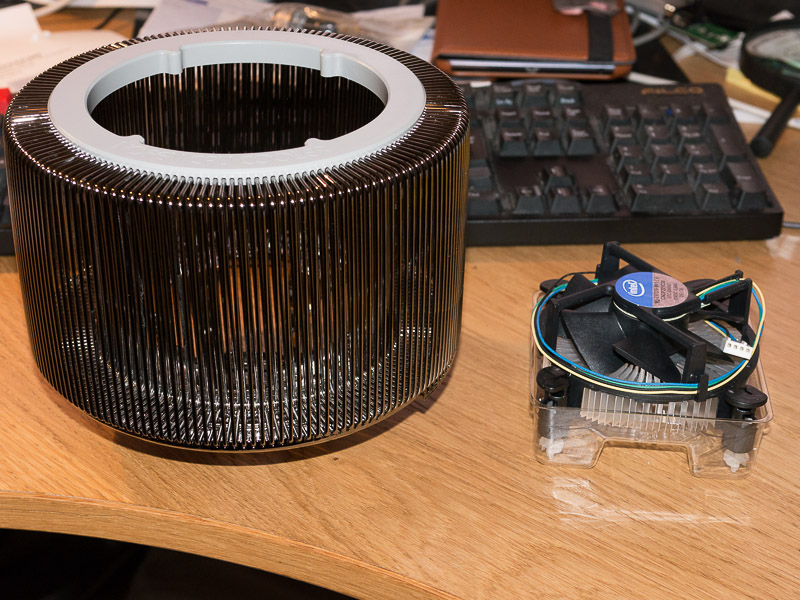
still has the 2 fans in front of the disks just to keep them cool but has one of these instead of the heatsink in the picture:

P1010123-800.jpg


and a Corsair AX760 PSU. I have also added a server network card, so it has 4 add-in cards:
  • Low end graphics card
  • Server network card
  • 2x PCI-e -> SATA cards

in a Fractal Define R3 case with all the fan spaces as unblocked as I can make it. Even running the CPU flat out for 3 days, I couldn't get the CPU temperature beyond 78 deg. C and the whole system (apart from the fans for cooling the HDDs) is passive....
 
A closed space would be something where you are venting out of the back or top of the unit into a closed cabinet without much clearance. Even worse would be with a cupboard door which shuts.

Basically, if there is nowhere for the heat to escape, it will just build. If it builds in the external environment, the air inside the case will become warmer, the heatsink then has less temperature differential to dump the heat into, so the chip temperature rises. The biggest "problem" (which may not be a problem at all!) is above and behind the unit. Hot air rises - you need to let it have somewhere to rise to....

Ah, well then shouldn't worry there, the corner of my desk is open space, heat can escape wherever it wants, well as a graphic designer and photographer, I'm most likely to be accessing a CD-ROM and needing to plug my Nikon into a front USB port most of the times, so I never bothered with the idea of putting my computers into a cupboard.

The left side of the tower (the side with airholes, opposite of the side where the motherboard is) will be next to a wall, but with good space between tower and wall, so I figure it will be okay as long as the front fan do its job, unless you think the side could do with a fan to make sure of sucking in more air?


Impressive.

My plan is most likely to include a CD/DVD drive, Zip diskette drive, floppy diskette drive, card reader, SSD, a couple of HDDs (one very large like around 500GB ish for my work and the other the lowest I can find for the kids) and since the Cooler Master HAF can have one of the HDD cages removed (it's able to hold 6 drives but I only need 3 so I can remove the top cage leaving bottom 3) and the front 200mm fan included with the case can blow over the HDDs and also with the cage out of the way, blow air into the main area.

I guess I can go with the suggestion that my case got more than enough fans, so seems I don't need to add any more.

Of course, I'm most likely to includes a graphic card, not for gaming, but to make it possible to have two screens, so maybe be tempted to put on a fan on the side?

I'm not into overclocking so I'm sure when I've finally decided on what motherboard and CPU I want to use, I can find suitable heatsink and CPU fan, which should be enough for my needs, not some powerful heatsink, I'm aware I need to be sure of cooling the CPU, but it's the airflow for the case itself I'm more worried about.
 
Back
Top