Glass.photo: users thread

myotis

Suspended / Banned
Messages
4,503
Name
Graham
Edit My Images
No
This is a thread dedicated to sharing experiences onusing the Glass.photo online (paid for) photo sharing platform, which allows you to link photographs to TP posts. @ancient_mariner suggested starting it in this forum.


It's still a relatively new platform (based in the Netherlands), which I and @EdinburghGary have been using for a spell, and @gramps and @Donnie have just joined to give it a trial. Although it offers a clean and professional presentation of photographs; I find some aspects of it a bit tricky to use. Indeed, rather annoying at times, but overall it looks like a good place to display and share photographs.

I have compiled a list of Glass.photo sites owned by TP members in a later post, which is here:


It's difficult to find any reviews of Glass, but here are are a couple of links, the latter offering a comparison with other platforms, and is more focused as a review (21 mins). The former is a bit more of a personal ramble about why the presenter likes Glass (7 mins).

View: https://www.youtube.com/watch?v=rrbdZ2vkURs


View: https://www.youtube.com/watch?v=uesElzovyt4&t=25s
 
Last edited:
Getting help in Glass.

I can't find any help in Glass, and the nearest thing to help pages are the faq pages, but even those are difficult to find once you are into the photo sharing pages of Glass.

Unless someone can suggest something better, the convoluted approach I have found is to...

1. go to your home page (click on the head icon to get there if not there by default)

2. click on the gear icon on your profile picture to open the settings page.

3. Open the community guidelines option on the settings page

4. In the community guidelines page, scroll down to the footer, and select the FAQ option.

There has to be a better way than this, but so far this is all I've found.

The other interesting link from the Settings page is the "Provide Feedback" one, which lists all the suggestions for new features and where you can add new suggestions.
 
Thanks for the heads up as I recall this being mentioned before.

I note that you can join as 'viewer' without cost is that what @gramps and @Donnie have done?

As a paid up member, how are you finding it and are any of your linked images here at TP from Glass, if so can you please share a couple so that I can 'look' at the interaction, so to speak'.
 
Thanks for the heads up as I recall this being mentioned before.

I note that you can join as 'viewer' without cost is that what @gramps and @Donnie have done?

As a paid up member, how are you finding it and are any of your linked images here at TP from Glass, if so can you please share a couple so that I can 'look' at the interaction, so to speak'.
I have accepted the 25% discounted 'member' offer so I have a two week trial to like it or cancel.
 
Thanks for the heads up as I recall this being mentioned before.

I note that you can join as 'viewer' without cost is that what @gramps and @Donnie have done?

As a paid up member, how are you finding it and are any of your linked images here at TP from Glass, if so can you please share a couple so that I can 'look' at the interaction, so to speak'.
They have both gone for a paid option with a 20% (I think) discount off the first year. Which is what I did a couple of months ago.

I linked a photograph in the flikr gone mad thread (where the discussion prompted the idea of a dedicated Glass thread):


I don't have any other pictures linked from Glass, and I am confident given Gary's response to linking from Glass he won't have any either (he hasn't tried)

I'm not really using Glass yet, and this was a random picture I added as part of a trial upload. I was attracted to Glass because it provided an uploader plugin for Capture One.

Edit: it's a 25% discount, as Gramps has just posted
 
Last edited:
It appears that Glass's version of Flickr's 'Albums' is 'Series' - this is where I made my first mistake!

Having uploaded the first 10 photos I clicked on 'Publish' and there they were ... gone, well not really they were uploaded but not visible until I went to my member profile.
I then decided to upload another 10 photos but I did not pay attention to the 'Add' button and instead found trhat I was starting another 'Series'. So if you want to add to a 'Series' (Album" you must 'Add' photos to it rather than do another bulk 10 photos upload.

Hope that makes sense!
:thinking:
 
It appears that Glass's version of Flickr's 'Albums' is 'Series' - this is where I made my first mistake!

Having uploaded the first 10 photos I clicked on 'Publish' and there they were ... gone, well not really they were uploaded but not visible until I went to my member profile.
I then decided to upload another 10 photos but I did not pay attention to the 'Add' button and instead found trhat I was starting another 'Series'. So if you want to add to a 'Series' (Album" you must 'Add' photos to it rather than do another bulk 10 photos upload.

Hope that makes sense!
:thinking:
Yep, I mentioned that series were albums in the Flikr thread.

As a relevant aside, you cannot set up a series with one photograph, and then add to it; it needs to be at least two photographs to get started.

It also appears from the new features request page, until recently (within months) you could only upload one picture at a time.
 
Further to the question from @Box Brownie here is a picture linked from Glass

L3Bvc3QvZDUyNzFmZTYtOTdkOS00NzQ0LWIzNzAtZTBhODY2YTg0MjMwL3Bob3Rv
 
I don't have any other pictures linked from Glass, and I am confident given Gary's response to linking from Glass he won't have any either (he hasn't tried)
I can't see how to link (like Flickr bbcode) - I get the option to mail a weblink but not in .jpg form that TP will accept.


How did you link @myotis ? (Yours isn't clickable like Flickr either).
 
Last edited:
I can't see how to link (like Flickr bbcode) - I get the option to mail a weblink but not in .jpg form that TP will accept.
How did you link @myotis ? (Yours isn't clickable like Flickr either).
You must be in grid view to use this method (not a single picture view)

Right click on the image in Glass,

choose "copy image address"

Paste this address into the "insert image" option in the TP post menu bar (select the "by url" option once in the insert image dialog box)

This gives clickable full size image in TP, but it doesn't take you to Glass, just opens the picture in a viewer which allows it to be enlarged to a bigger size than shown in the post. I seem to remember now that it has cropped up, that Glass restricts the image size.
 
Last edited:
Right click on the image in Glass,

choose "copy image address"

Paste address into "insert image" option in TP post
I'm on a mac and I don't get that option on right click.
 
I'm on a mac and I don't get that option on right click.
I'm on a Mac as well.

It seems you need to be in "grid" view to get it to work.

If you open a picture from the grid into the single picture view, with the metadata and comments, you get a different right-click menu
 
This is a thread dedicated to sharing experiences onusing the Glass.photo online (paid for) photo sharing platform, which allows you to link photographs to TP posts. @ancient_mariner suggested starting it in this forum.

Thanks for starting this Graham, I think it will become a useful resource. (y)
 
Thanks for the heads up as I recall this being mentioned before.

I note that you can join as 'viewer' without cost is that what @gramps and @Donnie have done?

As a paid up member, how are you finding it and are any of your linked images here at TP from Glass, if so can you please share a couple so that I can 'look' at the interaction, so to speak'.

I've joined on the their mid tier which is 40 dollars with a 2 week free trial if I change my mind and a 25% off offer, so only 30 dollars and I used my nectar credit card so I'll get 15p in points lol.
Im planning not cancelling and using it for the year, plan is to only publish my best work, proper work, not snaps if that makes sense.

as others have said, it's definitely not as intuitive as flickr, but I like the idea that it's cheaper, it's less algorithmic and it's evolving. One thing I am missing is the restrictions on trying to keyword, they are quite limiting currently.
But time will tell, might cancel the flickr pro next year if I like it enough.
I've literally only put one picture on there so far and it's this.


Yep, you guessed it, Im on a mac too just like @gramps so if i copy the link and insert it the forum wont use it.
 
I'm on a Mac as well.

It seems you need to be in "grid" view to get it to work.

If you open a picture from the grid into the single picture view, with the metadata and comments, you get a different right-click menu
Ahhh think ye were posting as I was

Going back to the grid view and

L3Bvc3QvM2ZhZmQ3NjctOGFjZS00M2JiLTlhNDQtN2RmNjMzZTBkNWRlL3Bob3Rv


(y) (y) (y) (y)
 
I see that when you click on the posted image there is an icon to then open the image in full screen.

There is also a "download" icon but that appears to be disabled.
 
That’s a positive for me. :)
I think that will be a positive for all of us. Glass say they have some download prevention measures in place, and I am assuming this is a Glass based viewer, but maybe not.
 
Not sure how much I can add of value to this thread but I'm glad it's here. I find Glass easy to use, fast, and full of high quality photography.

No clutter, very few ads and all the members I've come across seem really into photography in a big way and are posting images that are inspiring and interesting for the most...

Flickr is a sh*tshow in comparison, no offense intended. The quality of work generally across Flickr outside of "explore" is just not high but maybe because it's more used as general photo storage, I don't know.

Flickr also has ads literally everywhere. Pop ups and all sorts.
 
Not sure how much I can add of value to this thread but I'm glad it's here. I find Glass easy to use, fast, and full of high quality photography.

No clutter, very few ads and all the members I've come across seem really into photography in a big way and are posting images that are inspiring and interesting for the most...

Flickr is a sh*tshow in comparison, no offense intended. The quality of work generally across Flickr outside of "explore" is just not high but maybe because it's more used as general photo storage, I don't know.

Flickr also has ads literally everywhere. Pop ups and all sorts.
Well, the fact that you find it easy to use may make you very useful to people who are struggling with something, or have a question about Glass's capability.

You don't get the ads, if you pay for the Pro version, but as I posted in the Flikr thread, it was the ads, and the built in delays, in the free version, that made Flikr unuseable for me because this poor viewing experience meant I couldn't see me ever sending anyone to Flikr to look at my pictures.
 
Well I just singed up to see what it`s all about. Not sure yet, as it kinds seems a bit of a messy layout to me.

 
Well I just singed up to see what it`s all about. Not sure yet, as it kinds seems a bit of a messy layout to me.

The glass layout (mostly) should just be tiled photography without much else. I've always admired how clean and clutter free it is...
 
Well I just singed up to see what it`s all about. Not sure yet, as it kinds seems a bit of a messy layout to me.

Attempting to follow your link, the images can't be viewed without signing up. Is this a setting you've chosen, or a default?
 
Attempting to follow your link, the images can't be viewed without signing up. Is this a setting you've chosen, or a default?
Ahh I think it`s a setting option... I`ve changed it for now, so should work (y)
 
Attempting to follow your link, the images can't be viewed without signing up. Is this a setting you've chosen, or a default?

Mine aren't set to private, you should be able to see them...
 
Attempting to follow your link, the images can't be viewed without signing up. Is this a setting you've chosen, or a default?
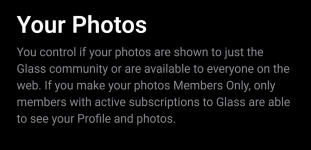
Default setting under 'Privacy' is members only.
 
I have to say that the lack of any text popout when hovering over buttons is getting more and more annoying!
Which ones are you having issues with - there only about 6 that I've found.
 
icons.jpg

Left gives you your photo feed - yours and those you follow.
Magnifying glass is 'Search' - select from options at top of search page.
Bust = your 'place' on Glass.
Bell = any notifications.
+ is where you click to add photos.
 
This thread has come up at just the right time for me, I signed up for Glass a while ago but never got as far as starting the trial ( putting in my payment details) as I absolutely HATE giving my details when I might not continue to use the service, the fairly positive comments so far and the fact that flickr has put its prices up again is making me seriously look elsewhere. This forum is pretty much the only place I share my images outside of FB, so being able to share here easily is a pretty important part of choosing a new photo site, I do have a 500px too but have never really taken to it for some reason :rolleyes:
 
View attachment 469611

Left gives you your photo feed - yours and those you follow.
Magnifying glass is 'Search' - select from options at top of search page.
Bust = your 'place' on Glass.
Bell = any notifications.
+ is where you click to add photos.
Yes as i say some are ok eg search / you / notifications but then once you look at someone elses photos you are faced with more unfamiilar ones that seem to be follow them, clicked on that earlier on someone i had not planned to follow then unfollowed them which then you think it's going to notify them of such etc. they need hover over text.
 
I have to say that the lack of any text popout when hovering over buttons is getting more and more annoying!
I agree. Something on hover would be handy ;)
 
The glass layout (mostly) should just be tiled photography without much else. I've always admired how clean and clutter free it is...
I`m probably too used to the layout of flickr at the moment. But will persevere.

Have you downloaded, or just use web interfaze?
 
Yes as i say some are ok eg search / you / notifications but then once you look at someone elses photos you are faced with more unfamiilar ones that seem to be follow them, clicked on that earlier on someone i had not planned to follow then unfollowed them which then you think it's going to notify them of such etc. they need hover over text.
You'll be getting another welcome email soon, they say reply with any issues - I did and at least they have taken my suggestion on board. :)
 
Well I just singed up to see what it`s all about. Not sure yet, as it kinds seems a bit of a messy layout to me.

I've only got Flikr to compare it against, which I've never liked, and I don't see it as messy; for me it comes across as rather clean and professional.

What comes across as messy to you?
 
Back
Top