Geo- Tagging import options

chuckles

Suspended / Banned
Messages
4,470
Name
Barry
Edit My Images
Yes
Anybody have experience of geo-tagging in Lightroom 5?

I know you can tag by selecting shots and then going to the map tab, search location and 'pop' the co-ordinates onto the selected shots. I have a GPS device for my compact camera but was thinking that getting the equivalent for my D800 is going to be expensive for what I want to do.

So, after all that, is it possible to sync a Garmin (other makes are available) tracker to Lightroom? I have LR5.4. (I believe in Aperture you can sync camera/files with the Garmin tracker)

Any ideas?
 
I'm using this plugin with lightroom 3

http://regex.info/blog/lightroom-goodies/gps.

I assume functionality is similar in 5. If truth be told I find it messy, but it is possible to exactly as you say....sync location from a garmin trace (etrex20) in my case to a series of pics.

Worth a download to play with free version before buying though.
 
Excellent - thanks. I'll also have to get a Tracker :)

I wanted to make certain it was possible before I went down the 'hardware' path.
 
Ok... easy-peasy! Got myself an Garmin eTrex20 tracker and after a bit of a kerfuffle with the map that is installed (I call it a few connected lines so I've sourced some free ones).

Next I checked out Arwyn's link and agree, it's a bit complex but it relates to older versions of Lightroom. Now, if only you could get manuals these days without having to resort to on-line 'help' pages I could've resolved this easier... Lightroom v5 (and v4) comes with all the S/W you could need. As long as your tracker produces a .gpx data file you're laughing. What you end up with are tags which are assigned to the Lightroom Library - not the photo files.

Only important point to remember - Camera internal clock and Tracker to be in sync! There is some fuzzy logic built into the software options I looked at to overcome sync issues as Camera clocks are no where near as accurate as GPS. Lightroom even sorts out issues like time zones and Daylight Saving settings.

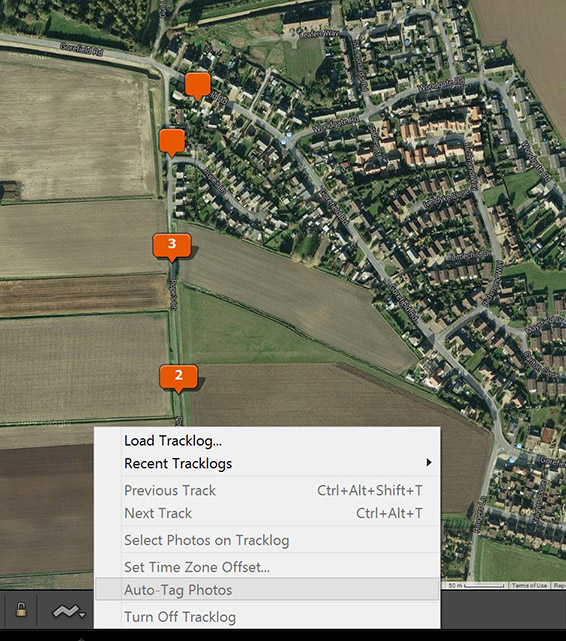
Import your photos, put them in a collection. Select that Collection -- Go to the Maps tab and you'll find a squiggly line at the bottom of the Map 'pane' - click on that to open and set your your <track>.gpx file --- then just hit the Auto-Tag photos option. Bob's your Uncle!

tracker_sync.jpg


I started in the back garden, walked up a little lane, took single and mutiple shots from (recognisable) locations and the above is the result. Bit cheaper than a Nikon GPS-1 unit and it does other stuff too.

There is another method that uses free software, Geosetter is pretty good , from within which you can actually save the GPS metadata of the Photo file(s) - that includes most Camera RAW files too. Import these updated files into Lightroom and the Mapping/Geotagging works straight away.

Thanks once again Arwyn. :ty:
 
Back
Top