fused external hard drive

LCPete

Suspended / Banned
Messages
9,785
Edit My Images
Yes
I have just plugged in the 20 volt power lead for my laptop into my seagate 500Gb external drive which is now dead:'(
blooming plugs are the same :bang:
luckily I had backed up all of the best shots :)
but was wondering if the seagate is economically repairable ?
Will the drive have an internal fuse ?
the case does not have any screws so I cant look inside
Pete
 
Bin job, no fuse inside as I know of, bad luck..
 
Thanks for the quick reply :)
Am very annoyed with myself but at least I was up to date with my backups get another drive now I guess :'(
Have to figure out a way of preventing the same thing happening again
Pete
 
I did this the other night, i have two internal hdd's and a docking system, and whilst using them my power cable shorted, and it isn't fused!! There were sparks and flames and all kinds of beautiful (and deadly) blues, reds and oranges Lol, bout ***** me pants! Unfortunately the flames were directed straight into a pile of letters, nearly set the house on fire! I don't know if my hdd's are damaged yet Lol :s
Sorry if i am thread stealing, i just wanted to tell you that you're not alone! :(

As for seagate harddisks, i can't imagine they are internally fused, you'll just have to hope it still works when you get another cable :(
Steve.
 
Thanks gonzo and steve:)
I have taken the drive out of the casing is there a lead that I can buy so that I can connect the drive to a usb port
I use a laptop and I dont want the mess with the wifes PC !:D

sorry to hear about your computer steve hope you can recover your data
 
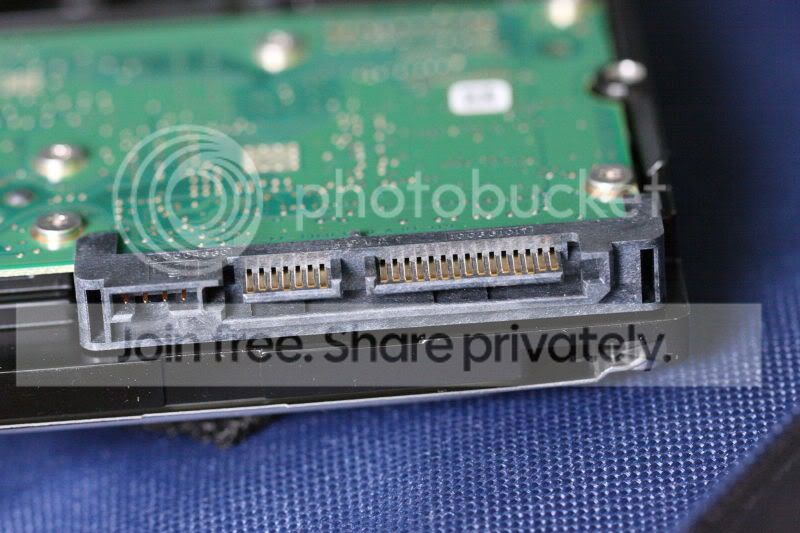
depends if its IDA or SATA, maybe a pic of the drive connections up here will help if your not sure ?

ebay has thousands of cheap cables and usb-hard drive cases, if you can confirm what the drive is i can give you some links.
 
depends if its IDA or SATA, maybe a pic of the drive connections up here will help if your not sure ?

ebay has thousands of cheap cables and usb-hard drive cases, if you can confirm what the drive is i can give you some links.
Thanks gonzo here's a pic of the connections its a seagate barracuda 7200.12 500gb
_MG_8670.jpg
 
Thanks very much gonzo for your help thats brilliant , have ordered the caddy on your link:)
With a bit of luck the drive itself is Ok its worth trying anyway:)
 
yes m8, if not you can get a new drive to fit in the caddy :)
 
Thats a SATA drive, and if you get a docking system they are really cool, just make sure its a fused plug!! Lol. My hdd's should be fine thx :)
Glad to see you have your problem fixed, its funny when you open up an "external hdd" and inside all it is, is an internal hdd with fancy packaging :P
Steve.
 
There is about 99% chance the hard drive itself still works, you have just blown the PCB board components... it is extremely unlikely that a hard drive can blown with to much power as its simply a magnetized metal disc.. just need to pop it in another external hard drive box or in to your pc should work fine :thumbs:
 
even if the hard drives popped you can then buy an identical one and swap the circuit board over to get the data off :)
 
Thanks thats a relief :)
there is stuff on there that I dont want to lose

I had backed up the best photos (raws) to 2 other drives and DVD but it would be good if I can save the rest

I did notice when I took it apart that the external drive was just an internal one in a fancy box !

I will swap the drive over when the new caddy arrives and let you know how I get on . Thanks again for your help I did not have a clue what to do :)
Pete
 
I am glad I am not the only one to have done this. I put the drive in another external case and all was fine.
 
Here's a couple of guys who can help!!

showphoto.php
[/url][/IMG]

Hope you get it sorted and all is well

Paul
 
OWIAN

There is about 99% chance the hard drive itself still works, you have just blown the PCB board components... it is extremely unlikely that a hard drive can blown with to much power as its simply a magnetized metal disc.. just need to pop it in another external hard drive box or in to your pc should work fine

I would rewrite this if I were you especially as your an IT technician.

Stick 20V up any SATA drive and you could fry everything from the mainboard to the heads themselves. A hard drive isn't just a metal disk, it has a solid state motor which contains electronics. The heads have amplifiers, then theres the drive mainboard etc ..........

Just popping it into another external drive box repairs the drive mainboard ? sticking it your pc does the same.

Not having a go but your comments are hugely missleading.


LCP Pete chances are that the drive survived being buffered from the 20V by the small SATA to IDE convertor board in the Seagate enclosure.
I don't want to sound like a killjoy but expect the worst and hope for the best. The Seagate psu if it's the same as mine is 12V so upping it to 20V is a big leap and may have fried the mainbord on the drive. If it has I'd go on ebay and input the exact drive model into the search, it must be the exact model number. If you could get one then swap the board and hopefully you can recover the data. I've done it on a western digital 1tb drive.
 
LCPete, at least you know now that you can go and get a 1TB internal harddisk dirt cheap and just use your caddy on it, instead of forking out hundreds for an external one :)
 
LCPete, at least you know now that you can go and get a 1TB internal harddisk dirt cheap and just use your caddy on it, instead of forking out hundreds for an external one :)

Hundreds for a 1tb external ? I picked up one of these last week, cheap as chips the only thing is that bugs me is there is no led on the front. http://direct.tesco.com/q/R.206-4435.aspx A bargin for £55 I think.
 
if i was confident in the drive being 99% i would have suggested a more expensive enclosure, as it stands the OP has a budget box on the way and fingers crossed when it arrives :)
 
Hi guys unfortunately the drive did not work in the enclosure
The drive itself or its board must be buggered
It was worth trying though :)

Thanks very much anyway

Its is a good suggestion Chris swapping the board on the drive itself but I do have the best photos already backed up so its not really cost effective for me to do but would have tried it if I did not have backups
Thanks very much for your help guys:)
Pete
 
Back
Top