
Fuji x-t20 files in adobe

Wookie123

Suspended / Banned
Messages
55
Name
Lukasz
Edit My Images
Yes
Hi guys,
I switched from Sony to Fuji, went on a great hike, took a lot of photos and I am just a bit concerned about the way to process the files. I know about the detail slider etc. I tried iridient x-transform plugin, but I just wanted to show you something and ask if that's just the sensor, or maybe something wrong with my lens? I can't seem to remove these artifacts even with chromatic aberration correction (manual). I'm posting iridient transformed file vs raf and raf vs jpg. Notice that weird halo. RAF and iridient dng have the same settings only that dng has only x-transformer default sharpening applied.
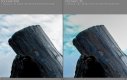
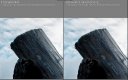
rafVSjpg (1280x813).jpg irVSadobe (1280x802).jpg
 
Hi guys,
I switched from Sony to Fuji, went on a great hike, took a lot of photos and I am just a bit concerned about the way to process the files. I know about the detail slider etc. I tried iridient x-transform plugin, but I just wanted to show you something and ask if that's just the sensor, or maybe something wrong with my lens? I can't seem to remove these artifacts even with chromatic aberration correction (manual). I'm posting iridient transformed file vs raf and raf vs jpg. Notice that weird halo. RAF and iridient dng have the same settings only that dng has only x-transformer default sharpening applied.

View attachment 112721 View attachment 112722

are these crops at 100% ?

To check your basic sharpness take some shots on a tripod at iso 200 with no additional Dr take some raws and some jpegs to compare when processing in lightroom or photoshop. you should see no chromatic aberration at all as that is automatically removed as are any other distortions.

The halo is caused by over sharpening.

It looks to me like the image was not overly sharp in the first place.
It is best to think of sharpening as a two stage process.
Input sharpening when you bring it into your raw processor should always be minimal to just eliminate any softness caused in the de- mosaicking. It is easy to create artifacts at this stage.
The output sharpening is done at the final output sizes and can be rather stronger as artifacts rarely show at these reduced sizes. For instance for web use at 1024 pixels on the long side you can increase sharpening to just before haloing starts to appear. Do that with the 1024 file at 100% and no one will ever see it, if you can not yourself.

The shot bellow was taken with the same lens as yours, but with the older XE2 and is about a 50% crop of the original. shown here at 1024 pixels. with both input and out put sharpening
I can not see any halo or artifacts. It was taken at F22 to maximise the depth of field, so has suffered considerably from the softening due to diffraction but is still acceptably sharp.
( processed with adobe raw and photoshop)

TAXE0411X by Terry Andrews, on Flickr
 
Last edited:
are these crops at 100% ?

To check your basic sharpness take some shots on a tripod at iso 200 with no additional Dr take some raws and some jpegs to compare when processing in lightroom or photoshop. you should see no chromatic aberration at all as that is automatically removed as are any other distortions.

The halo is caused by over sharpening.

It looks to me like the image was not overly sharp in the first place.
It is best to think of sharpening as a two stage process.
Input sharpening when you bring it into your raw processor should always be minimal to just eliminate any softness caused in the de- mosaicking. It is easy to create artifacts at this stage.
The output sharpening is done at the final output sizes and can be rather stronger as artifacts rarely show at these reduced sizes. For instance for web use at 1024 pixels on the long side you can increase sharpening to just before haloing starts to appear. Do that with the 1024 file at 100% and no one will ever see it, if you can not yourself.

The shot bellow was taken with the same lens as yours, but with the older XE2 and is about a 50% crop of the original. shown here at 1024 pixels. with both input and out put sharpening
I can not see any halo or artifacts. It was taken at F22 to maximise the depth of field, so has suffered considerably from the softening due to diffraction but is still acceptably sharp.
( processed with adobe raw and photoshop)

TAXE0411X by Terry Andrews, on Flickr


These are 1:1 crops. I think I need to experiment with that DR thingy, I am completely new to the Fuji system, so there's a lot to optimize. I kinda like the big sized photos even on the screen though ; )
 
Before you try sharpening, try no sharpening. I use the XT2 and X100F in Lightroom and have found there’s no need to touch sharpening at all.
 
Back
Top