flickr probs

dinorock

Suspended / Banned
Messages
4,581
Name
Mike
Edit My Images
No
i,m having problems with the new flickr, each time i upload a shot it says not available. what am i doing wrong? :shrug:


zebra finch edit by Mike Rockey, on Flickr


theres a photo in this start thread that wont even show

edit ...its when i try to put a pic on the forum it wont show.

edit2 replaced the url with correct info from the lovely peeps on tp :thumbs:
 
Last edited:
It because your using a page url and your using img tags

You need to use

Code:
http://farm5.static.flickr.com/4075/4913810412_8a429e2bd9_b.jpg
With img tags
 
Same thing I had Mike.

To sort it.... when in Flickr go to sharing and don't grab the link like you were used to doing but ask for the html code

Then you need to copy just the bit that says http://farm.static.flickr.com/imagenumber.jpg

it's just that little section of code you need to paste into TP for us to see your pics.

HTH
 
Last edited:
Or Sharing Grab the HTML/BBCode and check the BB Code box and copy and paste that code in your post
 
Last edited:
Theres no need to use image tags anymore, flickr have made it simple, so simple even I can do it :)

Go to the photo you want to share, top left of the photo is a couple of pull down menus. Click 'Share this' in the pull down choose the the option 'Grab the HTML/BBcode' click the BBCode button choose the size you want and copy the resulting code. Paste that directly into your post and the picture will appear :thumbs:

Steve
 
wow at least three differant methods there, give me a minute. in the words of arnie, i,ll be back.

 
Last edited:
Whoops Dave beat me to it :thumbs:

Steve
 
aha :lol: thanks one and all i did an edit three posts up its working now i used the bb code method its actually quite quick:$
 
Last edited:
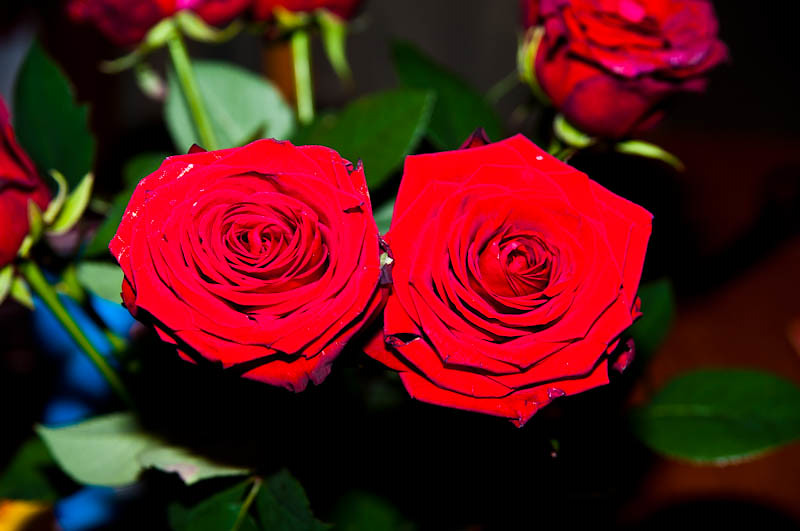
yey, i like the image but the reds look a bit blown :S odd one i dont think i can diagnose that :S

thanks all dont worry about the image it was roses with like a velvet finish on them i tried every thing i know and couldnt get it right :lol:
 
ha ha fair enough :)

i,m only joking chris,but what i found was the flash seemed to bounce off the flowers leaving them blown, and when i adjusted the power of the flash it just made the suroundings darker. but the flowers were still blown see flickr shot 2.


roses 2 by Mike Rockey, on Flickr
 
hmmmmm stick the camera on manual and drop the flash power to the lowest possible, then go for a longer exposure/low iso and you should be able to get all of the flower in

4737068540_8dc83990c3.jpg
 
damn i was shooting in aperture priority, odd as ive been shooting manual since the begining of the year after reading understanding exposure by bryan peterson.:thumbs: off to have a go in manual back soon will post an image shortly
 
make sure you use a tripod a hi F stop (around 11-16) and you should get a decent image if its dark (theres a few flower images on my flickr (page 5)) exif should be on those if your stuck

only saw this after i went down stairs:bonk: these are hand held but high f stop:suspect:
 
f16 60th sec


f16 60thsec -1stop on flash


f16 60thsec -2stops on flash


i think im using my flash wrong :bonk:
 
Last edited:
oh hell its all gone wrong now theres supposed to be writing between each shot doh

1st is f16 60 sec

2nd is f16 60 sec -1stop on flash

3rd is f16 60 sec -2stops on flash

sorted
 
Last edited:
Hi

Try just using natural window day light you wont need a flash then, move them close to a window, use AV, set your aperture say f8, place them quite a distance from you BG then you get nice Dof, take it your using a tripod and cable release, also I would go for a single rose rather than a bunch, also the red BG isnt helping try black or white
 
Last edited:
number 2 and 3 are bang on, the only issue really is the red backdrop, you could do with a black one to make the red flowers really pop, but there 100% better than the blown reds from before :)

yeah the red backdrop is the living room curtains i just wanted a single colour so put them up against there cheers they defo look better these are straight out of the camera no edits thanks for your help chris

Hi

Try just using natural window day light you wont need a flash then, move them close to a window, use AV, set your aperture say f8, place them quite a distance from you BG then you get nice Dof, take it your using a tripod and cable release, also I would go for a single rose rather than a bunch

bit difficult this time of night steve:D but i,ll give it a go tommorow:thumbs:

thanks to all for your help:thankyou:
 
Mike

Thanks :thumbs:

Yep day light at night not a good idea LOL and as said go for a single rose,and the red BGs not helping, if your using a tripod/cable release it dont matter how long the shutters open

you could just light it from a single desk light, take a shot, then use that as a custom WB and take another shot
 
Forgot to say make sure the light isnt hitting the BG just the flower, eg pointing away from the bg, but not into your lens
 
Last edited:
Back
Top