Flickr desaturation problem

dan_yorkshire

Suspended / Banned
Messages
2,398
Name
Dan
Edit My Images
Yes
This has been asked numerous times on google searches and each time a different answer has been given.

Does anyone have first hand experience in getting a photoshop image to look exactly the same on flickr?

I am using CS3 and find my shots are desaturated a fair amount, immediately noticeable.

I've seen people talk about making sure sRGB is ticked when saving the jpeg etc but I cant find that option, only the option to tick or untick the 'Adobe RGB (1998)' box.

Any help would be great.

Cheers

Dan
 
Yes would also like to no this. At the moment i tend to make the photo slightly warmer but it can still be a pain to get it how you want to on flickr.
 
I can't say i ahve noticed any difference, i also use CS3 and have recently uploaded some stuff, but they look the same to me.

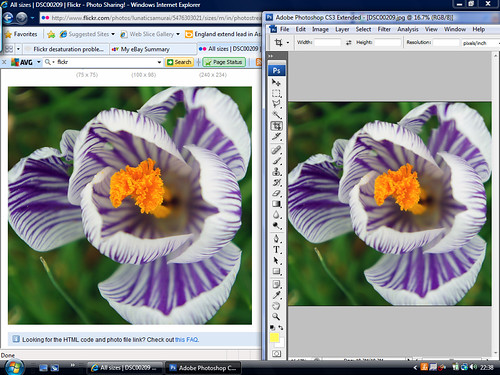
I have just taken a screen-shot of one of my images in CS3 and flickr and you can see there is no difference at all. Hope this helps.

5477629268_feae92434a.jpg
 
Last edited:
Cheers for the replies guys.

Do I change the colour settings under the 'edit' tab or is this something I need to do when saving a jpeg? If its the latter then I'm struggling to see how to do this.

I have just changed the colour palette and resaved the jpeg and its still desaturated once uploaded.

Dan
 
Cheers for the replies guys.

Do I change the colour settings under the 'edit' tab or is this something I need to do when saving a jpeg? If its the latter then I'm struggling to see how to do this.

I have just changed the colour palette and resaved the jpeg and its still desaturated once uploaded.

Dan

Could it be your screen? can you screen shot to show us the problem?
 
Flickr on the left, jpeg veiwed on my desktop on the right.

5478670426_a5187db941_z.jpg


I did a screengrab and saved it in windows paint.... so an upload to flickr from paint is ok.
 
Last edited:
Flickr on the left, jpeg veiwed on my desktop on the right.

5478670426_a5187db941_z.jpg

Ahh, see what you mean, that's very odd. I would say that it is a setting difference from CS to flickr, but like i say i have never had that problem.

When i opened up a flickr account i never mucked around with anything, everything is as standard so unless you have clicked something i really don't know what to suggest, are you using sRGB or CYMK for CS3? When you save your images are you saving for web?
 
Ok, so I've gone into my original PSD file, and changed my colour palette from 'Adobe RGB 1998' to sRGB and it immediately desaturates my image in CS3....this is what I dont want.

Changing my colour palette to sRGB is the only way when saving the file that it enables you to save as sRGB. I have never played around with my flickr settings and dont think this has always happened, unless I've just never noticed.

Here is a screengrab from my save page

5478092299_2f5f0b937d_b.jpg
 
So could it be that you desaturated image is what it is supposed to look like, and your 1998 RGB is making it too saturated?

Now if you look at the two images from flickr and CS are they the same?

Very possibly, but even the blacks are off, look at the light fall off on her right arm, its much better on the orignal version before saved to flickr......its the more saturated version I want. Do I have to change to sRGB and convert all my previous Adobe RGB 1998 files to what they used to look like? Really frustrating if thats the case.

Thanks for your input.
 
Last edited:
Very possibly, but even the blacks are off, look at the light fall off on her right arm, its much better on the orignal version before saved to flickr......its the more saturated version I want. Do I have to change to sRGB and convert all my previous Adobe RGB 1998 files to what they used to look like? Really frustrating if thats the case.

Thanks for your input.

Sometimes what you have to do is load your image into CS then go into image > Adjustments > auto levels/auto colour to bring the image up to what it should be, your always going to have to do a little PP no matter what for whatever reason as the image you take is never perfect in camera.

This is what i do and have never had any problems between programs.


Chances are that if you do this it will bring your image up to 1998 standards anyway.
 
You need to open the original image in CS3 and then go to Edit > Convert To Profile then select srgb from the drop down box.

But remember to save it as a different file name if you wish to keep your original Adobe RGB image.


When viewed in a none colour managed browser the difference in colour spaces can some times be striking

1198930555_DsiHL-XL.jpg
 
Last edited:
You need to open the original image in CS3 and then go to Edit > Convert To Profile then select srgb from the drop down box.

But remember to save it as a different file name if you wish to keep your original Adobe RGB image.

Cheers, I will do that where I need to keep my original too but from now on I'm gonna use sRGB for everything.... seems the only way forward if I'm uploading to flickr.

Dan
 
Back
Top