Fixing the sky in my pic

GIZTO29

Suspended / Banned
Messages
678
Name
Philip
Edit My Images
Yes
I took this photo at Seaton Deleval Hall in Northumberland (ish) on my Panny TZ7 recently before knowing about HDR etc then stumbled across a guide showing how to fake it with one JPEG.
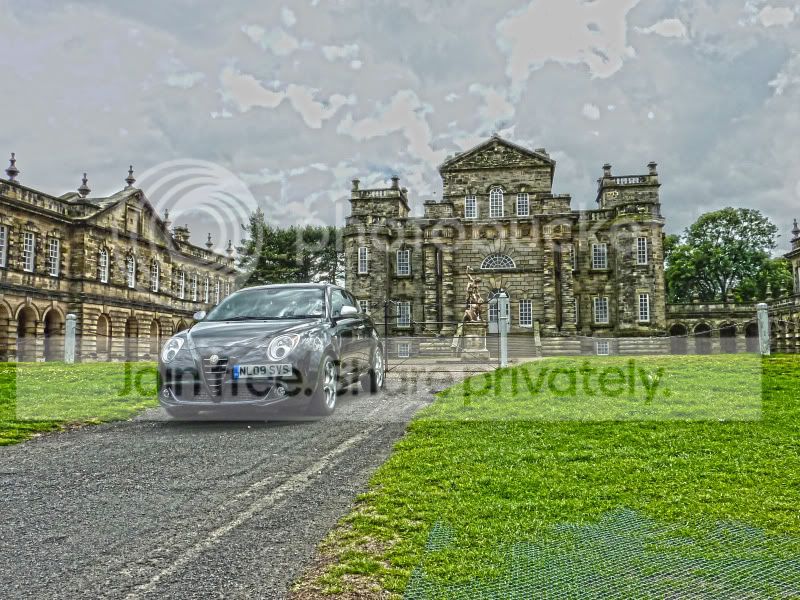
SeatonHallHDR.jpg

Im happy with all of the image bar the sky as its very blown out as you can see. Ive tried to fix it in PS using the lasso tool and level but it looks rubbish. I used the feather tool but i could still see the light sky for about 2mm above the buildings etc but the light sections still looked rubbish.
My question is is it possible to paste in a different sky from another photo? Ive no doubt it is but how would i achieve this?
Thanks in advance, Phil
 
Hi,

First can I suggest that you clone out the mesh that is under the grass at the bottom of your picture.

I guess you could use the export filter or the lasso tool and trace around your image then paste it on to an image of another sky.

I've not had a lot of experience so far with HDR but did you mean to make the appearance so strong?
 
Have I missed something? Surely HDR can't be done afterwards as the whole point is that the dynamic range is lost if you didn't take the series of photos in the first place?
 
Hi,

First can I suggest that you clone out the mesh that is under the grass at the bottom of your picture.

I guess you could use the export filter or the lasso tool and trace around your image then paste it on to an image of another sky.

I've not had a lot of experience so far with HDR but did you mean to make the appearance so strong?
I like the sound of cloning the grass so will do that and will try pasting another sky in but as for the image being so strong i basically took the 1st image altered the curves up, saved, down saved so i had 3 then used merge HDR in photoshop. I'de never used Photoshop before till this photo so was just following a guide. The pic just came out that way. I thought it was ok for my 1st attempt on Photoshop and will be doing them in RAW in future with 3 images. This was just me messing with what i had available at the time. That said i actually like the image and its strongness and im aware from reading HDR isnt everyones cup of tea in some of its forms but i love it. Its part of what pushed me towards buying a better camera along with Macro and Long Exposure stuff.
Thanks for the tips.

Have I missed something? Surely HDR can't be done afterwards as the whole point is that the dynamic range is lost if you didn't take the series of photos in the first place?
As i say above its a fake and i appreciate what youre saying. I only wanted to know how to remove the sky and paste in a better sky. It couldve been any photo really. Just so happened that this was one i thought showed what i was wanting to achieve better as the skys so crap. Ive just been introduced the the world of photoshop and am very interested in it so that why im asking various questions in this section at the minute.
Thanks Phil:)
 
Last edited:
I would be interested to see the photograph as it was before you started working on it.
 
Hi,

First can I suggest that you clone out the mesh that is under the grass at the bottom of your picture......

Or, simply crop the bottom of the pic to rid the image of that bit (scroll the page down to do a 'screen crop' of the piccie to see what's meant) ;)
An offset benefit is that, imo, the composition of the image is better as it would then be more 'landscape' than 'square' :)
 
I opened the image with the sky I wanted to use and selected it with the quick selection tool then copied it.
In your image I used the quick selection tool to select the sky and then used the refine edge tool to get a better selection around the trees.
I then pasted my copied sky into the image, Edit/paste into.
Adjusted the scale of the sky Edit/Transform/Scale
Flattened the layers to finish.


lO4J2.jpg
 
Right guys, i apologize as ive been in Egypt for a week but i love the pic with the new sky and thats exactly the type of thing i wanted. Thanks Stormcrow.:)
Thanks for the tip Mscotts.:)
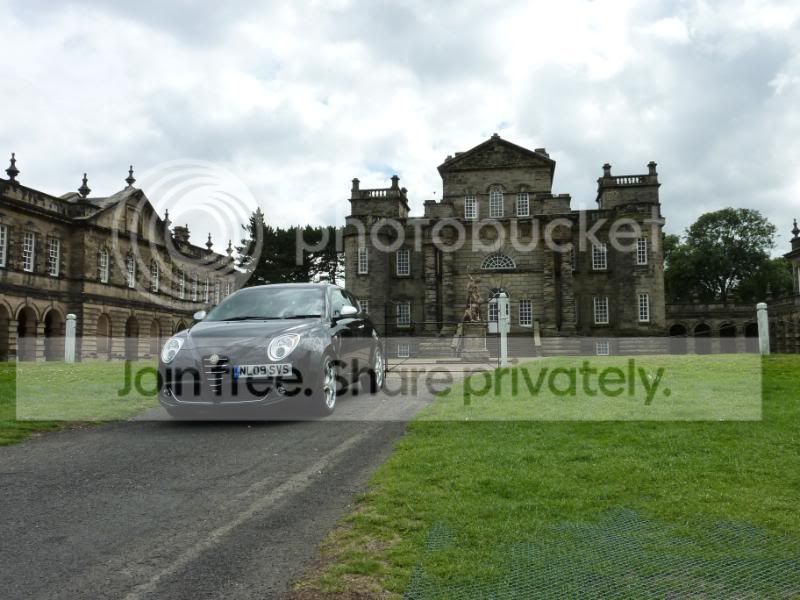
Andy, heres the original
SweetPic.jpg

Its not the best pic but as i mentioned i was just looking for a pic to try the fake HDR thing on as i didnt have any proper RAW bracketed pics to use to do a real one. I wanna spend a bit of time to produce that. Stormcrows improvement is exactly what i was looking to achieve so thats great, Phil:)
 
Well I just spent a while playing with the image only to find the mods I made had increased the file size so I couldnt put it on here :)

What I was trying to do was show that you can get a good result without HDR because the elements you need are in the image to begin with.

Play with shadows and highlights and then blend a B/W copy. Then you can mask the sky to reveal the original which I think looked ok anyway.
 
Well I just spent a while playing with the image only to find the mods I made had increased the file size so I couldnt put it on here :)

What I was trying to do was show that you can get a good result without HDR because the elements you need are in the image to begin with.

Play with shadows and highlights and then blend a B/W copy. Then you can mask the sky to reveal the original which I think looked ok anyway.

If its atall possible i'd like to see it via photo bucket if you saved it? On another note stormcrow is it possible to rotate the image on its axis as it looks out of level leaning to the left unless thats the perspective? Its mainly the right hand upright wall of the building that looks skew wiff to me:lol:
Phil
 
Last edited:
On another note stormcrow is it possible to rotate the image on its axis as it looks out of level leaning to the left unless thats the perspective? Its mainly the right hand upright wall of the building that looks skew wiff to me:lol:
Phil

What I've done here is created a new layer then I dragged some guides with the move tool from the rulers on the top & side to show how much adjustment I need to do.
Then I have gone to edit/transform/distort then dragged the corners until happy with the image.

AfR8f.jpg
 
Thats great help stormcrow and as i can see has really improved the pic. Maybe i need a spirit level on my camera! Remember this pic was taken a while back before i bought my D5000 and tripod. I did actually figure out how to rotate but i went a different way clicking on image then roatation and put in the degree eith cw or ccw. It took a while to get it right i admit haha. It was on a different photo btw and i noticed the transform option isnt highlighted on mine. Maybe this is due to me not creating a new layer. I apologise for my extremem lack of knowledge with photo shop as im totally new to it. One other thing, can i ask why you wouldnt use rotate? I would look at those options and naturally go with it so what does distort offer over rotate?
Phil
 
Last edited:
The problem is you have lens distortion to contend with here. You can rotate to make some lines straigh but it would mean others weren't. When you compose you need to decide which lines are the most important - in this case it would probably be the roof of the main building.
 
The problem is you have lens distortion to contend with here. You can rotate to make some lines straigh but it would mean others weren't. When you compose you need to decide which lines are the most important - in this case it would probably be the roof of the main building.
Yeh, i see what you mean. I just thought in the original the right wall and roof of the main building were very dodgy. I realise that if the wall is squared up the roof may not necessarily be as i think the last pic shows. In my mind though wheneve you look at a building from whatever angle the walls should always look plumb to the eye. Do you agree?
 
Is this what you wanted?

4957846567_d599e5c124.jpg
Youve changed the sky totally so yes mate, that was the idea and what i was wanting to learn so thanks.
Phil
 
Youve changed the sky totally so yes mate, that was the idea and what i was wanting to learn so thanks.
Phil

Note... the sky is your original
 
Note... the sky is your original

I did try this myself but i couldnt get a good result so thats why i asked in this thread if it was possible to put a whole new sky in there. Since and before stormcrow did his version i have seen a vid showing how to do what youve done but it was a basic beach pic where it was easy to feather the edges just above the sea. When i tried due to the intricate shape of the building i still ended up with the light sky in my version showing around the edge of the building or even worse going over the building!:bang: Im basically trying to learn what ps can do and how to do it at the moment and its overwhelming at the minute. I used the lasso tool whn i tried. All of questions are through intrigue i suppose at the minute so the end result isnt that important between yours and stormcrows, its the theory more than anything.
Thanks for the time in posting, Phil:)
 
Back
Top