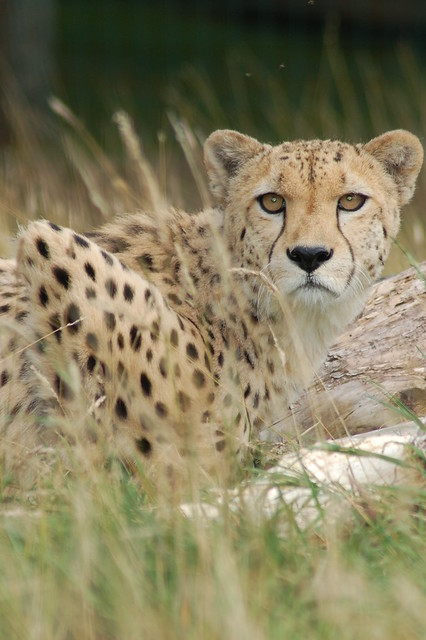
Fixing animals eyes

Floss

Suspended / Banned
Messages
42
Name
Liz
Edit My Images
Yes
Hello, this is probably a silly question, but how do I fix the eyes in this photo? I am using photoshop elements 7 and have tried simply using the spot healing tool, though this does not work particularly well. Thanks

6146792929_e62e3ff908_z.jpg
 
Last edited:
what do you want to fix? Tough to tell at this size, but about the only thing I can see you might want to change is the 'red' eye, which is slightly green here. If that is the case, I can tell you what I do in aperture and someone can translate that to PSE.

In aperture, I use the quick brushes and desaturate the green portion of the eyes. It will keep the dark/light gradient present, but take out the color. In aperture 3 you can quick brush with a saturate brush, or you can brush the area with a color brush and go to the color section and tell it to remove green. When the eyes are small like this, I prefer just to quick desaturate.

Thanks,
Rick

 
Select small sized paintbrush, choose colour black and paint pupils.

6146792929_e62e3ff908_z.jpg
6146792929e62e3ff908z1.jpg
 
If you mean the highlights on the eyes:-

Zoom in to 300%
Using the Clone Stamp tool (make the tool just smaller than the cheetah's pupil - [ key to reduce size). Take a sample from the black nose (put tool on nose, hold down Alt, and left click) and clone - i.e. click it on to each pupil.
Save that and the highlights should have gone leaving nice black pupils.

I tried it using PSE8 so hopefully PSE7 will be OK too.
 
Jim's method works fine too.
 
You're welcome
 
Back
Top