Fix the Cow!

Seajay

Suspended / Banned
Messages
1,493
Name
Cathy
Edit My Images
Yes
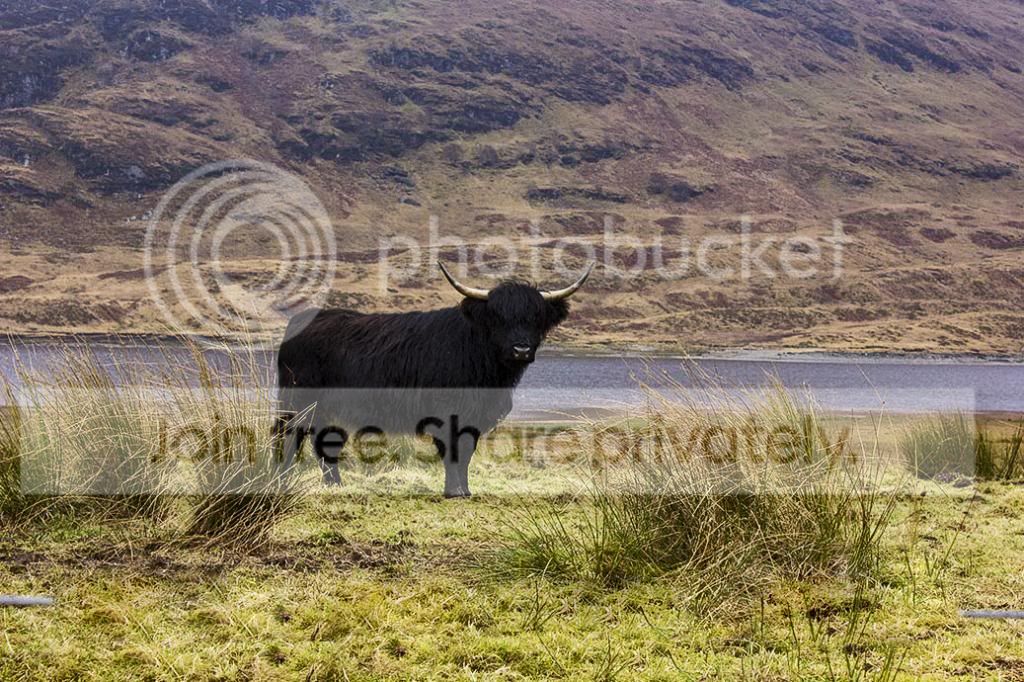
Hi everyone not been on for ages and have playing with some old photos from earlier this year.

Now I know this is only a cow but I really like it!
However can't for the life of me get the cow to pop from this picture.I have been trying but i always end up with too much sharpening.
Any tutorial links or advice would be great!
Cathy


cow3 by cooriedoon, on Flickr
 
It's not very well lit, that's the real problem. Not sure how much you can make a black cow, lit with dull, low contrast lighting "pop" without looking stupid to be honest. It really needed some raking low sunlight across it's coat.

This helps a little.

NyNT85b.jpg


Duplicated layer in PS

used a black and white adjustment layer, and adjusted filtration to get maximum tonal separation in it's coat.

Erased the black and white layer all except the cow

Adjusted opacity of black and white layer to 90%

Increased saturation to restore colour levels in the cow.

duplicated layer again, and ran a light high pass filter to add edge detail to the coat.

Erased the high pass layer all except cow.

Blended with Overlay

Flattened

Removed wire.

I reckon it looks too much.... gone too far I think. It would be more successful with a high res file though.


Lighting is the issue here.... not processing. The light wasn't with you... simple as that.
 
Last edited:
Thank you this is a great job much better than mine! and thank you for sending the steps to get it this good.
I spent a long time fiddling over the last couple of days it was driving me mad!.

I will follow your steps and see how I get on it will be fun to do.

You are right about the light it was very early morning and it took so long to get him to look my way! Lol!
 
That's nice.
 
Christine very well done! this is very good. I like the idea of losing the colour of the background rather than trying to enhance it.

Thank you for taking the time to help and giving me all the steps used to get this result!

Gosh I need to practice more and maybe have a lot more patience!
Cathy
 
Christine very well done! this is very good. I like the idea of losing the colour of the background rather than trying to enhance it.


Agreed. That's much better than my idea of enhancing the cow. That's why I felt it was overdone. Reducing the background has really helped here. Nice work Christine.
 
Thank you, I can see why you like this picture, I do as well, it is always easier to work on pictures I like :)

I do not get much spare time at the moment as I am working on another ongoing project but at the beginning of the year I spend ages following tutorials and practising with Photoshop and learned a lot - still even more to learn though
 
9224235394_29e53e0176_oA_zps3f2356e8.jpg


Oops! Just noticed I missed a bit of the wire at each end! That's (part) of the trouble with trying to work on a laptop. Still, that's what happens after opening in CS6 RAW and twiddling a bit.
 
Wow! Jon that is awesome! This is what I was hoping to try to get when I began. Lol! Nae chance of that happening anytime soon :)

Thank you for taking some of your time to help I appreciate this, especially during such a beautiful day!

To all of you well done! and many thanks.
I know it was not very interesting but I like it ! No idea why it just captures me every time I see it.
Sad woman I am!
Cathy
 
Ta! Actually I was just messing around while listening to the tennis, talking to my mother-in-law and eating breakfast!

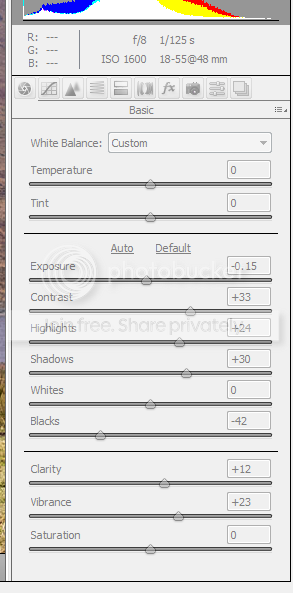
Dunno what editing system you are using, but for what it's worth, there were the RAW settings I used:

CS6_zps2bb6ed49.png


I played around with shadows/highlights in Photoshop before saving - and made a mess of cloning out the wire, but that's Andy Murray's fault. :)
 
Jon that's good to see.

I used Lighroom first then photoshop CS 5 but I have a long way to go. It was a super game today he has done us proud!!
Thank you
Cathy
 
Back
Top