
and please use their services
You are using an out of date browser. It may not display this or other websites correctly.
You should upgrade or use an alternative browser.
You should upgrade or use an alternative browser.
First use of DSColour labs - muddy brown prints
- Thread starter ancient_mariner
- Start date

OP

ancient_mariner
Moderator
- Messages
- 27,780
- Name
- Toni
- Edit My Images
- No
Are you, in visual terms, pixel-peeping? I wonder how you check your images before exporting for print. I can't imagine what the print machine might add to a sent file. Of course you can't predict a printed image entirely on a computer screen, but my experience is that the digital print process is a fairly neutral interpreter of the file sent. Thus in such a circumstance I would hesitate to blame the lab, and after taking a breather I'd patiently examine my workflow (and originals).
I think the OP's original expectation, and the point to the thread, was that if your image file is purely monochromatic (i.e. each pixel has identical R/G/B values) then you'd expect the print to be purely monochromatic. That's what I'd expect too, and despite the patient explanations in this thread I still don't understand why it isn't true. Of course, if you have a discrepancy in colour profiles then all bets are off. But if I've read this thread correctly, the OP was sending an sRGB image to a printer which was expecting an sRGB image. So unless he's made a gross error somewhere, it's not obvious (to me, at least) what tweaks he could make to his workflow which might correct this. (If I've understood properly, which I might not have.)
Stuart is correct. When DSCL asked for me to select an image to reprint I chose a mono because if there were a colour cast in the printing process then it might be revealed, while with a colour image a question about image processing could never really be answered. I know there is no colour component to the image because when in develop mode moving the saturation slider right or left does not make any difference to the image.
Workflow: basic image dev in LR, then move the image to Nik Silver Efex, process without any colour toning, return the image as a tiff to LR, where small changes to B&W points & 'exposure' were made. Image then exported - as I always do - using the export function from the library module for printing at the required size @ 300ppi. Normally I export using sRGB to jpg (sometimes 8 bit tiff if the printer requires that) at 100 quality as I did first time around. Second time instead of sRGB I used the printers profile for DC color labs frontier lustre (the paper I had requested).
Am I effectively pixel peeping? That's an interesting question from someone who commented that viewing the print under fluorescent light was an odd thing to do. Yes I am, in that I am now looking closely at the images to see what has gone wrong when something was visually very noticeably wrong in a way I have not noticed before, but I am not normally a print pixel-peeper, in that I will happily show a print that looks OK at normal viewing distance, even when it has minor flaws that can be seen close up.
Perhaps the issue is the paper type. The usual printer (snapmad) print on both gloss and lustre Fuji paper, but I don't see large changes in 'colour' to images according to lighting because my eyes normally adjust to match the lighting conditions. Likewise the 2 ali prints I received from Zor a couple of weeks back (1 colour, 1 heavily desaturated but not quite mono) looked perfect straight from the packaging under my office lighting. The DSCL prints, however, were noticeably warm under fluorescent office lighting and certainly not completely neutral under daylight. The paper profile certainly reduced a the dark muddiness in the shadow areas, but the cast hasn't gone completely. maybe this particular type of Fuji paper is especially susceptible to the colour temperature of ambient light, although if that were the case then I would not think it suitable for use printing images that might be displayed in mixed or non-daylight situations as one would find in almost every home.
I need to contact DSCL again, although there's a large degree of lost interest, not because they have done anything 'wrong' but because it's becoming too much effort when I can go elsewhere and be more certain of getting what I expect.
Last edited:

sk66
Suspended / Banned
- Messages
- 9,557
- Name
- Steven
- Edit My Images
- Yes
Perhaps the issue is the paper type. The usual printer (snapmad) print on both gloss and lustre Fuji paper, but I don't see large changes in 'colour' to images according to lighting because my eyes normally adjust to match the lighting conditions. Likewise the 2 ali prints I received from Zor a couple of weeks back (1 colour, 1 heavily desaturated but not quite mono) looked perfect straight from the packaging under my office lighting. The DSCL prints, however, were noticeably warm under fluorescent office lighting and certainly not completely neutral under daylight. The paper profile certainly reduced a the dark muddiness in the shadow areas, but the cast hasn't gone completely. maybe this particular type of Fuji paper is especially susceptible to the colour temperature of ambient light, although if that were the case then I would not think it suitable for use printing images that might be displayed in mixed or non-daylight situations as one would find in almost every home.
I highly doubt it...
The only reason I can see for a "maroon tint" might be to correct for fluorescent lighting... but that just seems unlikely. If it is the paper it should be an overall tint to everything, not resembling CA.
I did a test which you might want to try...
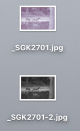
I used LR to convert an image to B&W and I exported it once in sRGB and once with a printer/paper profile. Can you tell which one has the wrong profile? The mac desktop is apparently not completely color managed
 .
.
I then used PS to open the images with their profiles applied and checked the colors.
This is the printer profiled image. The RGB levels are not equal so the image is not actually greyscale. I then converted the image to both Pro-Photo and sRGB... this made the RGB levels closer, but still not matched (no image). This image will only display/print correctly in a completely color managed environment that also has the printer/paper profile installed...
*understand that a printer cannot use it's own output profile to farther modify it's output...
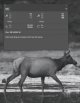
And then I checked the properly profiled/managed sRGB image... and it was greyscale as it should be. This image will print/display correctly in both an unmanaged and a completely managed environment (unless something is significantly/abnormally wrong).
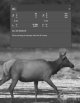
*unfortunately the dropper disappeared when making the screen captures, the samples were taken from approx. the same place on the cow's side.
Last edited:
OP
ancient_mariner
Moderator
- Messages
- 27,780
- Name
- Toni
- Edit My Images
- No
Thanks Steven - iot's taken a couple of reads through to be sure I understand what you've done. So your expectation is that the colour profile for the paper will cause a colour shift as well as a tonal range shift.
sk66
Suspended / Banned
- Messages
- 9,557
- Name
- Steven
- Edit My Images
- Yes
Yes, basically. And if there is something wrong with your system it may be possible (??) that even the proper sRGB color space image isn't actually grey scale (R=G=B).Thanks Steven - iot's taken a couple of reads through to be sure I understand what you've done. So your expectation is that the colour profile for the paper will cause a colour shift as well as a tonal range shift.
There are three stages of color management.
The first is "assume." This is actually "unmanaged" similar to many web browsers and applications, and it is what unmanaged printers use (DSCL?). They take the colors and treat them as sRGB, and if they are then everything is fine. But if they are not, then the output is wrong. I.e. the thumbnails on my desktop.
The second stage is "assign." This is where the embedded color space tag is read from the file and the correct profile is applied... This is what LR/PS etc do. i.e. apply a printer/paper profile or some other known color space.
The third stage is "convert." This is where the color information is modified to make up for discrepancies in hardware... I.e. a monitor profile.
Lets say there is a printer that when given a color coded as 14/13/12 (RGB) it outputs 14/13/13 instead due to its color space/gamut. The softproofing/printer profile makes it so that when your monitor displays 14/13/12 the color information is actually 14/13/11. Then when the printer gets that 14/13/11, it outputs the same error/shift and you get 14/13/12 like you wanted. This only works if the color space is unmanaged, or if the *correct color space is assigned.
*But the printer cannot use it's output profile for input... if it did, it would apply the same shift a second time (double managed); the input would then be 14/13/10 and the output would be 14/13/11, not the 14/13/12 you wanted.
In greyscale a similar shift would be coding a color as 11/11/11 in order to get 12/12/12 (a tonal shift, not a color shift). If the printer needs 12/12/11 in order to output 12/12/12, then there is something wrong with it (it needs calibrated/maintenance).
Edit: paper offsets are for tonality... i.e. how "bright" the paper is.
Last edited:

droj
Suspended / Banned
- Messages
- 5,069
- Name
- droj
- Edit My Images
- No
In a quick test, sending an srgb colour image into S Efex from PS, on its return as a mono image it was still rgb but the channels were equalised ... (you can get the same by converting to greyscale in PS then converting back to rgb.
The same with a 16-bit tiff sent & returned in argb. Then converted to srgb - no change.
If I then convert to Fuji Lustre (which I wouldn't normally do - I would use that profile for soft-proofing only), the channel values become different.
Confusing? Or enlightening?
The same with a 16-bit tiff sent & returned in argb. Then converted to srgb - no change.
If I then convert to Fuji Lustre (which I wouldn't normally do - I would use that profile for soft-proofing only), the channel values become different.
Confusing? Or enlightening?
Last edited:
OP
ancient_mariner
Moderator
- Messages
- 27,780
- Name
- Toni
- Edit My Images
- No
I fed back to DSCL about the reprint and their comment was "it is colour paper so it can show a warm cast sometimes." plus suggested I might try one of the fine art papers as being better for mono.
If there's something wrong with my system then other printers seem to correct for it automatically, or else it's just a better match for what they do. I really appreciate the time some of you have invested trying to help, especially Steven, but having not seen an *obvious* way forward then I'll park this. Perhaps I am doing the equivalent of pixel peeping, and if I were less demanding then all would be well....
If there's something wrong with my system then other printers seem to correct for it automatically, or else it's just a better match for what they do. I really appreciate the time some of you have invested trying to help, especially Steven, but having not seen an *obvious* way forward then I'll park this. Perhaps I am doing the equivalent of pixel peeping, and if I were less demanding then all would be well....
droj
Suspended / Banned
- Messages
- 5,069
- Name
- droj
- Edit My Images
- No
It's my belief (though I could be wrong) that dscl print files 'as sent' - ie without adjustment, automated or otherwise, at their end. So it will be up to the sender to accomodate their print profile if thought necessary and tweak the image as thought fit. The fuji gloss / matt C-types are quite bright and I find it necessary to drop the levels before sending for print, for which I set up a preset (action).
Some print houses will from my past experience auto-correct (their default unless asked not to). But for this to work on a mono image sent as an srgb with three colour channels, I imagine that the image would have to contain areas of full white and full black tone to provide a reference?
I have had no issues yet with images printed by dscl either in colour or mono - mono prints seemed entirely neutral, and everything approximates to what appeared on my display before saving for print.
I think that it's best to know what a lab's policy is for any given print type, so that you know how to prepare the image.
Some print houses will from my past experience auto-correct (their default unless asked not to). But for this to work on a mono image sent as an srgb with three colour channels, I imagine that the image would have to contain areas of full white and full black tone to provide a reference?
I have had no issues yet with images printed by dscl either in colour or mono - mono prints seemed entirely neutral, and everything approximates to what appeared on my display before saving for print.
I think that it's best to know what a lab's policy is for any given print type, so that you know how to prepare the image.
Last edited:

Byker28i
Suspended / Banned
- Messages
- 21,339
- Edit My Images
- Yes
I fed back to DSCL about the reprint and their comment was "it is colour paper so it can show a warm cast sometimes." plus suggested I might try one of the fine art papers as being better for mono.
If there's something wrong with my system then other printers seem to correct for it automatically, or else it's just a better match for what they do. I really appreciate the time some of you have invested trying to help, especially Steven, but having not seen an *obvious* way forward then I'll park this. Perhaps I am doing the equivalent of pixel peeping, and if I were less demanding then all would be well....
Strange. I used DSCL for all the prints I had to send to tutors. They were always picking out my failings, suggestions on how to improve the print result, but never the quality of the print. I've been heavily into B&W the last couple of years, printed lots of different media through them without issue.
There's a process issue somewhere in the pipeline between you and DSCL, but I think it'll be difficult to put a finger on it now, especially if you have good results elsewhere
sk66
Suspended / Banned
- Messages
- 9,557
- Name
- Steven
- Edit My Images
- Yes
As expected, and as I showed earlier.In a quick test, sending an srgb colour image into S Efex from PS, on its return as a mono image it was still rgb but the channels were equalised ... (you can get the same by converting to greyscale in PS then converting back to rgb.
The same with a 16-bit tiff sent & returned in argb. Then converted to srgb - no change.
If I then convert to Fuji Lustre (which I wouldn't normally do - I would use that profile for soft-proofing only), the channel values become different.
Confusing? Or enlightening?

- Messages
- 6,283
- Name
- Chaz
- Edit My Images
- Yes
This is the INfo from DScolour labsI have spoke to their lab guy a while back about this and he said that their colour profiles should only ever be used for soft-proffing and not for conversion. The onlline info was wrong and was going to be changed. Conversion should only be to sRGB.
They only provide a limited number of colour profiles now. I am sure their profiles covered more of the range of papers.
We have profiles for all our products but only release the C-Type paper profiles, these can be found below. For any other print surface or product please supply sRGB file and we will profile within the lab.
sk66
Suspended / Banned
- Messages
- 9,557
- Name
- Steven
- Edit My Images
- Yes
I don't believe you can really adjust an image for the paper color, only it's tonality. Keep in mind that at the edges of details there is usually a bit of a softer (less dense) transition and this means the paper color will have more influence there along with all "white" areas (which is why "hard" cutouts usually look wrong). But you said the image had a slight magenta cast similar to CA in appearance... that doesn't sound like "warm paper" to me.I fed back to DSCL about the reprint and their comment was "it is colour paper so it can show a warm cast sometimes." plus suggested I might try one of the fine art papers as being better for mono.
If there's something wrong with my system then other printers seem to correct for it automatically, or else it's just a better match for what they do. I really appreciate the time some of you have invested trying to help, especially Steven, but having not seen an *obvious* way forward then I'll park this. Perhaps I am doing the equivalent of pixel peeping, and if I were less demanding then all would be well....
FWIW, I'm not surprised that converting the image to the printer's profile didn't fix everything, but I am somewhat surprised that it helped at all. My best guess is that they made some adjustment or used a different machine for the re-submitted image...
Yes that's what I thought about it, only a limited number now.This is the INfo from DScolour labs
We have profiles for all our products but only release the C-Type paper profiles, these can be found below. For any other print surface or product please supply sRGB file and we will profile within the lab.