First pics back from Hexar - not happy

bambam

Suspended / Banned
Messages
236
Edit My Images
Yes
Hi there

Just had the first roll of film from the Hexar RF (with Voigtlander 35mm lens) back after a dev and scan from Jessops and I'm not that happy with them. They look soft and grainy. Now the grain I can handle, but they all look pretty soft to me.

I had a roll from the OM4 done at the same time and that looks good - in fact some of those are very sharp.

I used Fuji Superia Xtra 400 in the Hexar and 200 (not sure if it was Superia, but it was Fuji) in the OM4.

Will try and post some pics in a bit - but any ideas?

Also, how do I check that the Hexar and the Voigtlander are focusing correctly?

Cheers

Not so sharp from Hexar:
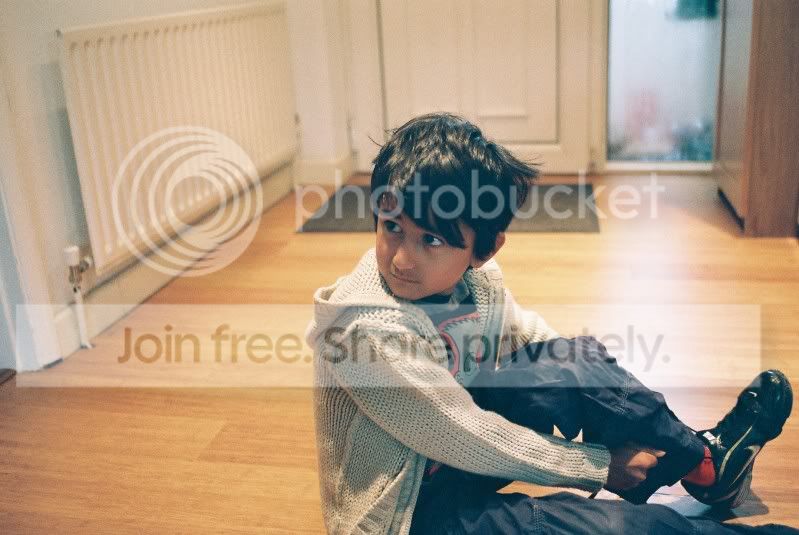
CNV00008.jpg


Sharp from OM4:
CNV00047.jpg


Actually, looking at them on the web and the Hexar one doesn't look so soft, maybe this is an issue of scanning?
 
Last edited:
Hello Bambam,

the sharp "problem" was not from the camera in these cases... If it exists any issue would be because of the lenses...

The camera has not a digital sensor that influences the final result so... Or the lens is not sharp, or the film was outdated or the light was not very good... Or (so many "or") the photographer didn't use the gear in the best way... And you have the scanning possibility too...

Here you show one interior photograph (the ligh would not be so good) vs exterior photograph. Maybe you were using low speeds on the Hexar and you got some grain too... But when I see better the boy's jacket is really sharp on the arm closer to "us"...

Try to do some outside tests and you'll get better results for sure.
 
Part of the problem may be where you got it processed and scanned - Jessops and other high street/supermarket processors unfortunately suffer from having very different staff at each branch, some really know their stuff and will be able to output excellent scans/prints whilst unfortunately most don't bother and just stick everything on 'Auto' which may explain the increase in grain, especially if it was underexposed and lightened.

The softness could be because no sharpening was applied, the lens is inherently soft, the rangefinder could be out of alignment or it could just be due to the depth of field as the arm is sharp. What aperture did you take it on and how close were you?

I would recommend using 'proper' place like Club 35 (http://www.club35.co.uk/cd.html) for processing and scanning, their a pro lab and handle all my colour neg films for not much more than it costs at Jessops with you usually getting them back within 4 days. They will develop and scan for £9.45 high resolution (about 6MP) scans or £6.95 for low res (£6.95) including postage etc.

BTW, Superia 400 is not exactly a fine grain film which accounts for the grain, for a very low grain (finest in the world) 400 speed film use the new Kodak Portra 400.
 
Jessops scanning is usually awful.. soft and grainy no matter what the negative looks like. If you know someone with a dedicated scanner, even one of the decent flatbeds with a negative carrier, who will put a bit of time into setting up the scan, you should get a much better idea of how the camera is working.
 
Part of the problem may be where you got it processed and scanned - Jessops and other high street/supermarket processors unfortunately suffer from having very different staff at each branch, some really know their stuff and will be able to output excellent scans/prints whilst unfortunately most don't bother and just stick everything on 'Auto' which may explain the increase in grain, especially if it was underexposed and lightened.

The softness could be because no sharpening was applied, the lens is inherently soft, the rangefinder could be out of alignment or it could just be due to the depth of field as the arm is sharp. What aperture did you take it on and how close were you?

I would recommend using 'proper' place like Club 35 (http://www.club35.co.uk/cd.html) for processing and scanning, their a pro lab and handle all my colour neg films for not much more than it costs at Jessops with you usually getting them back within 4 days. They will develop and scan for £9.45 high resolution (about 6MP) scans or £6.95 for low res (£6.95) including postage etc.

BTW, Superia 400 is not exactly a fine grain film which accounts for the grain, for a very low grain (finest in the world) 400 speed film use the new Kodak Portra 400.


Thanks for the replies for far.

To answer the questions above, I was a few feet away but I don't recall the aperture I was using so maybe there was some operator error. The lens I was using is a Voigtlander 35mm f2.5 Color Skopar on a LM mount - quite new and I don't think its known for being soft.

I do take your point about Jessops and I think I've definitely suffered there in this process - the girl knew nothing about developing and scanning so I'm sure it was on auto. Maybe I'll try sending the negs to Club 35 to see if they can scan them. I have a scanner but its not set up and I want to know that the lens/camera combo works before scanning myself.

Lazzaros - I took some pics outside too and they suffer from the same type of issue. Film was definitely in-date, but I know that its not the finest around. I have some Portra so will try that to see what I get back.

Trying to rule out all the possibilities hence the question regarding how to check that the camera/lens are focusing correctly - any guidance?

Cheers
 
There are so many variables that could've gone wrong throughout this process.

The Hexar RF may be out of alignment, the film pressure plate (if it has one) may not be functioning correctly, any part of the focus system may be slightly out, especially if it hasn't had a CLA recently. The lens could be soft, I'm not saying it necessarily is but lenses are difficult to get right and there are soft copies around.

More simple, could just be a problem with Jessops - and if they are scanning with a default scanner profile setting, it could be a setting that responds better to certain types of consumer brand film better than other emulsions. Also, they tend to apply sharpening automatically, and maybe the ones from the OM were just sharpened automatically to a higher amount.
 
When I was having problems with a TLR I printed out something like this

http://static.bhphotovideo.com/images/images345x345/536056.jpg

I've used them in the past for checking the back focus on pro video cameras but it serves the same purpose for stills.

I printed out a copy on an A4 sheet, stuck it on the wall then I shot a test roll, making notes of actual distance and distance indicated on the lens, then adjusted the camera using the information I got back from the processed roll.
 
Bambam, my pictures with that same camera (when it was mine hehe) were good. I was using one Zeiss ZM 50mm f/2.

Here it is one set where I used very looow shutter speed as 1/8 and 1/15...

housethings01hexarrfzei.jpg


housethings02hexarrfzei.jpg


housethings04hexarrfzei.jpg


housethings05hexarrfzei.jpg


housethings06hexarrfzei.jpg


Fuji Reala 100 - Konica Hexar RF + Carl Zeiss Planar T* 50mm f/2 ZM
 
Last edited:
Forgot to say I scanned the film myself and I missed the focus at one or two pictures hehe...

(maybe they are not such a good examples...)
 
Bambam,
first you shoul'd try another lens, like the Hexar 50mm for exemple.
you can try to check the focus shift by normal test, trying all apertures with same object.
you can try rf with a single white paper with two square figures in it and put it in the wall or a closet or something like that, put the camera in a tripod and then try the rf.
usually this camera's don't have many rf problems, some electronic probs yes, but rf not usually.
i had 4 of them, still have one and never had problms.
try a good film, a good hexar lens and you will never let go the camera ;)
 
With any decent lens, everyone should be able to put a sharp shot up on a computer screen, and as the C41 process should be the same anywhere in the world that just leave getting the image off the film for showing.....which nowadays means a scanner and sharpening by software, well sharpening software is well known now so that just leaves a crappy scan (or no sharpening).
The file manager in windows will tell you the size of the file and dimension.
 
Last edited:
Back
Top