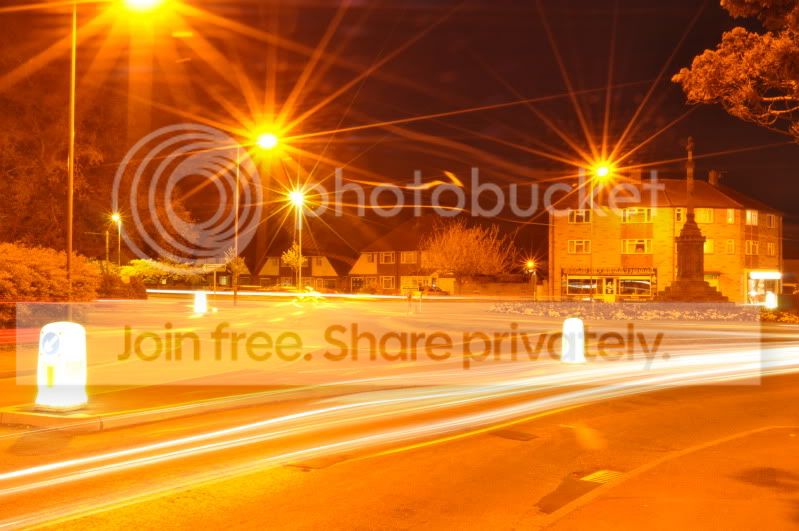
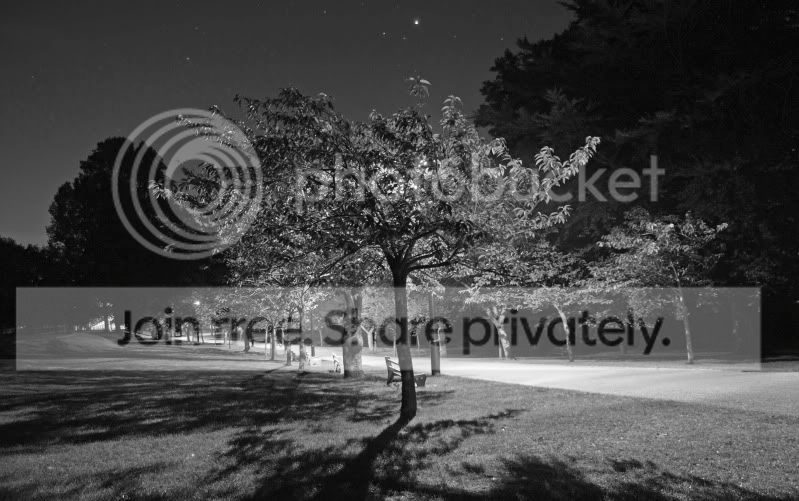
First long exposure night shoot.

Dogmatix

Suspended / Banned
Messages
268
Name
Martin
Edit My Images
Yes
Hey all.

I went for a little walk last night, decided to get the remote working, and try my hand at some tail lights...

I took some pics, was happy-ish, with them.
But heres the best out f the bunch I took:
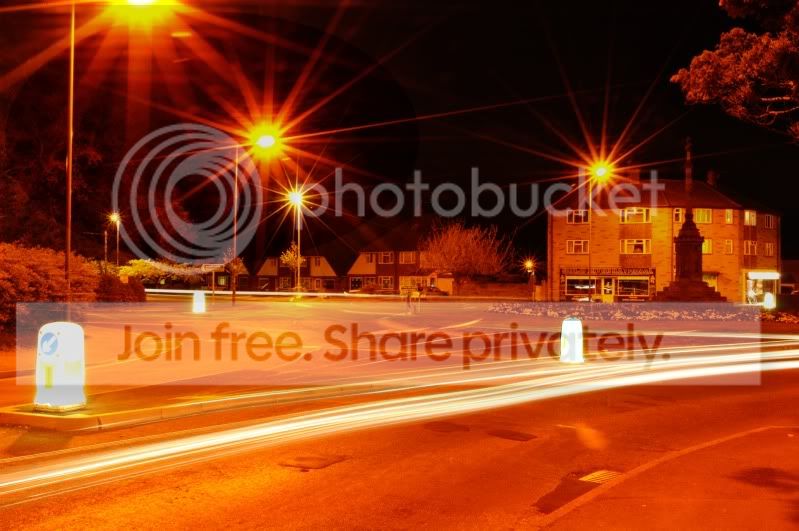
tailights.jpg


Camera: D5000
Lens: 18-55mm 3.5-5.6 VR
ISO: 200
Apature: F27
Exposure: 60secs

I don't like it so much, looks very yellow, I know I was near street lamps, but is there a WB I could use to dampen the yellowness?

Also, any other crit is most welcome!
All I want to do is improve.
 
You can fix the WB in Lightroom or by taking picture of a something white and then using that to set the white balance in camera.
 
You can fix the WB in Lightroom or by taking picture of a something white and then using that to set the white balance in camera.

I don't have lightroom :(
I have Gimp2 though.

Also, how do I adjust the WB to set the camera up?

Try converting it to black and white and see what you think

Thats an idea... I'll try it.
 
f27 is way to high. I think f11 would of been fine. As for white balance have a look at:

[YOUTUBE]<object width="640" height="385"><param name="movie" value="http://www.youtube.com/v/I4JBU1bbN2M&hl=en_GB&fs=1&"></param><param name="allowFullScreen" value="true"></param><param name="allowscriptaccess" value="always"></param><embed src="http://www.youtube.com/v/I4JBU1bbN2M&hl=en_GB&fs=1&" type="application/x-shockwave-flash" allowscriptaccess="always" allowfullscreen="true" width="640" height="385"></embed></object>[/YOUTUBE]

Good photo though so keep at it. :)
 
If you have a Nikon with live view, which you do, then you can set white balance very easily with no further equipment. Select LV mode and then look at the screen. Then press the WB button and adjust the white balance until white looks white....... Job done.
 
To clean up these shots use the Tungsten white balance setting. That will cool down the colours considerably.

You are also using too high an F-stop for these pictures, which is why the lamp posts have gigantic stars coming off them. Stop up to f/5.6 and just lessen the exposure time if need be. If your ISO wasn't as low as it would go (ISO 100 or 200) then drop it down to that.

This image, although not quite as sharp as I'd have liked it to have been, was done at f/5.6, ISO 100 or 200 (I can not remember) and if I am recalling correctly, a 25 second exposure.

IMG_8826_sb.jpg


As you can see it has exposed fine, with no obvious star patterns on the lights. Stopped down to f/8, and the stars came straight back. Don't be led to believe that the higher your f/ number the sharper the picture will be. By f/5.6 most lenses have reached their sweet spot and past f/8 image quality begins to deteriorate due to diffraction. Your f/27 image is actually noticeably softer than the one on f/11 - although neither are exactly what I'd call sharp. Just practise with it - I'm far from mastering night photography myself, it's not easy.

EDIT: Answering your Q about white balance, it is not a permanent setting. You can change it whenever you want to.
 
Awesome reply!

I think I was shooting around ISO200 - I try and keep it around there if I can.
My lens isn't very sharp anyways, its only a kit lens, and I have noticed the images I get are a little soft. Admittingly I do and did you a tripod with a remote, so no movement was on the camera, yet pics are still soft?

Ok, I'll try a F/5.6ish next time, and see how I get on. I think in all honesty, I left the bulb setting on too long, and obv has let more light then needed into the sensor.

I'll try again at the weekend.


Thanks for all the replies guys, its all helpful!
 
Soft focus could just be that the AF is struggling. Try live view (if you have it) using contrast detect or manual focus.
 
lol 122 seconds. Thats why its bright. :lol: Get a filter or try just doing exposures around 20-30 seconds. Wait for a car coming about 5 seconds before firing the shutter button.
 
You could also try turning down the saturation, looks like you're set in one of the vivid modes.

Reckon f/5.6 will give you an exposure so short you won't get whole traffic trails through the scene, better to keep it f/11 (or f/9 - f/13) as suggested above to give you a few secs worth and time your car trails so you're clicking the shutter just before a car comes into frame.
 
@ Dogmatix: do you have a UV filter on with your 18-55 VR when you took those shots? Lens flare seems to extreme for that kind of lens.

As for the settings, try to play around with f11 to 18, adjust your shutter speed accordingly and try to keep your ISO to 100 (I'm not sure if the D5000 has it though).
 
I think I can go down to as low as 50, but ISO100 should be doable.
I do normally have a UV filter, but I removed it for all my night shooting. I do suffer lens flare alot with my kit lens.

I'll have another play at the weekend.
 
I'd second the black and white comment, I took several shots down the local park in colour but have to say that when converted to B&W they look better IMHO.

DSCF3931v3.jpg


Conversion to black and white shouldn't take more than a few seconds.

Paul
 
Well the beep sounds and the green square shows, all in live veiw, so means it focused and ready to shoot?

Yes indeed it may be focussed, but might not be quite a perfect focus as it could be. I've had this where it's said it focussed, but because of the conditions it had actually focussed a centimetre in front or behind the subject. It wasn't a fault, it was just that the camera's AF struggled in low light. I posted a thread about it and concluded my expectations were just too high. Even manual focus doesn't always get it right because you're still waiting for the dot and confirmation beep - which is just the same system that the AF uses to confirm. Live view is a good way to get around this as you can zoom in and focus until you see a sharp picture.

What's contrast detect?

It's the same method of focussing that compacts use, where the focus is obtained by gradually moving the focus plane of the lens until the image on the sensor is the sharpest - the software determines this by the contrast of the image, and it is usually fairly accurate. I always use it if I have the time, am shooting a landscape/long exposure, or I want a more arbitrary focus than my 9 focus points offer me. Coupled with mirror lockup and a steady tripod (and good glass) and you can get very sharp shots indeed by using contrast detect.
 
Back
Top