First camera choice

Thanks for your post skullfunkery

I’m going out for a walk around our local nature reserve again shortly,i don’t really care if photographs don’t turn out good,I think it will ad to the pleasure you get from the one or two that your happy with,it’s all good fun
That's the way to go :)
Enjoy the walk, and use the camera, even a bad photo gives something to learn from, and helps towards getting what you want.
 
Thanks for the post cranky it’s all bud fun buddy
 
Yes that’s the thing a lot of people forget about , you need ..camera..lenses.. and computer .. while a phone will do for starters it’s a stop gap .. .. as for editing on Flickr if your shooting just j.pegs it will probably suffice .. and it’s certainly a place to learn what can be done .. just don’t get carried away with fancy effects
 
Stephen welcome to the forum
first of all go out and enjoy taking photos. No matter what others may say, I maintain that of you like the photos you then your happy, if others like them its a bonus. there is so much to learn so take it step by step and you will quickly find where you go wrong and not make the same error again. The only tips i will give on landscapes is have something to act as a stop on the right hand side of the photo be it a bush/tree building. and something in tghe forground to add depth. keep; below the trees block any thing more on the right and the rocks in the foreground add depth to the photo. level horizon is something else to watch out For. IHope this is of some help to get

Thanks for the reply real speed thanks for the advice on composition I’ll take your advice onboard to help me on my next walk
 
Is there anybody that would help me to get photos from my photo stream on Flickr step by step to posting on our site,I’ve been trying and I can’t do it
Thanks in advance:headbang: lol
 
Is there anybody that would help me to get photos from my photo stream on Flickr step by step to posting on our site,I’ve been trying and I can’t do it
Thanks in advance:headbang: lol
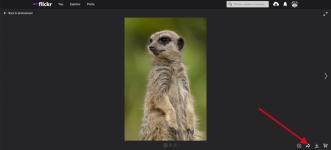
Click the arrow sharing button here
Screenshot 2022-07-23 at 18.06.20.png


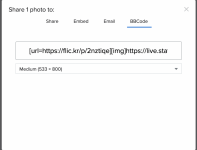
Then in the pop up window select bbcode and copy the link and post on here
Screenshot 2022-07-23 at 18.06.29.png
 
I’ve got to where I copy the link how do I do that?


Hi Stephen, just seen this.

All as above getting to the link, then highlight it, right click, copy, then paste the link into your post. (y)

You can also use the 'Attach Files' tab below, files must be no longer than 1024 pixels on the longest side and 500kb or smaller.
 
Hi Stephen, just seen this.

All as above getting to the link, then highlight it, right click, copy, then paste the link into your post. (y)

You can also use the 'Attach Files' tab below, files must be no longer than 1024 pixels on the longest side and 500kb or smaller.
thanks Dale that took me 2 hours to work out,im not great with technology but i got there thanks (y)
 
On beginners
I’ve replied on there. Took me a while to find the beginners section, didn’t even know it was there :LOL:
 
Back
Top