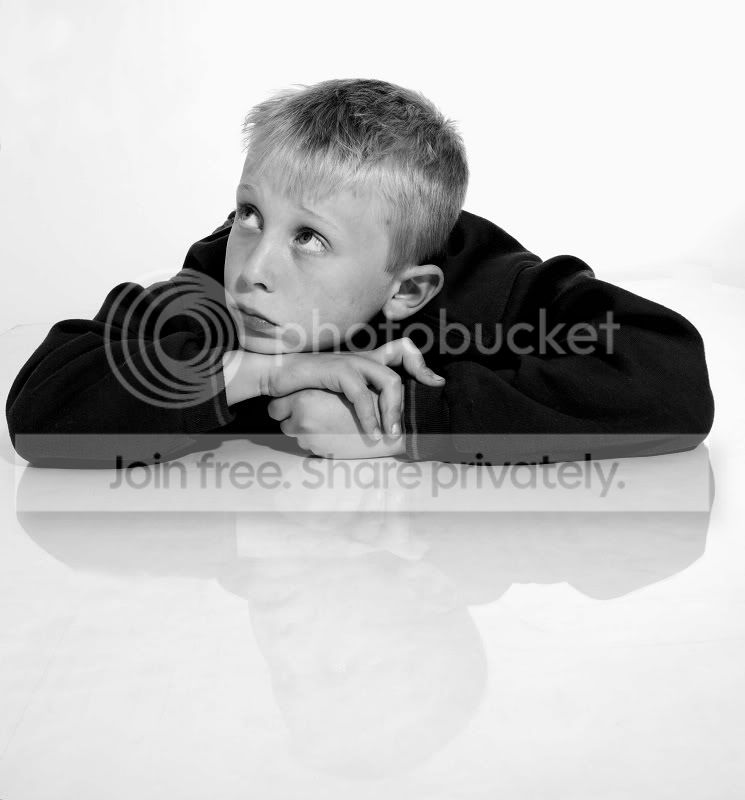
First attempt using a perspex floor sheet

FlyTVR

Suspended / Banned
Messages
4,234
Edit My Images
No
Bought a perspex sheet from B&Q today. Firstly I'll be taking it back as it's scratched. I didn't realise until I got it home :(

Anyway, managed to get 10 mins with my lad to test it out (as you can see below).

Has anyone got any tips on lighting etc in order to get the best reflection?

Image straight off camera, cropped and B&W conversion.
IMG_5925.jpg
 
Looks good to me - the ones I've done have been with a hilite background which gives off some light and then my key light is a large shoot through brolly close to camera axis but a little higher. Any reason for the black & white?
 
Pete - I dont think it is but could be wrong. Wickes do some too and that is listed online though. Search for acrylic I think...
 
If you put white paper underneath it should make it reflect slighty more.

I use this for my shots .. " one in people and portraits at the moment" I find the reflection to be very good

If you pp this photo slightly it will help the reflection stand out. it would take one min..

MD
 
1800mm x 900mm or 1220mm x 600mm at Wickes. B&Q do bigger - I think I ended up with an 1800x1200mm from B&Q which only just fit in the back of my car! Probably better to buy 2 of the largest that Wickes do and deal with the join in post - or tape over it or something.

Here's the Wickes stuff... http://www.wickes.co.uk/Acrylic-Sheet/invt/210002
 
If you put white paper underneath it should make it reflect slighty more.

I use this for my shots .. " one in people and portraits at the moment" I find the reflection to be very good

If you pp this photo slightly it will help the reflection stand out. it would take one min..

MD

What pp'ing would you do?
 
What pp'ing would you do?

I would use the levels to blow the b/g more then use the dodge tool around the floor to whiten it around the subject..

I would show you but your edit box is not ticked...

MD
 
I would use the levels to blow the b/g more then use the dodge tool around the floor to whiten it around the subject..

I would show you but your edit box is not ticked...

MD

That would be great - thanks. How do I enable edit? :amstupid:
 
That would be great - thanks. How do I enable edit? :amstupid:

I would click on private messages top of screen and go into your settings there...

But the pic I would do this.
FlyTVR_copy.jpg

If you look around his arms and below his reflection it should look whiter...


Is this taken with a white sheet underneath it ?


MD
 
Go to user control panel

Edit your details

At the bottom is a tickbox for edits
 
You can then play with whatever crop you want this gives him some space to look into...


FlyTVR_copy_2.jpg


Again takes seconds to do.


MD
 
Is this taken with a white sheet underneath it ?


MD

No. Roll of white paper - but well trampled from previous work. I'll have a play tomorrow with a fresh section of paper, or maybe some white material.

Thanks for the edit. Now that you've given my lad some space to loook into, the image looks.... well - quite nice :)
 
1800mm x 900mm or 1220mm x 600mm at Wickes. B&Q do bigger - I think I ended up with an 1800x1200mm from B&Q which only just fit in the back of my car! Probably better to buy 2 of the largest that Wickes do and deal with the join in post - or tape over it or something.

Here's the Wickes stuff... http://www.wickes.co.uk/Acrylic-Sheet/invt/210002


I was just about to order it but £20 delivery!?
 
Amazing how much difference the crop makes, but you have chopped off the reflection of his head...


It was only a quick edit to show what you could do... lol

MD
 
I really like this, and you seem to have the back lighting just right without any spill on the subject (not that i know a lot about it, but looks good to me), what sort of lighting were you using ? i looked at the perspex sheets from B&Q and Wickes, but they were to small for what i wanted, and to get a 2500 x 1500 piece online is about £120 delivered, so that's going to have to wait till next month for me :)
 
Possibly a stupid question, but can the perspex be painted with white gloss on one side to be able to use it without needing something white underneath?
 
I really like this, and you seem to have the back lighting just right without any spill on the subject (not that i know a lot about it, but looks good to me), what sort of lighting were you using ? i looked at the perspex sheets from B&Q and Wickes, but they were to small for what i wanted, and to get a 2500 x 1500 piece online is about £120 delivered, so that's going to have to wait till next month for me :)

Thanks.

Lighting wise, nothing complex. One head at 45 deg to the backdrop (white paper roll). Key, shoot through brolly (45 deg to subject) and finally one head used as a fill. Shot in my living room :)
 
Possibly a stupid question, but can the perspex be painted with white gloss on one side to be able to use it without needing something white underneath?

Don't know. Let me know if it works :)

However, if you ever needed a different colour......?
 
Possibly a stupid question, but can the perspex be painted with white gloss on one side to be able to use it without needing something white underneath?

2 points from this;

1) if you really must paint, use a spray to get a smooth even coating on the acrylic.
2) Why not just buy white acrylic, it's still as reflective??
 
Thanks.

Lighting wise, nothing complex. One head at 45 deg to the backdrop (white paper roll). Key, shoot through brolly (45 deg to subject) and finally one head used as a fill. Shot in my living room :)

Thanks for the info, did you have any problems with spill from the backlight, as you said their was no PP work, so looks like you nailed it pretty well :)

I was just about to order it but £20 delivery!?

Yes that's what i thought, i was going to settle for the smaller size for the £23 for now, but when i seen the delivery charge i thought i may as well wait till i have the extra cash and get the size i really want.
 
Had another go with modified light setup. A little more PP this time.

IMG_6459.jpg


IMG_6491.jpg
 
Back
Top