external hard disk with ability to plug card reader in and transfer photos

  • Thread starter Thread starter A_S
  • Start date Start date

A_S

Suspended / Banned
Messages
864
Name
Andrew
Edit My Images
Yes
Any recomendations?

I've been looking around but it seems hard to find much information.

Essentially. At the moment I shoot 1000s of photos at an event, get back to the car - turn my laptop on, plug it in via an inverter, fire up lightroom, plug the card reader in and transfer the photos direct to lightroom. But its a bit of a PITA sorting it all out when I get back to the car....

...so ideally i want to cut the laptop element out - transfer the photos to an external drive then plug that in and import to lightroom when i get home. Appreciate it will still have to build previews but i just want to see if this makes life a bit easier!

any suggestions appreciated
 
I have searched for something similar last year but came up with nothing. What about using your phone for the transfer with a powered (with a power bank) usb hub/ card reader and external drive? Same process as using the laptop back at the car but slightly more portable.
 
I'd need a way to connect them all up, i guess phone -> hub -> hub to HDD and card reader - possible. Although I have an apple phone and a windows PC so i obviously don't the process locked into the apple eco system, i want it on a windows file system.
 
I'd need a way to connect them all up, i guess phone -> hub -> hub to HDD and card reader - possible. Although I have an apple phone and a windows PC so i obviously don't the process locked into the apple eco system, i want it on a windows file system.
Some hubs have the reader built in and if you format the drive to exFAT it should be readable and writeable from both win and mac machines.
 
ah perfect, would apple be able to write to that and recognise it via the files App? (I also have a "file explorer" app which i still use from before Files existed)
 
ah perfect, would apple be able to write to that and recognise it via the files App? (I also have a "file explorer" app which i still use from before Files existed)
I've never owned an iPhone so I couldn't say for sure but according to a web search should be doable. It definitely works for transferring filed from a mac to a PC which I have done on multiple occasions
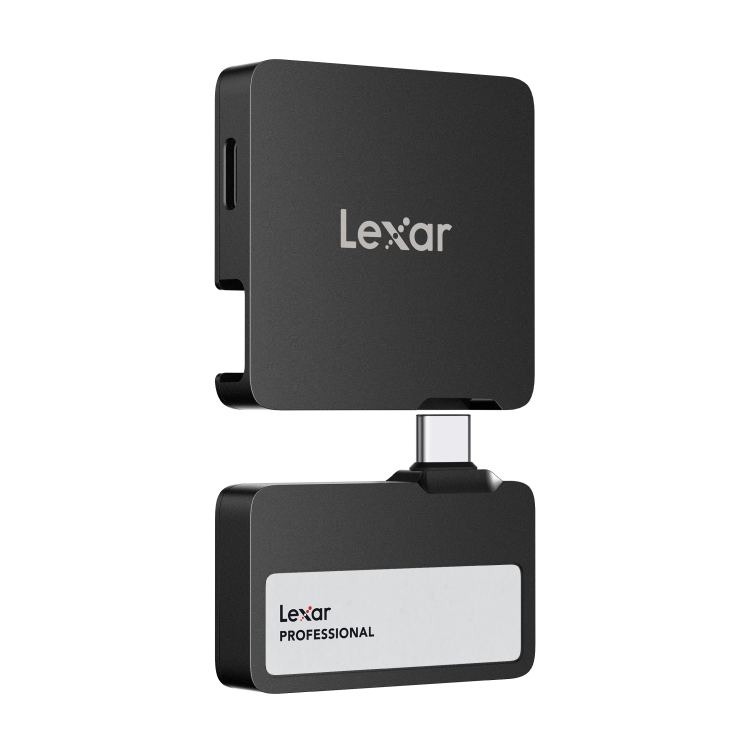
a friend pointed me to this:


although it seems more focussed around direct connection to an Iphone and video - the information is pretty ambiguous
looks like an interesting bit of kit although wow what a price tag... It does say it under specs Systems Supported: Mac® OSX 10.6+, Windows® 11/10/7/8, iOS, Android 4.4+ so it should work. ( you would still need to format the drive to exFAT though and a card reader too.)

*edit* after searching I see its quite a bit cheaper here in the UK compared to US prices.
 
Last edited:
I've never owned an iPhone so I couldn't say for sure but according to a web search should be doable. It definitely works for transferring filed from a mac to a PC which I have done on multiple occasions

looks like an interesting bit of kit although wow what a price tag... It does say it under specs Systems Supported: Mac® OSX 10.6+, Windows® 11/10/7/8, iOS, Android 4.4+ so it should work. ( you would still need to format the drive to exFAT though.)

*edit* after searching I see its quite a bit cheaper here in the UK compared to US prices.
Yes but effectivly it would still be doing only what you suggested above, with the addition of having to buy 2 new devices (the HDD and the hub). I'll probably look for a hub with integrated card reader on amazon
 
Yes but effectivly it would still be doing only what you suggested above, with the addition of having to buy 2 new devices (the HDD and the hub). I'll probably look for a hub with integrated card reader on amazon
You will also need a power bank to power the external drive if you don't already have one. The Lexar solution is powered directly from the phone by the look of it.
 
There is a device that does what you are asking, didn't really take off, still available at a few uk stores.
This would put me off (as well as the insane price)
This memory storage can be used in conjunction with the Gnarbox App. Please note that this app is no longer available to purchase or download. The Gnarbox 2.0 SSD can be used without this application however some features may not be available. Please only purchase this SSD if you do not require the app or have pre-existing access to it.
 
You will also need a power bank to power the external drive if you don't already have one. The Lexar solution is powered directly from the phone by the look of it.

will power via the USB or inverter in the car :) (but yes i have a powerbank as well!)
 
l’ve been looking for something like that as well and havent seen anything suitable
I did ask for advice at our local computer shop they said that it could be done with an Android phone (SD card reader to external drive via phone ) but wouldn’t work very well on an iPhone
I do have an external drive , think it was made by WD, that you can insert an SD card and copy the files directly to the drive and it works well, I used it for backup on our last trip away, unfortunately they are no longer available and mine is only 500 gb. This was enough for a week away but next time we are going for longer so may not be enough capacity
Am hoping to be able to take my laptop but plan B is to use the camera , R5 to copy the files directly from one card to a spare
For what the OP is looking for the WD drive with sd slot may be an option but its only available second hand now, I got lucky and found mine cheap on ebay
 
I use a card reader with the lightning-usb adapter for my phone (note, the newer one with lightning power in too). Newest iPhones you could of course just use a usb-c card reader. Or adapter to cam via usb cable works too. Modern iPhone and camera - just use a usb-c cable.

Works fine, to files or photos app. Doesn’t need external power for many devices,

Literally did it yesterday with my son’s camera when out and about.

I use my iPad to do the same travelling.

Why do you need the inverter, old laptop?
 
Last edited:
SD card slot no good as its CF express these days but i had seen the WD elements pro or whatever it was called with the SD card slot :)
 
Or if the point is to get the pics out the camera… just take the card(s) out? Or swap them for spares?
 
If it is CFExpress, could you get a CFExpress card reader that mounts the card as a drive, rather than a device, then you can work from the card, rather than citing for the images to be copied.

Personally, I don't find it too bad to just wait for the images to be downloaded, it is pretty quick with CFExpress, over USB3.2, so I just do it when I get home and am putting my kit away. Its the sorting through the images that takes the time.
 
I have a similar workflow as I also take 1000s of photos over a weekend. What I do is as follows;

I have the same directory structure on the laptop as my desktop at home (e.g. photos\2024\...)

Create a new directory on the laptop and desktop before the event.

Make sure the laptop battery is fully charged.

Throughout the weekend I'll copy the photos onto the laptop from the memory cards (only takes a minute or two each time) into the new directory for the event.

If I have access to power, then I'll perhaps import the existing photos into LR and build previews as I get the chance, and maybe edit and publish a few photos.

At the end of the event, I'll copy the last of the photos into the folder and then import them into LR, building previews at the same time and then secure the laptop with a seatbelt in the back seat and leave it building the previews whilst I drive home (power settings configured so it doesn't shut down). If I have to stop on the way home, I'll pop in a fresh card into the card reader and copy the whole directory including LR catalogue and previews and leave that copying onto the card. At some point after this the laptop normally runs out of battery power and shuts itself down.

When I get home, I simply copy the whole directory from the card reader onto my desktop at home and open the LR catalogue. With the previews already built you are up and running and ready to start editing once the files have finished copying, which it usually has by the time I've packed my camera gear away and grabbed a beer or coffee.

No need for extra devices or external drives and it's about as quick a process as I can make it.
 
Back
Top